Shopify Flash Sale With Session Timer: Create Real Urgency
Sitewide flash sale timers reset and train customers to wait. Learn how a Shopify session-based flash sale gives each customer their own countdown window to create real FOMO.
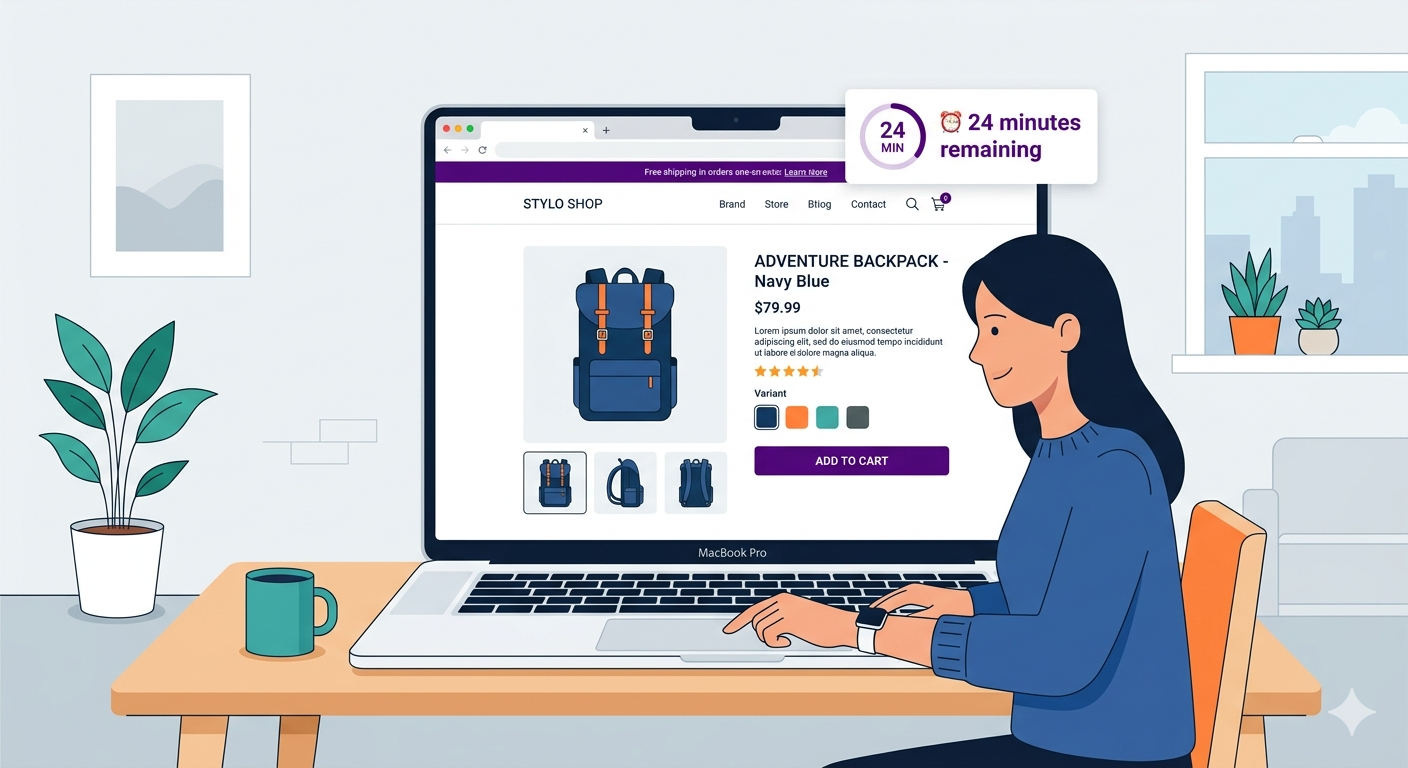
This is the problem with sitewide flash sale timers. They don’t create genuine scarcity. Customers learn that the timer resets, so they don’t feel real urgency. A Shopify session-based flash sale solves this.
“Flash Sale: 20% Off For 60 Minutes!”
- You check the timer: 45 minutes remaining.
- You browse for a bit. The timer gets down to 20 minutes. You think: “I still have time; let me keep browsing.”
- You keep browsing. The timer reaches zero. The sale ends.
- But here’s the thing: The sale resets. A new 60-minute timer starts. The deal is still available.
So the urgency wasn’t real. There was no actual cost to waiting. The “limited time” wasn’t limited, it was perpetually available with a rolling timer.
This is the problem with sitewide flash sale timers. They don’t create genuine scarcity. Customers learn that the timer resets, so they don’t feel real urgency.
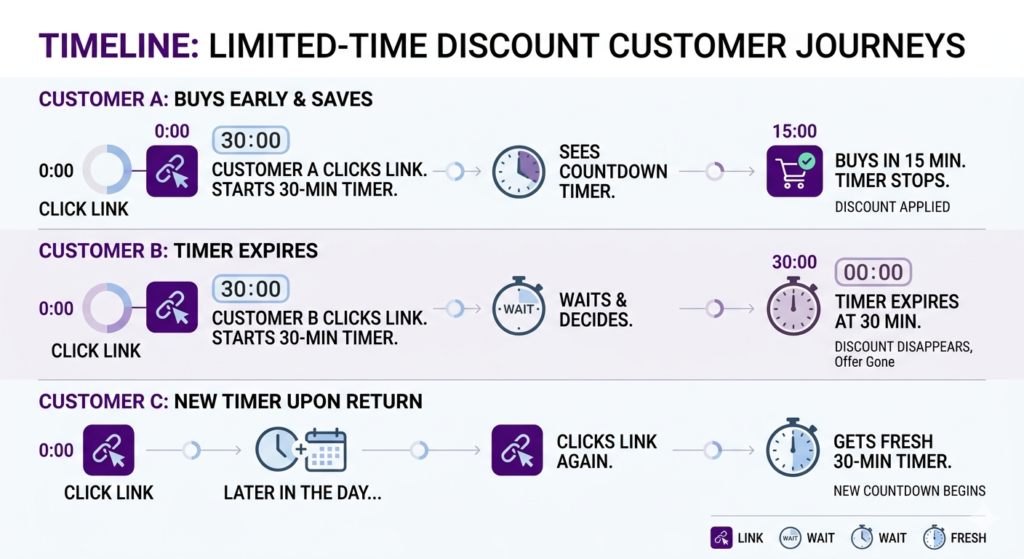
Session-based flash sale timers solve this. Each customer gets their own personal countdown. When they click a flash sale link, their clock starts. They have 30 minutes (or whatever duration you set). After 30 minutes, the sale ends for them specifically.
If they come back later, they get a new 30-minute window. But the point is: within that customer’s session, the urgency is real. They have a fixed window. No resetting, no perpetual availability.
This creates genuine FOMO (fear of missing out).
The Psychology: Why Session Timers Work Better Than Sitewide Timers
Sitewide Timer Issues
- Trust erosion: Customers notice the timer resets. They realize the “limited time” isn’t actually limited. Trust decreases.
- Procrastination: Knowing the timer resets, customers feel safe procrastinating. “I can come back in 2 hours; the deal will still be there.”
- Diminished urgency: A timer that resets indefinitely loses psychological power.
Session-Based Timer Advantages
- Real scarcity: Each customer has a true, non-repeating window. Once it expires, the deal is gone for them.
- Higher trust: The scarcity is real, so customers believe the urgency.
- Conversion lift: Real urgency converts better. Customers add to cart and complete checkout faster.
How a Shopify Session-Based Flash Sale Works
When you create a session-based flash sale (using private promotions with session timers):
- Generate a private link for your flash sale (e.g., adsgun.com/flash?link=flash_5pm)
- Announce the link in an email, social media, or SMS: “Flash sale live NOW! Click here to unlock 30-minute deal.”
- Customer clicks the link and enters a session. They now see the flash sale prices.
- Countdown timer appears on every page: “Your exclusive access expires in 28 minutes”
- Customer browses and adds to cart. The timer keeps ticking.
- Timer expires (say, after 30 minutes). The session ends. The discount is no longer available.
- If the customer comes back (same day or later), they can click the flash sale link again and get a new 30-minute session.
The key: Within each session, the timer is real and non-repeating. This creates genuine urgency.
Use Cases for Session-Based Flash Sales
Use Case 1: Friday Evening Flash Sale
Setup:
- Time: Every Friday 6 PM–midnight (6-hour window)
- Session duration: 30 minutes per customer
- Link:
store.com?flash_friday - Announcement: Email/SMS at 5:50 PM: “Flash sale starts at 6 PM. Click here when it goes live.”
What happens:
- Customer clicks at 6:05 PM. They get a 30-minute window (6:05–6:35 PM). Within that window, 20% off is available.
- If they browse beyond 30 minutes without buying, the discount expires.
- If they leave and come back at 7 PM, they can click the link again and get a new 30-minute window.
- The sitewide flash sale window is 6 PM–midnight (6 hours), but individual customers have rolling 30-minute sessions.
This creates multiple layers of urgency:
- Sitewide urgency: The Friday 6 PM–midnight window (it won’t run again until next Friday)
- Personal urgency: The 30-minute session (scroll too long and the deal vanishes for you)
Use Case 2: Secret/Invite-Only Flash Sale
Setup:
- Send a secret link to your email list: “You have early access to our secret flash sale for 24 hours.”
- Link:
store.com?secret_flash_2024_04_04 - Session duration: 60 minutes per customer
- Discount: 30% off
What happens:
- Subscribers see the link as exclusive and urgent.
- Each subscriber has a 60-minute window from when they click.
- Only subscribers have the link; regular store visitors don’t see the flash sale.
- Creates a sense of privilege and scarcity.
Use Case 3: Live Stream or Event-Based Flash Sale
Setup:
- You’re hosting a live stream on Instagram.
- During the stream, you announce: “For the next 45 minutes, anyone watching gets 25% off. Click the link in bio.”
- Session duration: 45 minutes
- After 45 minutes, the flash sale ends (regardless of when individual customers clicked)
What happens:
- Viewers watching the stream click the link
- They have 45 minutes to browse and checkout
- The urgency aligns with the live event
- After the event, the flash sale ends for everyone
Step-by-Step: Creating a Session-Based Flash Sale on Shopify
Create a Friday Evening Flash Sale
Step 1: Open Adsgun
In Shopify admin, open Adsgun.
Step 2: Create Promotion
Click Create New Promotion
Step 3: Choose Type
Select Private (private promotions support session timers)
Step 4: Name
“Friday Flash Sale 20% Off”
Step 5: Define Discount
- Type: 20% off
- Applies to: All products (or specific categories)
Step 6: Set Session Duration
- Session length: 30 minutes
- This means each customer who clicks the link gets a 30-minute window
Step 7: Enable Scheduler (Optional)
- Set the flash sale to run every Friday 6 PM–midnight (using Adsgun’s promotion scheduler)
- Or create as a one-time event
Step 8: Customize Display
- Timer banner: “Your exclusive access expires in X minutes”
- Timer position: Top of page, prominently visible
- Badge: “Flash Sale” or “Exclusive 30-Min Deal”
- Announcement: “Friday Flash Sale: 20% Off (30-minute timer)”
Step 9: Generate Private Link
Adsgun generates the link: yourstore.com?adsgun_private=flash_friday_link
Step 10: Copy Link
Copy the link to your clipboard.
Step 11: Distribute
Share the link:
- Email: “Friday Flash Sale starting now! [Link]”
- SMS: “Flash sale live NOW for 30 minutes. [Link]”
- Social: “Flash sale started! Link in bio.”
- Announcement bar: Show on your homepage Friday at 6 PM
Step 12: Publish
The session-based flash sale is live.
Real-World Impact: Session Timers Increase Conversion
Scenario: You run two flash sales with the same offer (20% off), same traffic, different timer approaches.
Flash Sale A (Sitewide timer):
- Announce: “Flash sale: 20% off for 60 minutes”
- 2,000 clicks
- 100 orders (5% conversion)
- Customers perceive: “Timer resets; I can come back later”
Flash Sale B (Session-based timer):
- Announce: “Flash sale: 20% off, click now for your 30-minute window”
- 2,000 clicks
- 140 orders (7% conversion)
- Customers perceive: “Real time limit; I need to act now”
Same traffic. 40% higher conversion. The only difference: real urgency vs. fake urgency.
Combining Session Timers With Promotion Scheduler
For maximum effectiveness, combine:
- Promotion scheduler: Defines when the sitewide flash sale window is open (Friday 6 PM–midnight)
- Session timers: Each customer who clicks gets a rolling 30-minute window within that sitewide window
This creates layered urgency:
- Outer layer: Friday 6 PM–midnight is the sitewide window
- Inner layer: Each customer has 30 minutes from their click
Both are real. Both create pressure to act.
Best Practices for Session-Based Flash Sales
1. Session Duration for Your Shopify Session-Based Flash Sale
- Short windows (15–30 min): Ideal for impulse purchases, online shoppers
- Medium windows (1–2 hours): Good for considered purchases, mobile shoppers who might put the phone down
- Long windows (6+ hours): For overnight or next-day delivery; less urgency
Choose based on your product type and customer behavior.
2. Communicate the Timer Clearly
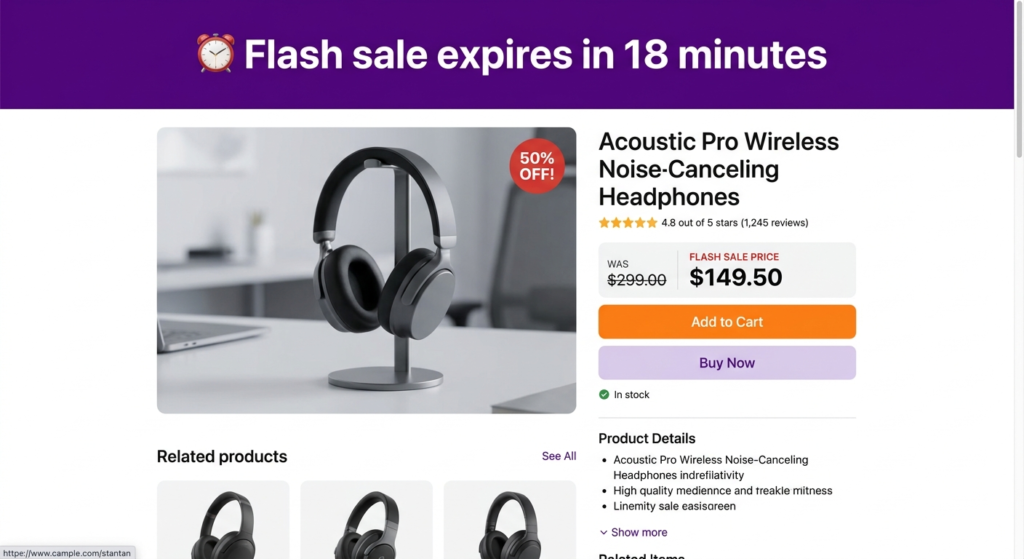
Make the countdown unmissable:
- Large, bold text
- High-contrast color (red or orange for urgency)
- Update in real-time (shows “28 minutes remaining” → “27 minutes” → etc.)
If customers don’t see the timer, it doesn’t create urgency.
3. Pair With Strong Communication
Email before the flash sale: “Flash sale at 6 PM Friday. Set a reminder.”
This preps customers. They’re ready to click and act when the sale goes live.
4. Test Session Durations
Try different durations and measure conversion:
- 20 minutes: Very high urgency, but might lose browsers
- 30 minutes: Good balance
- 60 minutes: More relaxed, higher take-rate, but less urgency
Track which duration drives the best ROI.
FAQ: Session-Based Flash Sales
Q: What if a customer’s session expires while they’re checking out?
A: The discount should still apply (they added to cart before expiration). If you want to be strict, the discount expires on expiration, so check out quickly.
Q: Can I offer customers a “time extension” if their session expires?
A: You could, but it defeats the urgency purpose. Stick to fixed windows.
Q: Do session timers work on mobile?
A: Yes. Adsgun’s timers are responsive. On mobile, the timer might be condensed, but it still functions and updates in real-time.
Q: What if no one clicks the flash sale link?
A: The private link is inactive. No sessions are started. You can share the link multiple times (same link works for repeat visitors).
Ready to Create Real Urgency With Session Timers?
Sitewide flash sale timers create the illusion of scarcity. Session-based timers create real scarcity, because each customer’s window is fixed and non-repeating.
Real urgency = higher conversion. It’s that simple.
Start your free 7-day trial and launch your first session-based flash sale today. No credit card required.