Shopify Customer Tag Promotions: Target Specific Customer Groups
Not all customers deserve the same price. Use Shopify customer tag discounts to show VIPs, wholesale buyers, and first-timers the right offer - automatically.
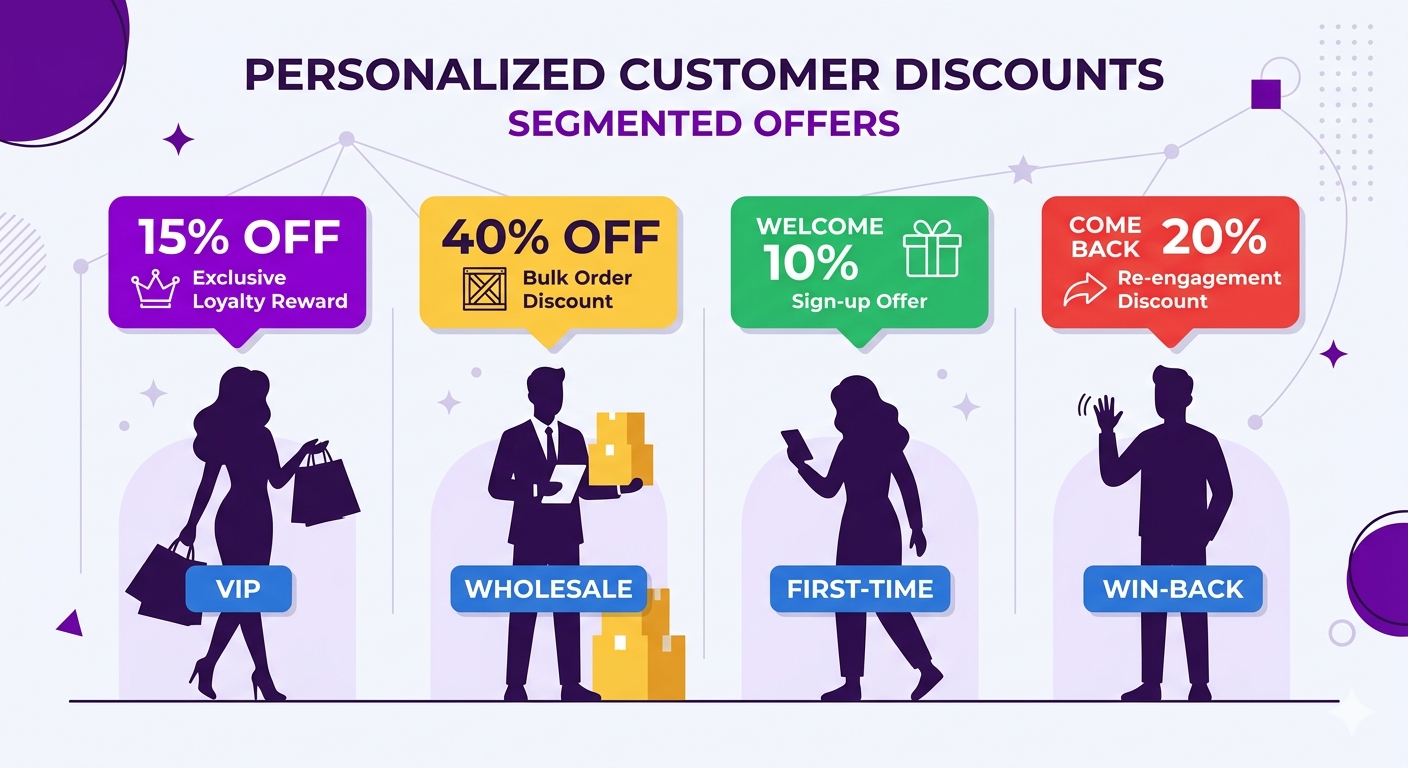
Your store has 10,000 customers, and they are not all the same. Shopify customer tag discounts let you show each segment exactly the right offer automatically, without a single discount code.
Here is what a well-segmented store might look like:
- 200 VIP customers (lifetime spend $5,000+) should see an exclusive 15% discount
- 50 wholesale partners should see trade pricing (40% off)
- 500 first-time buyers should see a welcome discount (10% off, once)
- 300 lapsed customers (haven’t bought in 6+ months) should see a win-back offer (20% off, time-limited)
- 8,950 regular customers see regular prices or general promotions
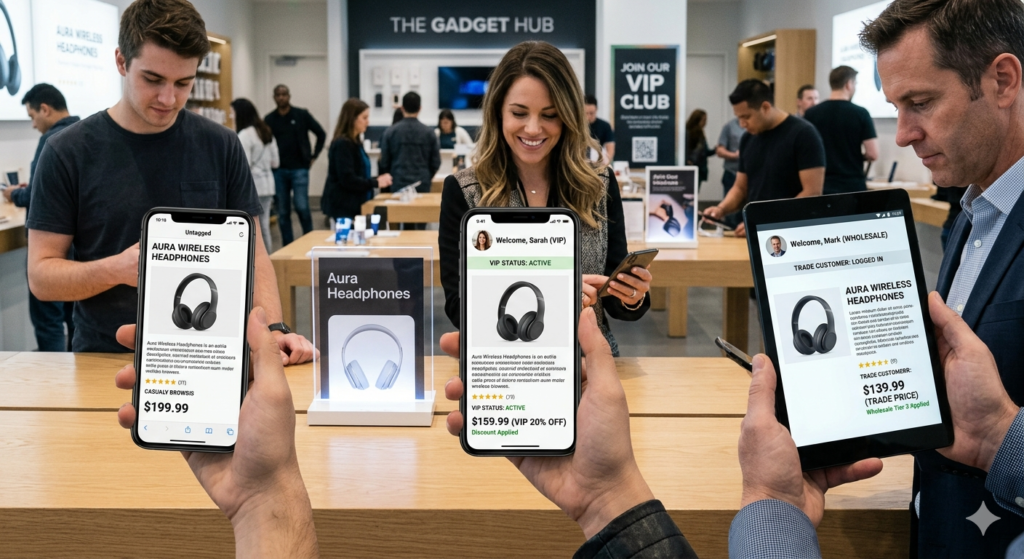
With Shopify customer tags, you can automatically apply different discounts to each segment. A customer logs in, Adsgun reads their tags, and shows them the appropriate price.
What Are Shopify Customer Tags? (Quick Review)
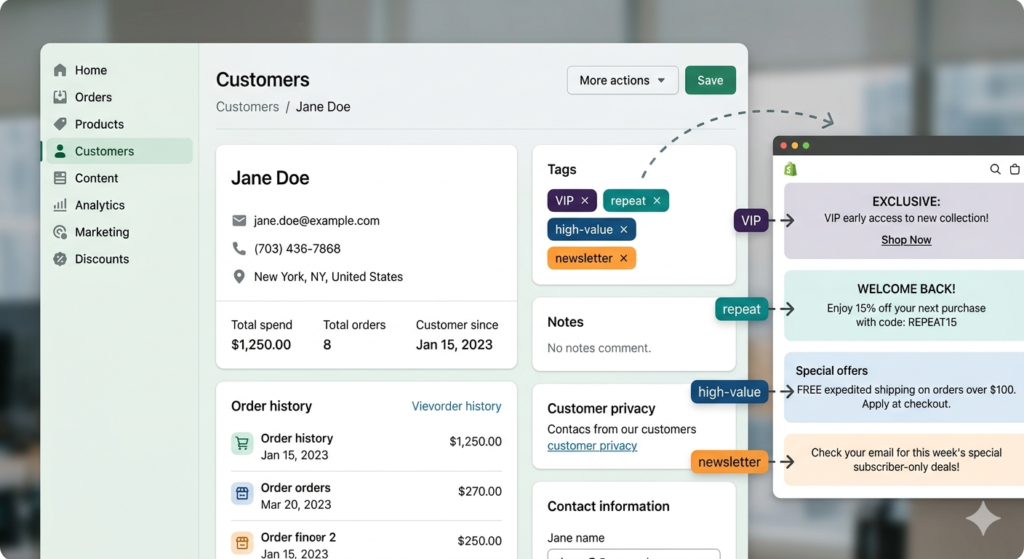
Shopify customer tags are labels attached to customer profiles. They are the foundation for Shopify customer tag discounts because every discount rule you create in Adsgun is tied to a tag.
You can manually tag customers, or use Shopify Flow to auto-tag based on rules.
Common examples:
- VIP: Customers with 5+ orders
- Wholesale: B2B resellers
- First-time: Customers with exactly 1 order
- Newsletter: Opted into emails
- Lapsed: Haven’t purchased in 6+ months
- High-value: Lifetime spend over $500
Tags are the foundation for segment-based promotions.
Types of Shopify Customer Tag Discounts
VIP Loyalty Discount
Customers with the “VIP” tag automatically see 15% off.
- Setup: Create a promotion “VIP 15% Off”, apply to customers with tag “VIP”
- Result: They see discounted prices on every product page, collection, and cart
- Benefit: Feels exclusive, rewards loyalty
Wholesale Trade Pricing
Customers with the “Wholesale” tag see 40% off.
- Setup: Create a promotion “Wholesale Trade Price”, apply to customers with tag “Wholesale”
- Result: They see trade pricing when logged in
- Benefit: A completely separate pricing tier for resellers, no codes required
Win-Back Campaign
Customers with the “Lapsed” tag see 20% off for 14 days.
- Setup: Create a promotion “Win-Back 20% Off”, apply to customers with tag “Lapsed”, set a 14-day expiration
- Result: When they log in within 14 days, they see the re-engagement offer
- Benefit: A tailored incentive to re-activate dormant customers
First-Time Buyer Welcome
Customers with the “FirstTime” tag see 10% off (one-time).
- Setup: Create a promotion “Welcome 10% Off”, apply to customers with tag “FirstTime”
- How it works: Use Shopify Flow to tag customers when they make their first purchase. Adsgun shows them the welcome discount on their next visit.
- Benefit: Encourages the second purchase, the most important conversion for long-term retention
Inverse Targeting: Discount for Everyone Except VIPs
Show a promotion to everyone except your VIP customers.
- Setup: Create a promotion “Regular Customer Flash Sale 15%”, apply to customers without tag “VIP”
- Result: Regular customers see 15% off; VIPs see their existing VIP discount or higher
- Benefit: Creates tier differentiation and incentivizes customers to reach VIP status
Newsletter Subscriber Exclusive Access
Customers with the “Newsletter” tag get early access to sales, before the general public.
- Setup: Combine the promotion with Adsgun’s scheduler. Create “Newsletter Early Access 24 Hours”, apply to customers with tag “Newsletter”.
- Timeline: Sale goes live for newsletter subscribers on Friday. Regular customers get access on Saturday.
- Benefit: Rewards email subscribers and drives newsletter signups
Step-by-Step: Creating a VIP Tag Discount in Adsgun
How to Set Up Your First Shopify Customer Tag Discount
Step 1: Tag Your VIP Customers
Option A: Manual
- In Shopify admin, go to Customers
- Select a customer
- Scroll to Tags
- Type “VIP”
- Repeat for each VIP customer (tedious for 200+ customers)
Option B: Shopify Flow (recommended)
- In Shopify admin, go to Workflows (or Automations)
- Create workflow: “Auto-tag VIPs”
- Trigger: Customer placed order
- Condition: IF total spent (across all orders) ≥ $2,000, THEN add tag “VIP”
- Save
Every customer who reaches $2,000 in lifetime spend is automatically tagged VIP. The tag applies immediately after the qualifying order.
Step 2: Create the Promotion in Adsgun
- Open Adsgun in your Shopify admin
- Click Create New Promotion
Step 3: Choose Promotion Type
Select Customer Account
- This shows discounts only to logged-in customers with specific tags. See the Adsgun Promotions guide for a full breakdown of visibility options.
Step 4: Name the Promotion
“VIP 15% Off Everything”
Step 5: Define the Discount
- Type: 15% off
- Applies to: All products
Step 6: Set Customer Targeting
- Apply to customers with tag: VIP
Only customers with the VIP tag see this promotion.
Step 7: Customize Display
- Badge: “VIP Price” or “Member Exclusive”
- Strike-through color: Your brand color
- Sale price color: Green or contrasting
- Announcement bar: (Optional) “VIP Pricing Active” when they’re logged in
Step 8: Test
- Create a test customer account
- Tag them manually as VIP (or wait for Flow to auto-tag if you set that up)
- Log in as that customer
- Visit a product page
- Confirm you see the VIP discount and strike-through pricing
- Log out as a regular customer
- Verify regular pricing appears (no VIP discount)
Step 9: Publish
The VIP promotion is live. All VIP-tagged customers automatically see 15% off when logged in.
Real-World Multi-Tier Discount Structure
Here is how a complete multi-tier system looks in practice:
Promotions active simultaneously:
- “Welcome First-Time Buyer 10% Off” (Customers WITH tag “FirstTime”)
- “Bronze Loyalty 10% Off” (Customers WITH tag “Bronze”, 3+ orders)
- “Silver Loyalty 12% Off” (Customers WITH tag “Silver”, 10+ orders)
- “Gold Loyalty 15% Off” (Customers WITH tag “Gold”, $1,000+ lifetime spend)
- “Wholesale Trade Price 40% Off” (Customers WITH tag “Wholesale”)
- “Win-Back Campaign 20% Off” (Customers WITH tag “Lapsed”)
- “General Flash Sale 15% Off” (Customers WITHOUT tag “VIP” — incentivizes upgrade)
Customer Experiences:
- New customer: Sees Welcome 10% Off on first login
- After 3 purchases: Automatically tagged “Bronze”, sees 10% off
- After 10 orders: Automatically tagged “Silver”, sees 12% off
- After $1,000 spent: Automatically tagged “Gold”, sees 15% off (+ eventually promoted to “VIP” tag)
- Wholesale partner: Tagged manually or via signup, sees 40% off
- Lapsed customer: Flow auto-tags them after 6 months of inactivity, sees 20% off win-back offer
All promotions run simultaneously. The system applies the right discount for each customer based on their tags.
Combine Tag Discounts With Scheduled Promotions
For even more control, combine tag-based discounts with Adsgun’s promotion scheduler:
Example for a VIP customer:
- VIP 15% Off – always active
- VIP Flash Friday 20% Off – every Friday evening (recurring schedule)
- VIP Black Friday 25% Off – November 24 to 26 only
During a normal week, VIPs see 15% off. Every Friday evening, they see 20% off. During Black Friday, they see 25% off. Adsgun automatically applies the highest available discount based on tag and schedule. Read more about setting up promotion schedules.
FAQ: Customer Tag Promotions
Q: What if a customer has multiple tags?
A: Adsgun applies all matching promotions. If a customer is tagged both “VIP” AND “Newsletter”, they might see both the VIP discount and the Newsletter exclusive discount (or the highest of the two, depending on stacking rules).
Q: Can I combine tag-based with code-based promotions?
A: Yes. A VIP customer might have their tag-based 15% discount, plus enter a referral code (10% additional). Both apply (if stacking is enabled).
Q: What if I want to remove a tag from a customer?
A: Edit their customer profile and remove the tag. The promotion immediately stops applying (next time they visit).
Q: Do customers see that they’re tagged?
A: No. Tags are internal. Customers just see different prices. They might infer they’re in a special group (“Why am I seeing 15% off?”), but they don’t see the tag itself.
Q: How do I track which promotions are used most by which tags?
A: In Adsgun analytics, filter promotions by customer segment. You’ll see “Customers with VIP tag used this promotion X times, generating $Y revenue.”
Ready to Segment & Target With Precision?
Most stores treat all customers the same. Smart stores segment and target. A VIP customer deserves a different experience than a first-time visitor.
With Shopify customer tag discounts and Adsgun, the entire system runs automatically. Customers are tagged via Shopify Flow, and the right discount appears the moment they log in. No codes, no manual work, and no friction.
Start your free 7-day trial and create your first tag-based discount today. No credit card required.