
Shopify Free Gift With Purchase: How to Set It Up (Complete Guide)
Shopify free gift with purchase promotions increase conversions and AOV. Learn how to set them up and optimize performance.
Free gift promotions are among the highest-converting strategies in ecommerce. A well-implemented Shopify free gift with purchase offer increases both conversion rates and average order value by giving customers a clear incentive to spend more.
Why? Because the psychology is powerful:
- Addition, not subtraction: A discount feels like “I’m paying less.” A free gift feels like “I’m getting more.” Addition is psychologically more rewarding than subtraction.
- Tangible value: A customer can see and touch a free gift. An abstract discount (“20% off”) is harder to understand. A free branded t-shirt is concrete and desirable.
- Urgency and exclusivity: “Free gift with purchase” implies limited quantity. It creates a sense of scarcity. “While supplies last” reinforces urgency.
- Increased cart value: To unlock the free gift, customers often spend more than they planned. “I need to spend $50 to get the free gift. I’m at $38. Let me add $12 more.” AOV increases naturally.
Types of Free Gift Promotions
Type 1: Spend X, Get Free Gift
Customer spends a minimum amount and receives a free gift.
- Example: “Spend $50, Get a Free Branded T-Shirt”
- Trigger: Purchase total ≥ $50
- Gift: Branded t-shirt (fixed, predetermined)
Type 2: Buy Specific Product, Get Different Product Free
Customer buys one product and gets a complementary product free.
- Example: “Buy Premium Headphones, Get a Free Carrying Case”
- Trigger: Customer purchases premium headphones
- Gift: Free carrying case
Type 3: Free Gift, Customer Choice
Customer spends X or buys Y, then chooses from a selection of gifts.
- Example: “Spend $75, Choose Your Free Gift: T-Shirt OR Hat OR Stickers”
- Trigger: Purchase total ≥ $75
- Gift: Customer picks from multiple options
Type 4: Tiered Free Gifts
Different gifts at different thresholds.
- “Spend $50: Free socks”
- “Spend $100: Free t-shirt”
- “Spend $150: Free hoodie”
Customers are motivated to spend more to unlock better gifts.
How Shopify Free Gift With Purchase Works
A Shopify free gift with purchase promotion rewards customers when they reach a specific spending threshold or buy certain products. This creates a strong incentive to increase cart value and improves overall conversion performance.
Shopify’s Native Approach (Buy X Get Y)
Shopify’s automatic discount type includes “Buy X Get Y,” which can be used for free gifts.
You can learn more directly in the official Shopify documentation:
https://help.shopify.com/en/manual/discounts/discount-types/buy-x-get-y
How to set up:
- In Shopify admin, go to Discounts > Automatic Discount
- Discount type: Buy X Get Y
- Trigger: Customer buys X units or spends $X amount
- Free items: The gift product(s)
- Save
This works, but the free gift is not visible until checkout. A customer does not know they can unlock a free gift while browsing. They do not see progress like “Spend $50 more to unlock a gift.” Because of that, the offer does not influence early purchase decisions.
When customers reach checkout and discover the gift, it feels nice. However, it does not actively drive them to increase cart value.
What Adsgun’s Free Gift Feature Adds: Visibility and Psychology
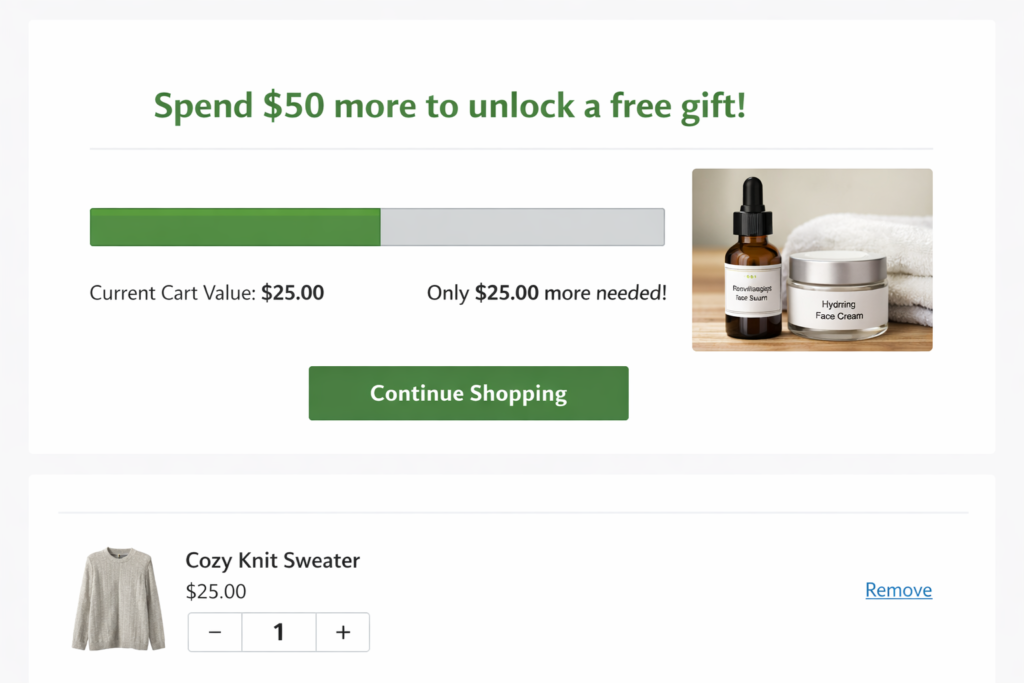
Adsgun’s Free Gift promotion type is designed specifically for visibility and psychology:
- Announcement on product pages: “Spend $X more to unlock a free gift”
- Progress bar: Shows how much the customer needs to spend to unlock the gift
- Gift visualization: Shows an image of the gift product so it’s tangible
- Cart messaging: When the threshold is met, “You’ve unlocked a free gift! Click to add it to your cart”
- Gift selection: Customer can auto-add the gift OR choose from multiple gift options
All of this happens before checkout and directly influences buying behavior.
Shopify Free Gift With Purchase Setup (Step-by-Step)
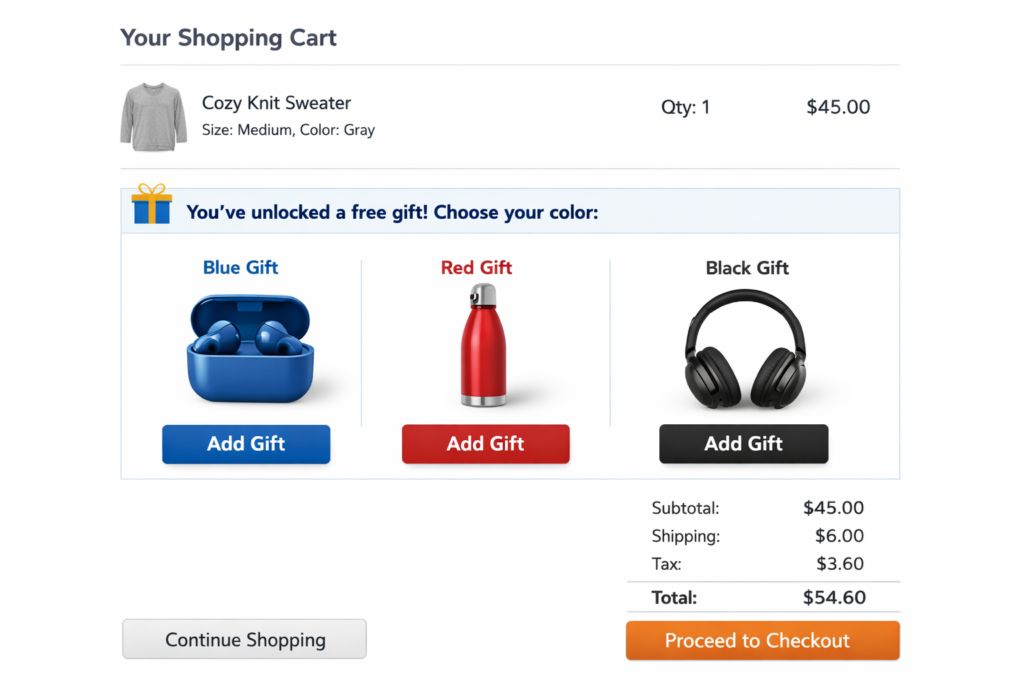
Shopify Free Gift With Purchase Setup Using Adsgun
Scenario: “Spend $50, Get a Free Branded T-Shirt”
Step 1: Open Adsgun
In Shopify admin, open Adsgun.
Step 2: Create New Promotion
Click Create New Promotion
Step 3: Choose Promotion Type
Select Free Gift (if available on your plan)
Step 4: Name Your Promotion
“Free T-Shirt With $50 Purchase”
Step 5: Define the Trigger
- Trigger type: Spend amount
- Spend amount: $50 (or whatever threshold you choose)
- Applies to: All products (or specific collections/products)
Step 6: Define the Gift
- Gift product: Select the branded t-shirt from your product catalog
- Gift quantity: 1
- Gift variant: (Optional) If the t-shirt has colors/sizes, specify which one (e.g., “M size only” or “all sizes/colors available”)
Step 7: Gift Delivery Method
Choose how customers receive the gift:
- Option A: Auto-add to cart
- When customer’s cart hits $50, the t-shirt is automatically added to their cart for free
- Pro: High take-rate (customers don’t have to do anything)
- Con: Less customer agency
- Option B: Customer choice
- When cart hits $50, a prompt appears: “You’ve unlocked a free gift! Add to cart?” Customer clicks to add
- Pro: Customer feels in control
- Con: Slightly lower take-rate (some customers won’t click)
- Option C: Choose from multiple gifts
- When cart hits $50, customer sees options: “Free T-Shirt OR Free Hat OR Free Stickers” and chooses one
- Pro: Personalization, higher satisfaction
- Con: Most development effort
Choose based on your goals. Auto-add = highest efficiency. Choice = highest satisfaction.
Step 8: Display Settings
- Announcement on product pages: “Spend $50 to unlock a free gift”
- Progress bar: “Spend $X more for a free gift” (shows progress toward $50 threshold)
- Gift image: Display the t-shirt product image so customers see what they’re getting
- Cart messaging: “You’ve unlocked a free gift! [Add to Cart]”
Step 9: Customize Appearance
- Progress bar color: Your brand color or green (positive association)
- Messaging text: Your wording (can be playful: “Almost there!” or straightforward: “Spend $X more”)
- Gift section styling: Match your brand
Step 10: Set Conditions (Optional)
- Start/end date: (Optional) Make the gift promotion time-limited
- Recurring: (Optional) “Free gift every Friday,” etc.
-
Exclude products:
- (Optional) Can’t spend on discounted items to trigger the gift, for example
Step 11: Test
- Add products to cart
- Check progress bar updates
- Reach threshold
- Confirm unlock message
- Verify gift is added correctly
Step 12: Publish
The free gift promotion is live.
Real-World Examples: Successful Free Gift Strategies
Strategy 1: Seasonal Gift Giveaway
Setup:
- Promotion: “Free Holiday Ornament With $75 Purchase”
- Season: November 1–December 31
- Gift: Branded holiday ornament
- Message: “Collect all three ornament designs” (hint at multiple promotions)
Why it works:
- Holiday shopping season has high AOV inherently
- Free ornament feels festive and collectible
- Drives repeat purchases if there are multiple designs
Strategy 2: New Customer Incentive
Setup:
- Promotion: “Free Sample Pack With First Purchase”
- Trigger: First-time customer spending $25+
- Gift: Curated sample pack of your best products
- Message: “Try before you commit to full-size”
Why it works:
- Lowers barrier to first purchase
- Gives customer experience with multiple products
- High conversion to repeat orders (customers love the samples)
Strategy 3: Loyalty Milestone Gift
Setup:
- Promotion: “Free Upgrade With $100 Purchase (VIP Members Only)”
- Trigger: VIP tag + spend $100
- Gift: Premium version of a product (e.g., spend $100 on a basic skincare set, get a premium version free)
- Message: “VIP Exclusive: Free Upgrade”
Why it works:
- Rewards loyal customers
- Feels exclusive (VIP only)
- Increases perceived value for high-spend customers
Strategy 4: Cart Recovery / Cross-Category Gift
Setup:
- Promotion: “Free Socks With Shoe Purchase”
- Trigger: Buy any shoes
- Gift: Free socks (complements shoes, encourages cross-category shopping)
- Message: “Complete Your Outfit: Free Socks”
Why it works:
- Drives basket add-ons
- Encourages cross-category engagement
- Socks are low-cost gift, high-perceived value
Combining Free Gift With Other Promotions
You can combine free gift offers with other strategies.
Example:
- Base promotion: Free gift with $50 purchase
- VIP boost: Free VIP customer spends $35 for the same gift (lower threshold for loyal customers)
- Flash sale: During Friday flash, free gift threshold drops to $40 for all customers
Adsgun stacks these automatically. A VIP customer during Friday flash sees the lowest threshold ($35) and qualifies for the gift fastest.
Measuring Free Gift Promotion Success
Track these metrics:
Gift redemption rate
Target: 70% or higher
Average order value
Target: Increase by $15 to $30
Conversion rate
Target: Increase by 2 to 5 percent
Customer satisfaction
Target: Increase repeat purchase rate
If results are low, adjust the gift or threshold.
FAQ: Free Gift Promotions
Q: What’s the best gift to offer?
A: Something complementary to your products, low-cost to you, but high-perceived value to customers. Branded items, samples, or related products work best.
Q: Should I auto-add the gift or let customers choose?
A: Auto-add = higher take-rate, but less control. Customer choice = better satisfaction. If your goal is quick conversion, auto-add. If you want to build loyalty, offer a choice.
Q: What if I want different gifts for different products?
A: Create separate promotions: “Spend $50 on shoes, get free socks” and “Spend $75 on skincare, get free sample kit.” Each with its own gift.
Q: Can I limit the free gift quantity?
A: Yes. Set “Limit to X gifts per month” or “While supplies last” messaging. This creates scarcity.
Q: Will free gifts reduce my margins?
A: Potentially, yes. The gift has a cost. But if the AOV increase and conversion boost exceed the gift cost, you’re profitable.
Ready to Launch Your First Free Gift Promotion?
Free gift promotions are one of the highest-converting offer types available. They’re psychological, tangible, and drive both conversion and AOV.
With Adsgun’s Free Gift feature, customers see the gift from the moment they land on your store. They see progress toward unlocking it. When they reach the threshold, they feel accomplished. They add the gift and complete the purchase.
Start your free 7-day trial and set up your first free gift promotion today. No credit card required.




