
Shopify Discount Apps vs Shopify Scripts: What’s Right in 2026?
The Shopify Scripts deprecation has been pushed twice already, but June 30, 2026 is the final cutoff. After that, every Script stops executing. Editing locks even earlier on April 15. If you are a Plus merchant running custom discount, shipping, or payment logic on Scripts, your migration window is now measured in weeks. Here is what you need to know.
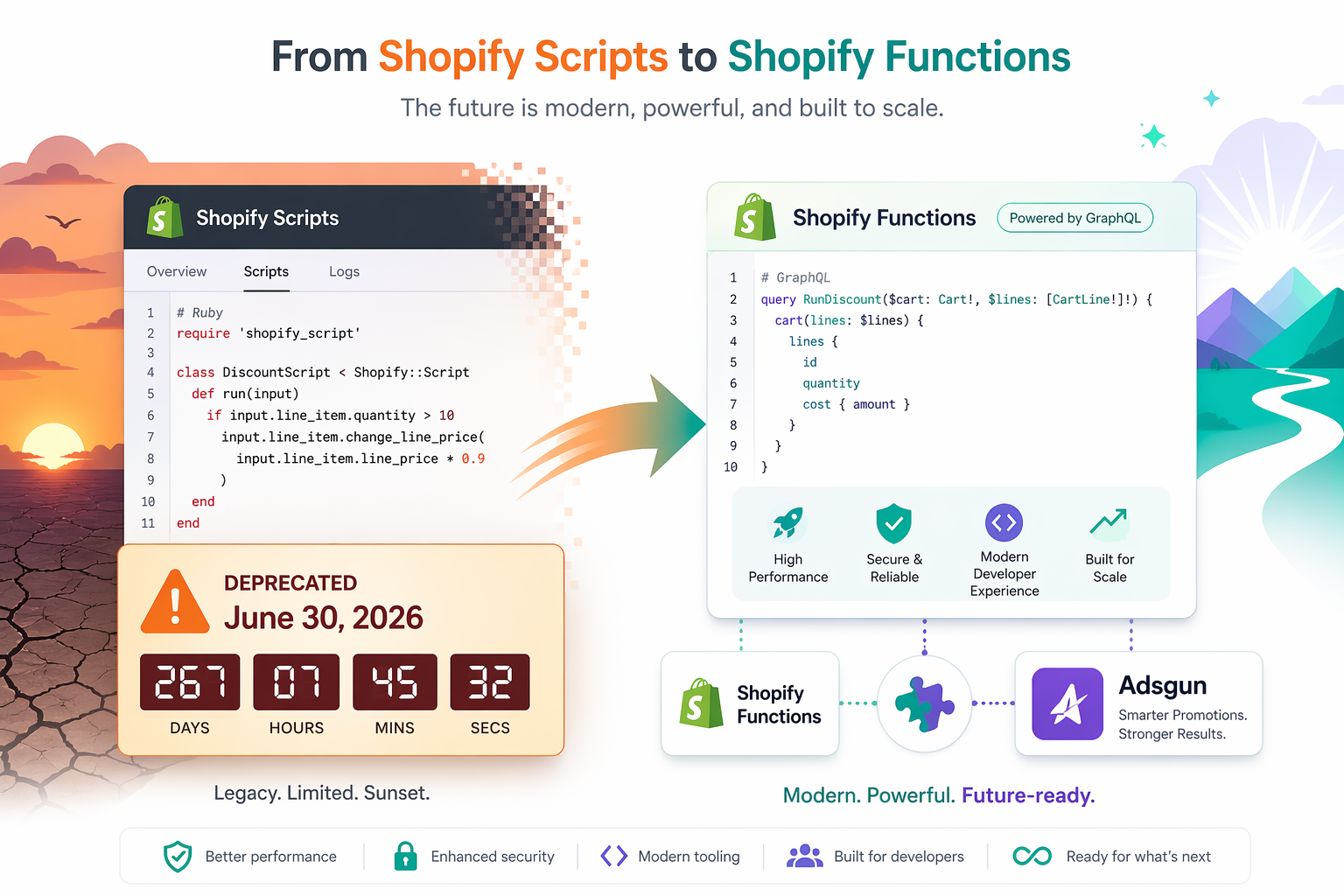
What Shopify Scripts Were and Why They Are Going Away
Shopify Scripts were a Plus-only feature that let merchants run custom Ruby code on the cart and checkout pages. Through the Script Editor, Plus stores could write logic that native Shopify discounts could not handle: tiered wholesale pricing, conditional discounts based on customer tags, complex stacking rules, custom shipping logic, and payment gating. However, with the ongoing Shopify Scripts deprecation, merchants now need to transition these customizations to newer solutions like Shopify Functions.
Example Script logic:
- “If customer buys 3 or more items from the ‘shoes’ collection AND they have the VIP customer tag, apply 20% off. If they only have one of those conditions, apply 10% off.”
That kind of conditional, multi-variable logic was impossible to express through Shopify’s standard Discounts menu, so for years Plus merchants relied on Scripts as their custom checkout customization layer.
The Shopify Scripts deprecation announcement changed all of that. After two timeline extensions (originally August 2024, then August 2025), Shopify finalized the cutoff at June 30, 2026. On that date, every Script in every Plus store stops executing. There is no grace period, no rollback option, no opt-out path.
For most stores, this is a much bigger deal than it looks on the surface, because Scripts often power critical revenue logic that nobody on the merchant team has touched in years.
The Two Dates That Matter
The Shopify Scripts deprecation has two hard dates, not one:
- April 15, 2026: Editing and publishing new Shopify Scripts will no longer be possible. Your existing published Scripts will continue to run, but you cannot fix bugs, push updates, or create new Scripts after this date. If something breaks between April 15 and June 30, you have no path to repair it inside the Script Editor.
- June 30, 2026: All Shopify Scripts cease to execute entirely. Custom discount logic, shipping rules, payment gating, anything that ran through Scripts simply stops working. Customers will see the standard Shopify behavior in place of whatever your Scripts were doing.
The April 15 date is the one most merchants underestimate. Two and a half months of frozen code in a system you might still be migrating from is enough time for an undiagnosed edge case to silently cost you sales. The migration window is effectively closing in mid-April, not at the end of June.
What Replaces Scripts: Shopify Functions
The official replacement for Scripts is Shopify Functions. Functions are a fundamentally different technology from Scripts, even though they often get described as “the new version.”
Architectural difference:
- Scripts ran sandboxed Ruby code in a shared environment
- Functions run as compiled WebAssembly (Wasm) modules executing on Shopify’s core infrastructure with sub-5ms execution and no cold starts
Distribution difference:
- Scripts lived inside the Script Editor in your admin
- Functions are distributed as apps, either through the Shopify App Store (public apps available on every plan) or as custom apps (Plus only)
Capability difference:
- Functions support cart transforms, checkout validation, delivery customizations, payment customizations, and order routing, none of which Scripts could do
- Functions cannot make external network requests at runtime; all data must come from the input query or Shopify metafields
This last constraint is the one that catches most teams off guard mid-migration. If your Scripts called external APIs to check customer eligibility, fraud signals, or third-party inventory, you cannot translate that pattern directly. You either sync the external data into Shopify metafields ahead of time or move that logic to a different extension point that supports async operations.
The Visibility Gap That Functions Inherit From Scripts
Here is the part of the Shopify Scripts deprecation conversation that most migration guides skip: Functions inherit the same fundamental visibility problem that Scripts had.
A Function evaluates discount logic on the backend and applies the result at checkout. The customer browsing your store at full prices on product pages and collection pages does not see the discount until they reach checkout. The logic is more powerful, the runtime is faster, but the customer-facing display experience is the same.
Shopify’s own documentation is explicit about this gap: “To display savings from discounts with crossed-out (strikethrough) prices on product pages and collection pages, you need to use a third-party discount app, or hire a Shopify Partner to build a custom solution for you.”
Concrete example of the gap:
- You build a Function: “Customers tagged ‘vip’ get 15% off all products”
- A VIP customer lands on a product page
- They see the full $100 price (no discount indicator anywhere on the page)
- They add to cart
- At checkout, the 15% discount finally appears, taking the price to $85
The Function did its job. The customer just never knew there was an offer until they had already committed to checkout, and 70% of carts get abandoned before they ever reach that step. The most motivated audience, the VIP customers your Function specifically targeted, sees full prices for the entire shopping journey.
This is the gap apps like Adsgun fill. Functions handle the discount logic. Adsgun handles the display so customers actually see what they are getting.
Adsgun in the Shopify Scripts Deprecation Migration
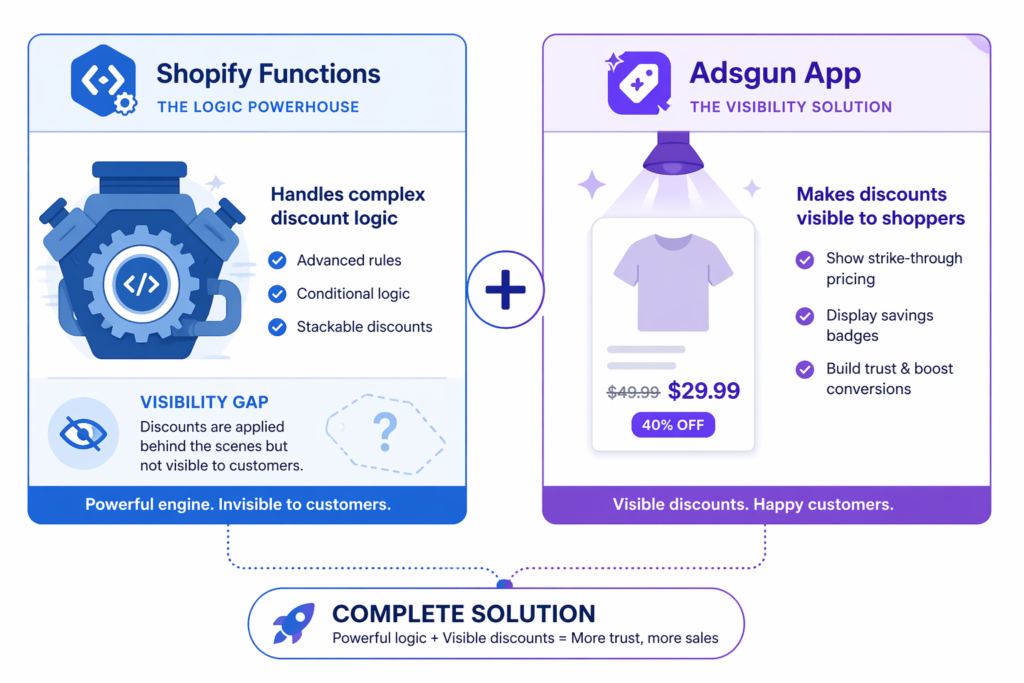
Adsgun does not replace Scripts and it does not compete with Functions. It works alongside them by reading the discounts your Functions (or native Shopify discounts) create and rendering them as visible strikethrough pricing on product pages, collection pages, cart, and checkout.
The migration architecture for a typical Plus merchant ends up looking like this:
- Functions handle the conditional logic that used to live in Scripts (VIP tier rules, stacking conditions, tag-based pricing, B2B wholesale tiers)
- Native Shopify discounts handle the simple cases that never needed Scripts in the first place (sitewide promotions, free shipping thresholds, scheduled flash sales)
- Adsgun displays the resulting discounts on the storefront so customers see them before checkout, and provides scheduling, multi-channel URL targeting, and customer-tag-based promotions for the cases that benefit from a no-code interface
For most Plus stores migrating off Scripts, this stack delivers more than Scripts alone ever did, because Scripts only handled logic and never solved storefront visibility.
Migration Path: Step by Step
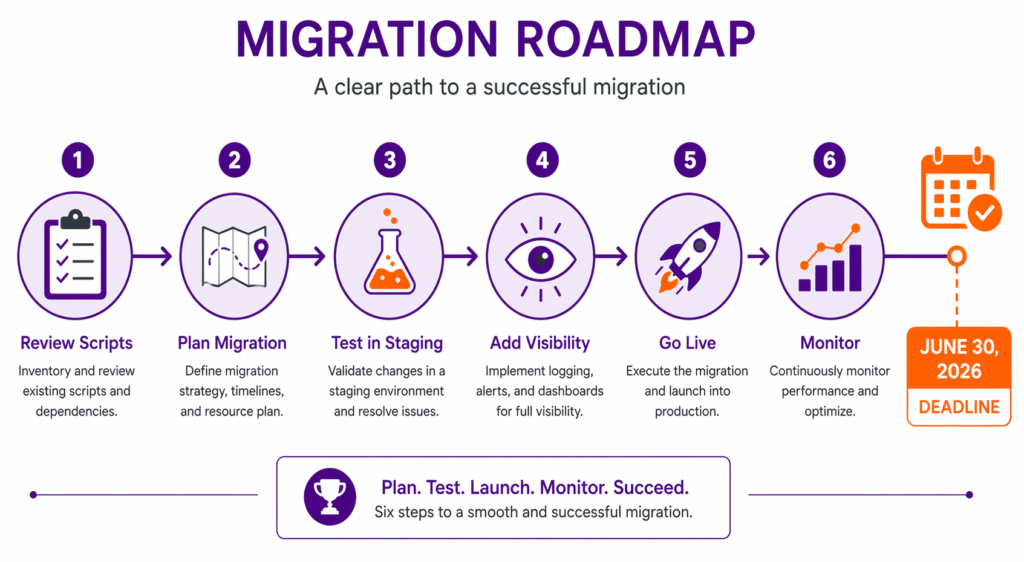
The Shopify Scripts deprecation migration breaks into six concrete steps. The official Scripts customizations report inside your admin (Apps > Script Editor > Replace Shopify Scripts) generates an automated audit of every active Script and links to recommended replacements.
Step 1: Run the Shopify Scripts Customizations Report
From your Shopify admin, navigate to Apps > Script Editor and click “Replace Shopify Scripts” in the deprecation banner. The report lists every active Script, what it does, and links to recommended apps and Function tutorials. Export the report as CSV for your migration tracking.
Step 2: Categorize Each Script
For each Script in the report, decide:
- Drop: the Script is no longer needed (legacy code from a campaign that ended)
- Quick win: the logic can be replaced by a public app or by native Shopify discounts without custom development
- Functions rebuild: the logic is genuinely custom and needs translation to a Shopify Function
Aim to drop or quick-win as many Scripts as possible before resorting to Functions rebuilds. Most legacy Script catalogs have at least 30% dead weight.
Step 3: Build and Test Functions in Staging
For Scripts that need Function-based replacements, develop in a staging environment first. Functions and Scripts can run in the same store simultaneously, so you can deploy a Function alongside its corresponding Script and validate that they produce identical checkout outcomes before disabling the Script.
Step 4: Add Visibility Layers (Monitoring + Storefront Display)
Visibility comes in two forms during a Scripts migration, and both matter:
- Monitoring visibility: logging, error alerts, and dashboards that catch when Functions return unexpected results in production. This is what gives you confidence to disable Scripts. Set up Function-level logs and at minimum a daily alert on checkout error rate.
- Storefront visibility: the customer-facing strikethrough pricing on product and collection pages that Scripts (and Functions) cannot deliver natively. Install Adsgun (or a similar app) at this stage so the discounts your migrated Functions calculate are actually visible to shoppers before checkout. This is the upgrade Scripts never delivered, and it tends to lift conversion meaningfully on the same underlying offers.
Step 5: Disable Scripts as Functions Stabilize
After a Function has run cleanly in production for at least two weeks alongside its Script, disable the Script. Running both can create checkout conflicts where a Script and a Function compete to apply the same discount.
Step 6: Monitor After Cutover
Watch conversion rate, average order value, checkout error rate, and discount redemption for at least two weeks after each Script is fully replaced. Most migration issues surface as a small percentage of orders where the discount applies differently than expected, easy to miss without active monitoring.
Common Migration Pitfalls
Patterns that show up repeatedly in Shopify Scripts deprecation migrations across the Plus ecosystem:
- Assuming Functions can do everything Scripts did. Most use cases translate, but not all of them. Scripts that called external APIs, used real-time data, or relied on specific Ruby behaviors may need rearchitecting rather than direct translation. Run the customizations report early to identify these.
- Migrating without a staging environment. Functions deployed straight to production can produce subtle pricing differences from Scripts that go unnoticed for days. A development store with parallel Function + Script execution catches these in QA.
- Forgetting the April 15 lock-out. Teams plan around June 30 and discover too late that they cannot edit Scripts after April 15. If you find a bug between April 15 and June 30, you have no Script Editor path to fix it.
- Skipping the visibility upgrade. Many Plus teams migrate Functions one-for-one with Scripts and ship without ever addressing the on-page discount display. Customers continue to see full prices until checkout, and the conversion lift the migration could have unlocked never materializes. The visibility gap is not new; it just becomes visible once you stop being focused on getting the migration done.
- Trying to migrate everything at once. Phased migration (one Script category at a time, validated in production for two weeks before moving on) is significantly safer than a big-bang cutover.
Cost of the Migration
The migration cost depends entirely on Script complexity:
- Simple discount logic (sitewide percentage, free shipping thresholds, basic tag-based offers): often replaceable with native Shopify discounts plus a visibility app, at $0 to a low monthly app fee
- Moderate logic (tiered pricing, conditional stacking, multi-variable rules): typically replaceable through public apps built on Functions, at standard app pricing
- Complex custom logic (B2B pricing matrices, advanced stacking rules, custom shipping by zone or tag, payment gating): typically $2,000 to $10,000 in custom Function development
For Plus merchants already paying $2,300+ per month for the platform, even the higher end of custom development is usually a one-time cost that pays back quickly compared to the revenue lost if Scripts break in production.
FAQ: Shopify Scripts Deprecation
Q: What exactly happens on June 30, 2026?
Every active Shopify Script stops executing. Any custom discount, shipping, or payment logic running through Scripts disappears. Customers will see the standard Shopify behavior. Stores that did not migrate will silently lose whatever Scripts were doing.
Q: Will Shopify extend the deadline again?
Shopify has stated June 30, 2026 is final. The deadline has already been extended twice (from August 2024 to August 2025 to June 2026). Plan around this date as the hard cutoff.
Q: Can I keep using Scripts and Functions side by side?
Yes, but only until June 30. Scripts and Functions can coexist during the migration period, which lets you deploy and test a Function alongside its corresponding Script before disabling the Script. After June 30, Scripts simply stop running regardless of Function presence.
Q: Do I need to be on Shopify Plus to use Functions?
No. Public apps that contain Functions work on every Shopify plan and are distributed through the Shopify App Store. Custom apps with Functions and certain advanced Functions APIs are Plus-only. For most discount and shipping use cases, public apps cover the migration without requiring custom development.
Q: What about the visibility gap?
Functions, like Scripts before them, evaluate discount logic at checkout and do not display the discount on product pages by default. Apps like Adsgun read your Function-based or native discounts and render them as strikethrough pricing across the storefront, so customers see savings before adding to cart.
Q: Can my Scripts logic call external APIs the way it used to?
Functions cannot make network requests at runtime. If your Scripts called external services for eligibility checks, you need to either sync that data into Shopify metafields ahead of time or move that piece of logic to a different extension point that supports async operations.
Q: I just opened my Script Editor and the customizations report is empty. What does that mean?
You either have no active Scripts or your Scripts have already been disabled. Either way, you have no migration to do, you just need to confirm with your developer or agency that nothing in production depends on Scripts.
- Modern infrastructure (WebAssembly, sub-5ms execution, no cold starts) instead of a sandboxed Ruby environment
- Distribution through apps means no developer required for most use cases
- Easier to audit, easier to support, easier to debug than custom Ruby code nobody on the team wrote
- Visible discount display through apps like Adsgun, the upgrade Scripts never had
Plus merchants who migrate proactively, well before the April 15 lock-out, gain access to a richer extensibility platform and finally close the storefront visibility gap. The merchants who wait until late May find themselves competing for developer availability against every other procrastinating Plus merchant on the platform.
If you have not started, start this week. The window is shorter than the calendar suggests.




