
Shopify Conversion Rate Optimization: 10 Tactics for 2026
A Shopify conversion rate optimization 2026 playbook with 10 tactics ranked by impact and effort, complete with implementation steps and expected conversion lift for each.
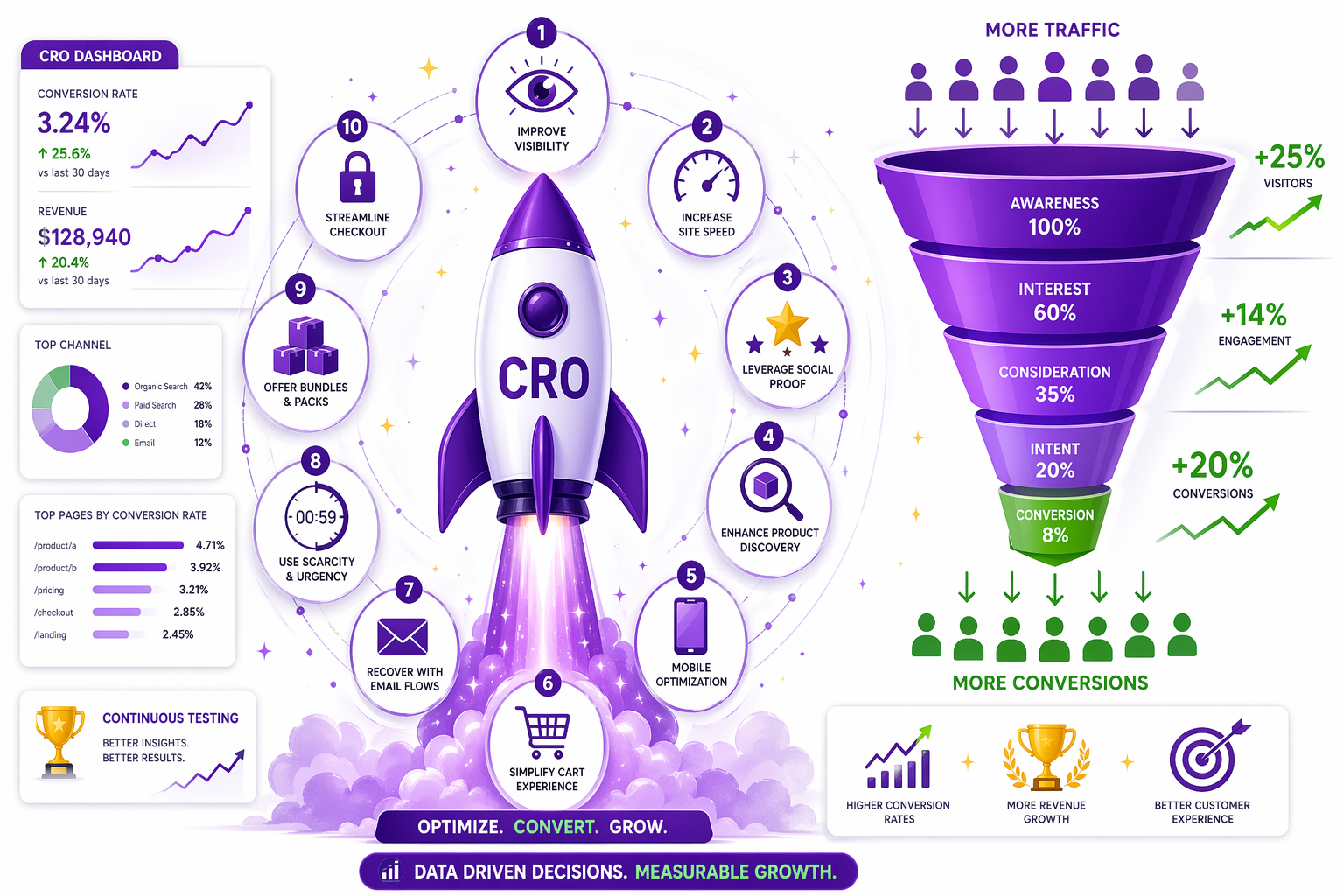
Your traffic is fine. Your products are fine. What is not fine is the percentage of visitors who actually buy. This Shopify conversion rate optimization 2026 guide walks through the 10 highest-impact tactics, ranked from biggest lift per hour of work to smallest, with implementation steps, expected impact ranges, and the order to run them in. By the end, you have a working CRO roadmap, not just a list of ideas.
The 10 Shopify Conversion Rate Optimization 2026 Tactics Ranked by Impact
Shopify conversion rate optimization 2026 boils down to one discipline: understanding why visitors don’t buy, and systematically removing those reasons. The 10 tactics below are ranked by impact-to-effort ratio. The earlier they sit on the list, the more conversion lift you get per hour of work.
Tactic 1: Make Discounts Visible Everywhere (Estimated Impact: +10-25% CRO)
This is ranked first because it’s the highest-impact change with the lowest implementation effort.
What it is: Instead of hiding your discounts in discount codes or showing them only at checkout, display strike-through pricing on product pages, collections, cart, and checkout. Everywhere your customer sees a price, they should also see the savings.
Why it works: Anchoring and loss aversion. When customers see “Was $99, Now $79,” their brain immediately registers a deal. That perception drives the purchase decision. An invisible discount (even a substantial one) has zero impact on product page decisions because the customer never sees it.
How to implement:
- Audit your active Shopify discounts (automatic and codes)
- Install Adsgun
- Configure which discount types to display (public, private, URL-targeted, customer account)
- Customize badge text and colors to match your brand
- Enable on all placement options (product page, collections, cart, checkout)
Estimated impact: Industry data shows 10 to 25% conversion improvement. Tire Streets saw +14% conversion with the same traffic during BFCM, which translated to $37,800 in incremental revenue.
Effort: 30 minutes setup, zero ongoing maintenance.
Tactic 2: Improve Page Speed and Core Web Vitals (Est. Impact: +5-15%)
Google’s Core Web Vitals (Largest Contentful Paint, First Input Delay, Cumulative Layout Shift) directly affect search rankings and user experience.
What it is: Optimize your site’s technical speed. That covers how fast pages load, how responsive they are to user input, and how stable the layout is while loading.
Why it works: Slow pages equal bounced traffic. A one-second delay in page load time can reduce conversion by up to 7%. Mobile users especially abandon slow sites.
How to implement:
- Test your site on Google PageSpeed Insights
- Address Shopify theme performance (choose a fast theme like Dawn, Studio, or Supply)
- Optimize images (compress, lazy load)
- Remove unnecessary apps that slow down your store
- Enable Shopify’s native performance features like Liquid preloading
- Consider a CDN for faster global delivery
Estimated impact: +5 to 15% conversion improvement if your site is currently slow. If you are already fast, minimal additional impact.
Effort: 4-8 hours, potentially with developer help.
Tactic 3: Add Social Proof, Reviews, and Trust Badges (Est. Impact: +5-12%)
What it is: Display customer reviews on product pages, testimonials, trust badges (SSL, money-back guarantee, payment icons), and user-generated content.
Why it works: Customers trust other customers more than brands. Seeing that 500 people bought this product and rated it 4.8/5 stars makes the purchase feel safe.
How to implement:
- Install a review app (Judge.me, Yotpo, or Stamped)
- Request reviews via post-purchase email
- Display reviews on product pages (usually automatic with the app)
- Add trust badges (SSL, guarantee, payment icons)
- Showcase testimonials in a carousel or section
- Consider case studies for higher AOV products
Estimated impact: +5 to 12% conversion improvement.
Effort: 1-2 hours setup, ongoing review moderation.
Tactic 4: Optimize Product Pages (Est. Impact: +5-20%)
What it is: Make sure product pages have high-quality images (10+ photos, zoom capability, lifestyle photos), complete descriptions (benefits, not just features), size guides, and a clear return policy.
Why it works: Product pages are your sales tool. Poor photos or vague descriptions create friction and increase return risk. Customers who know the product will fit and works as described are more likely to buy.
How to implement:
- Add 8-10+ product images per product (detail, lifestyle, size reference, video)
- Write descriptions that answer: What is it? What is it made of? Why is it better? Who is it for?
- Add a size guide with actual measurements, not vague “runs small” notes
- Include return policy and guarantee prominently
- Add videos where possible (unboxing, try-on, demo)
Estimated impact: +5 to 20% conversion improvement, plus reduced returns.
Effort: 3-6 hours per product, but can be templated across the catalog.
Tactic 5: Mobile Optimization (Est. Impact: +3-10%)
What it is: Make sure your store works flawlessly on mobile. Buttons are large (minimum 44 by 44 pixels), fonts are readable (minimum 12px), checkout is single-column, images load fast, and navigation is intuitive.
Why it works: Over 50% of ecommerce traffic is mobile. A broken mobile experience means you are losing half your potential customers.
How to implement:
- Test your store on actual mobile devices, not just browser tools
- Ensure all buttons are large and touch-friendly
- Simplify mobile navigation (hamburger menu, clear hierarchy)
- Use mobile-optimized checkout (Shopify’s default is already optimized, but check any third-party checkouts)
- Test on slow 4G connections
- Compress images for mobile
Estimated impact: +3 to 10% conversion improvement if you have mobile issues. Already-optimized sites see little additional lift here.
Effort: 4-6 hours if issues exist, zero if already optimized.
Tactic 6: Optimize Cart for Friction and Savings Visibility (Est. Impact: +3-8%)
What it is: Cart pages should be frictionless. Show line-item savings, total order savings, free shipping progress (if applicable), and make the checkout button obvious. Cart abandonment is mostly a visibility and friction problem, not a desire problem.
Why it works: Carts are where commitment happens. Customers have already decided to buy. The cart page should not scare them away with surprises or friction.
How to implement:
- Show savings per line item (“Save $20 on this item”)
- Show total order savings prominently (“Total savings: $47”)
- Add a free shipping progress bar (“Add $15 more for free shipping”)
- Simplify checkout flow (remove unnecessary steps)
- Show trust signals (security badge, guarantee)
- Offer guest checkout
Estimated impact: +3 to 8% conversion improvement.
Effort: 1-2 hours development work.
Tactic 7: Capture Email Before Exit (Est. Impact: +2-5%)
What it is: When a visitor is about to leave without buying, show an exit intent popup offering 10% off in exchange for their email. This captures shoppers who are not ready to buy today but might buy tomorrow.
Why it works: Email marketing has 4000%+ ROI on established lists. Capturing emails from abandoners lets you re-engage them via structured discount email sequences later.
How to implement:
- Install an exit intent popup app (Gorgias, Privy, or Attentive)
- Offer a discount for signup (10-15% off)
- A/B test popup timing (after 5 seconds, 30 seconds, on scroll)
- Integrate with your email provider (Klaviyo, Mailchimp)
- Create a follow-up email sequence for captured emails
Estimated impact: +2 to 5% immediate conversion improvement, plus ongoing email list growth that compounds over time.
Effort: 1-2 hours setup.
Tactic 8: Add Urgency Signals (Est. Impact: +5-15%)
What it is: Display limited stock (“Only 3 left”), countdown timers (“Sale ends in 6 hours”), and limited availability language.
Why it works: FOMO (fear of missing out) is a real psychological driver. Scarcity signals activate that trigger and push undecided shoppers off the fence.
How to implement:
- Show real low-stock warnings (“Only 2 left”) when inventory is actually low (fake scarcity backfires)
- Add countdown timers for time-limited promotions, as outlined in our Shopify flash sale guide
- Use urgency language (“Selling out fast,” “Last chance”)
- Use Adsgun’s promotion scheduler to set time-limited promotions and display countdown timers automatically
Estimated impact: +5 to 15% conversion improvement on time-limited offers.
Effort: 30 minutes setup.
Tactic 9: Cross-Sell and Upsell (Est. Impact: +5-20% AOV)
What it is: Show related products on product pages, frequently bought together recommendations, product bundles at discounts, and post-purchase upsell opportunities.
Why it works: Customers who are buying are the easiest to sell more to. Show them complementary products and 10 to 20% will add another item, lifting AOV (not conversion rate, but revenue per visitor).
How to implement:
- Add a “Frequently bought together” section on product pages (Frequently Bought Together by Bold, ReConvert, or similar app)
- Create product bundles with bundle-specific discounts
- Show related products (top sellers, similar items)
- Add post-purchase upsell (one-click upsell to upgrade or add to next order)
Estimated impact: +5 to 20% AOV improvement.
Effort: 1-3 hours setup.
Tactic 10: Reduce Checkout Friction (Est. Impact: +2-8%)
What it is: Shopify’s default checkout is already excellent, but you can optimize further by:
- Allowing guest checkout (no account required)
- Enabling saved payments (for repeat customers)
- Testing one-page versus multi-page checkout
- Removing unnecessary fields
Why it works: Each additional form field drops conversion by roughly 1%. Every extra step is a drop-off point.
How to implement:
- Ensure guest checkout is enabled (it is by default in Shopify)
- Enable saved payment methods for logged-in customers
- Remove optional fields (ask only for essentials)
- Test different checkout form layouts
- Consider a third-party checkout if Shopify’s default is slow for your audience
Estimated impact: +2 to 8% conversion improvement.
Effort: 1-2 hours.
The Order Matters: Start With Tactic #1
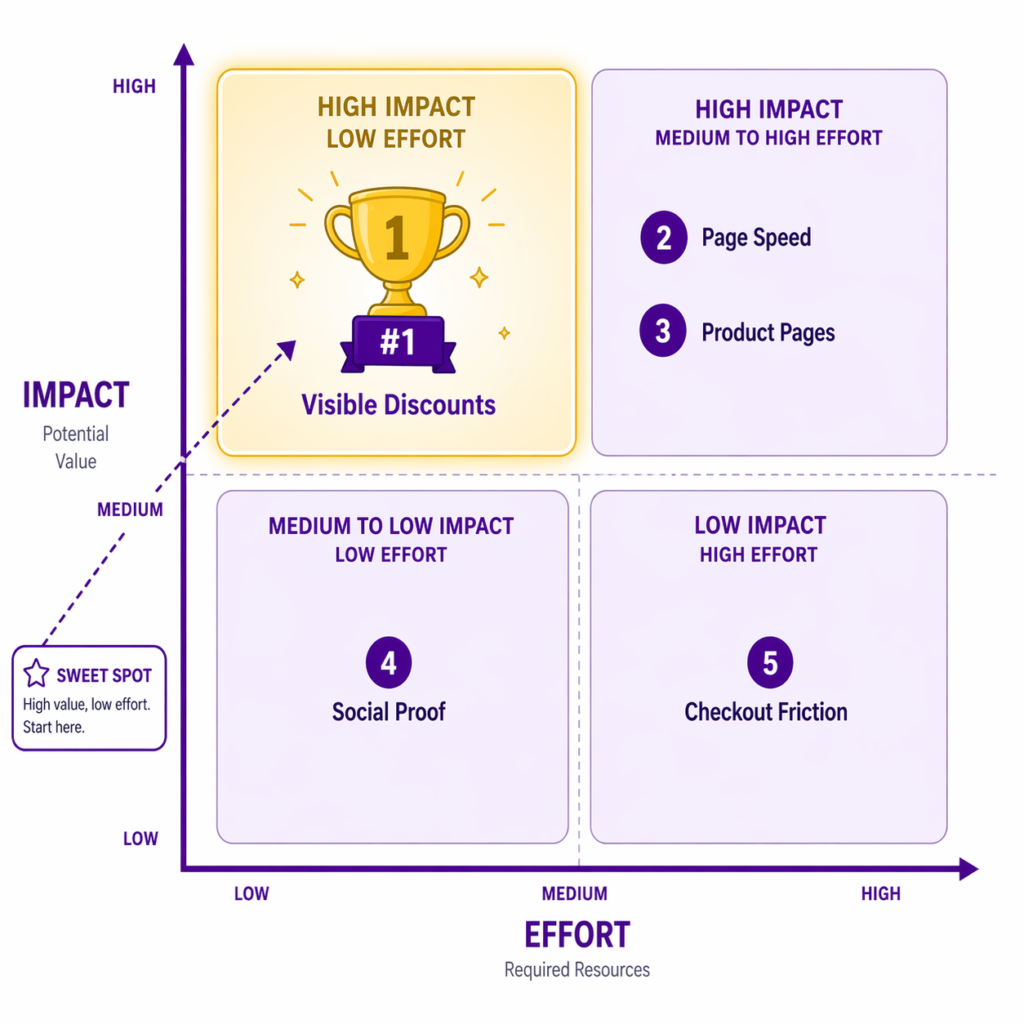
If you are starting CRO work, start with Tactic #1 (visible discounts). It is the highest-impact change you can make with the lowest effort. The math on this is consistent across categories. You can read how store revenue moves when you improve conversion without buying more traffic for the underlying logic.
Then move to Tactic #4 (product page optimization) and Tactic #5 (mobile optimization). These two are foundational. Everything else compounds on top of them.
Then layer in the others: social proof, cart optimization, urgency signals.
Most stores improve conversion by 20 to 40% by implementing tactics 1-4. The remaining tactics compound on top of that foundation.
Measuring CRO Impact
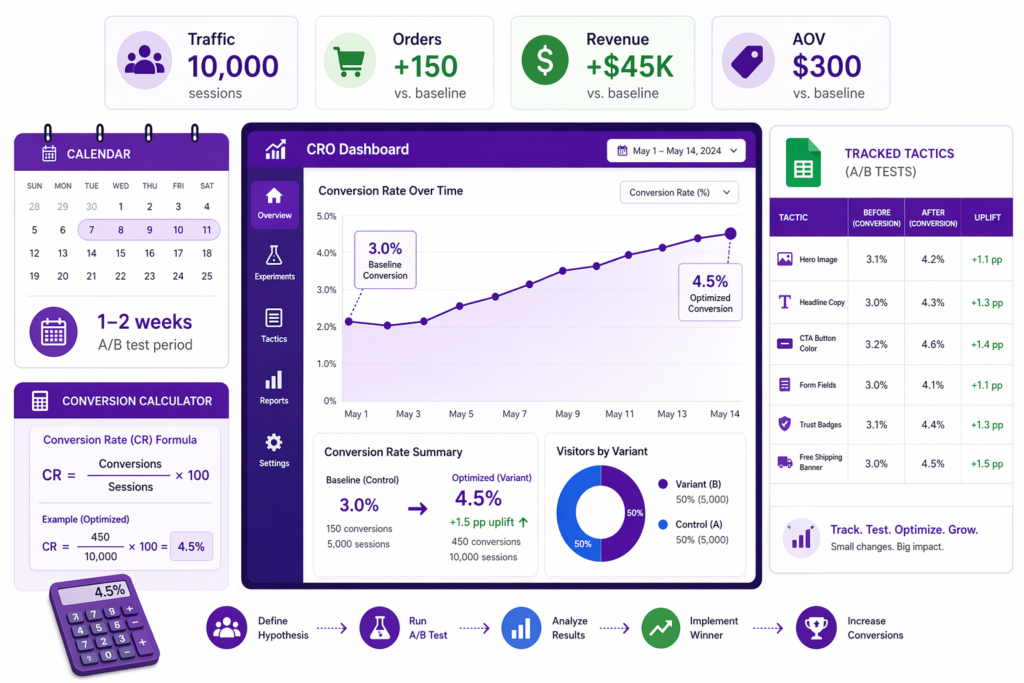
How to Track Each Shopify Conversion Rate Optimization 2026 Tactic
For each tactic you implement, measure:
- Baseline conversion rate before the change
- New conversion rate after the change (wait 1-2 weeks for statistical significance)
- Revenue impact: (new conversion rate minus baseline) × traffic × AOV = incremental revenue
Track all of this in a simple spreadsheet. Over a year, even a 1 to 2% improvement per tactic adds up to a 15 to 25% total conversion lift, which often means 50 to 100% revenue growth on the same traffic. Pair this with disciplined Shopify discount profit margin tracking and you can also confirm those revenue gains are actually flowing to the bottom line.
CRO does not exist in a vacuum. It is the conversion layer of your broader Shopify marketing strategy 2026 stack. The same visitor who saw your TikTok ad, opened your email, and clicked your Google search result is the one who hits this funnel. Every percentage point you improve here multiplies every dollar you spent getting them to the store.




