
Why Shopify Discounts Don’t Show Until Checkout (And How to Fix It)
Shopify's discount system was built with a checkout-first architecture. Learn the history of why, the business cost of this design, and three tiers of solutions to show discounts earlier.
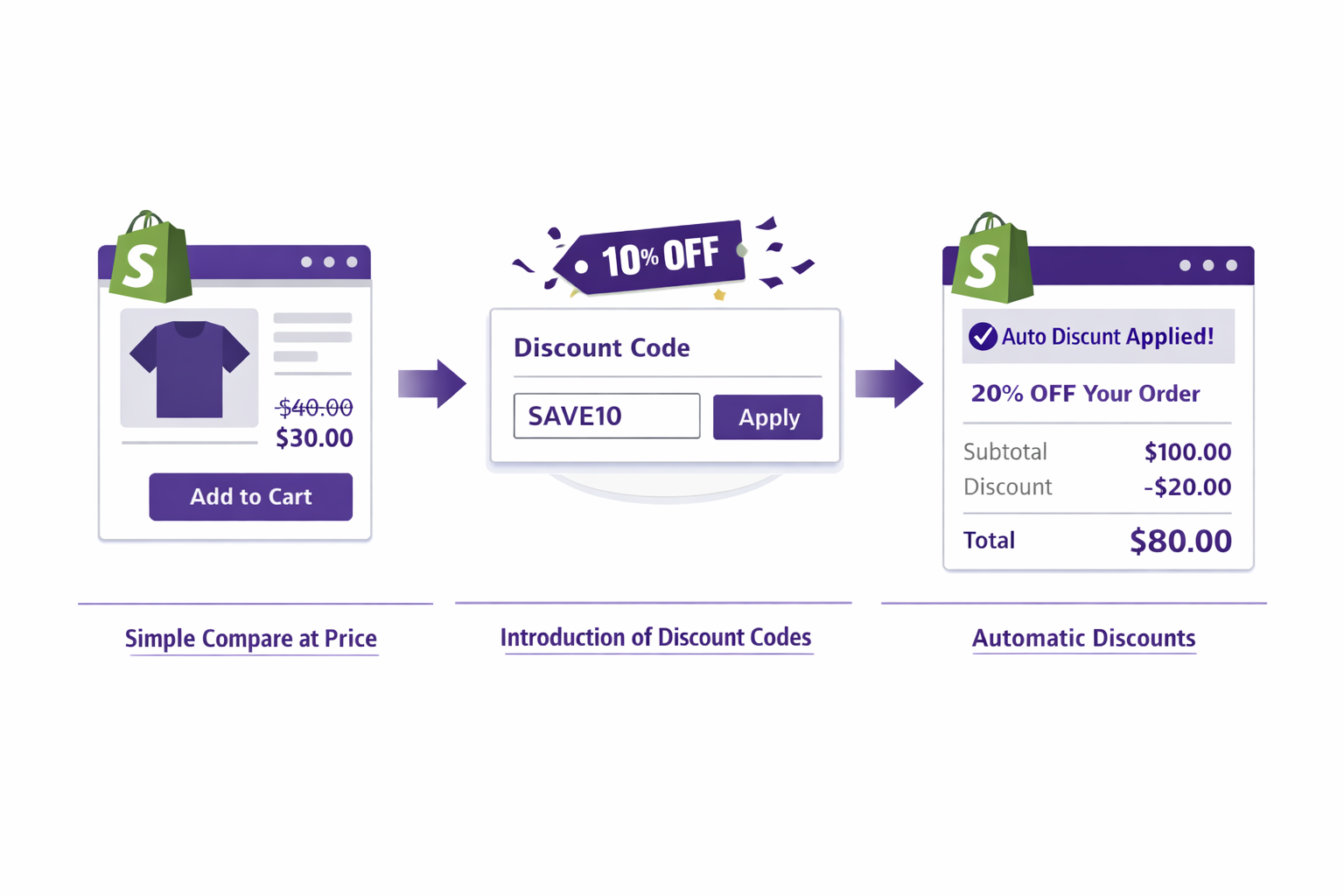
The Architecture: Why Shopify Built It This Way
To understand why Shopify discounts don’t show until checkout, we need to understand the architectural decision that led to it.
When Shopify was founded in 2006, e-commerce was simpler. Most stores had a handful of products and maybe one or two promotions running at a time. Discounts were simple: “20% off everything” or “Free shipping on orders over $50.”
Shopify’s architects made a key decision: store discounts separately from products. The product itself would have a price ($100). Discounts would be rules applied at a different layer (at checkout). This separation made the system simpler to build and maintain.
Here’s why that made sense then:
- Technical simplicity: Products are just data. Discounts are rules. Keep them separate and the system is modular.
- Accuracy: At checkout, the discount engine can evaluate all rules against the actual cart and apply the exact discount owed. No pre-calculation needed.
- Consistency: If discounts are calculated at checkout, every transaction goes through the same logic. Less room for bugs.
- Scalability: Discount rules can be complex (minimum purchase, specific collections, customer tags). It’s easier to evaluate these at checkout when you have all the cart data than to pre-calculate on product pages.
This made sense in 2006. It still makes sense for Shopify’s infrastructure. But it doesn’t make sense for your store’s conversion rate.
The Customer Journey Cost
Modern e-commerce is different. Modern shoppers visit multiple stores for every purchase. They’re comparison shopping. They’re evaluating prices.
When a shopper lands on your product page and sees a full price with no indication of a discount, they’re making an evaluation: “Is this a good price?” Their answer is often “I don’t know, let me check a competitor.”
They never reach checkout. They bounce. This aligns with typical cart abandonment behavior
Here’s real funnel data:
- 10,000 monthly visitors
- 5,400 reach product pages (54%)
- 950 add to cart (9.5%)
- 150 reach checkout (1.5%)
- 130 complete purchase (1.3%)
Of your 10,000 visitors, only 150 ever see your discount. 9,850 don’t.
Now assume your discount increases conversion from 1.3% to 1.4% among those who see it. That’s 16 additional orders. But you need those 150 people at checkout to see it. Getting there requires seeing the product page, adding to cart, and reaching checkout. Each step is a funnel leak.
If you showed the discount on the product page instead, you might convert some of those 5,400 product page visitors directly at the “add to cart” decision point. Say you convert even 0.5% of them directly due to visible savings. That’s 27 additional orders. 70% more than the checkout-only approach.
What This Costs You: Real Numbers
Let’s quantify it:
- Monthly visitors: 20,000
- Normal conversion rate at checkout: 2%
- Normal monthly revenue: 400 orders × $100 = $40,000
- Your discount: 15% off (converts at -$15 per order)
- Discounted revenue: 400 × $85 = $34,000
Now, assume showing the discount on product pages increases conversion by 10% (conservative). Conversion goes from 2% to 2.2%.
- New monthly orders: 440
- Revenue: 440 × $85 = $37,400
That’s $3,400 more per month, or $40,800 per year, from the same traffic. Just by making the discount visible earlier.
If you’re running a larger store with 100,000 monthly visitors, that becomes $200,000+ per year.
Why Shopify Hasn’t Fixed This
Why doesn’t Shopify just display discounts on product pages? A few reasons:
- It would require calculating discounts in two places – on product pages (pre-purchase) and at checkout (final). This is more complex.
- It would require keeping them in sync – if a discount changes mid-day, product pages and checkout need to update simultaneously. Race conditions are risky.
- Shopify Themes are partner-controlled – Shopify could add discount display to all Shopify themes, but that would require coordinating with theme partners to add the feature consistently.
- It’s out of Shopify’s core business – Shopify makes money when merchants sell more. But they also make money on transaction fees, so there’s no direct financial incentive to fix this. (Shopify charges 2.9% + $0.30 on each transaction.)
The result: Shopify has built excellent multi-channel discount infrastructure, but the UI to display discounts outside checkout remains incomplete. That’s where apps come in.
Three Tiers of Solutions
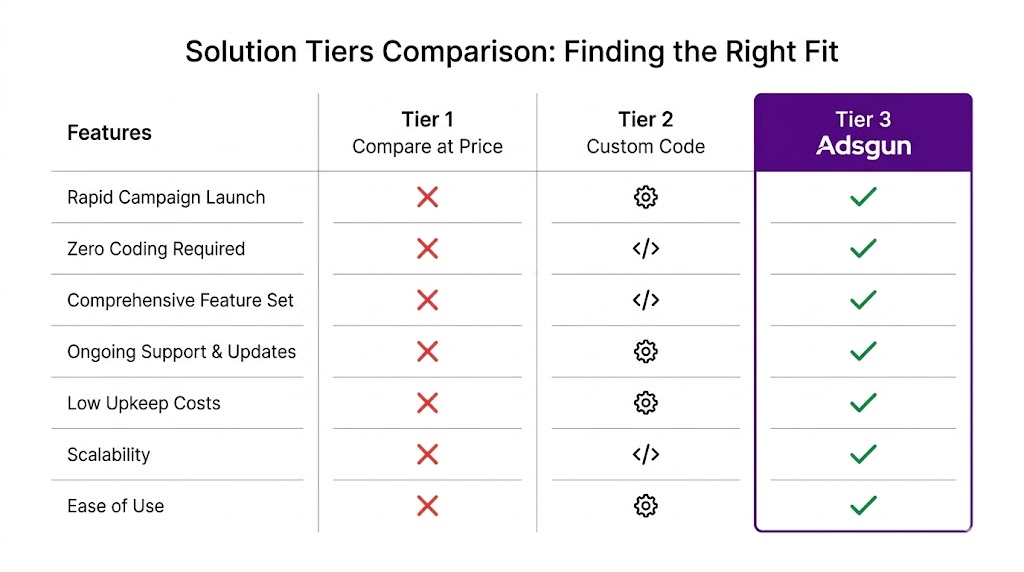
Tier 1: Compare at Price (The Native Workaround)
Use Shopify’s “compare at price” field to show a discount. Free. No app needed.
Pros:
- Free
- Built in to Shopify
- Shows on product pages and collections (depending on theme)
Cons:
- Manual updates required
- Doesn’t reflect real discounts (just a number you enter)
- Variant inconsistency issues
- Breaks analytics (no discount line item)
- Doesn’t work with automatic discounts
- Can’t express complex logic
Best for: Very simple stores with one static discount that never changes.
Cost to implement: Free, but costs you conversion due to inconsistency and lack of real-time updates.
Tier 2: Custom Theme Code (The Developer Solution)
Hire a developer to add Liquid code that displays discounts on product pages.
Pros:
- Connects to real Shopify discounts
- Can be customized for your theme
Cons:
- Expensive ($500-2000 for a developer)
- Fragile – breaks with theme updates
- Requires ongoing maintenance
- Not all discount types are easy to display via code
- Only works for theme pages (not mobile apps, not third-party channels)
Best for: Stores with developers on staff or large enough to justify the cost.
Cost to implement: $500-2000 upfront, plus ongoing maintenance.
Tier 3: Adsgun App (The Reliable Solution)
Install an app that reads Shopify discounts and displays them across your store.
Pros:
- No code required
- Works with all discount types
- Survives theme updates
- Real-time updates
- Works on all pages and channels
- Includes analytics and scheduler
- Multi-currency support
Cons:
- Monthly subscription ($19-249)
- Requires app installation
Best for: Most growing Shopify stores.
Cost to implement: Free trial, then $19-249/month depending on features.
The Comparison: Tier 1 vs. Tier 2 vs. Tier 3
If you run 1 static discount: Tier 1 (compare at price) is fine for now.
If you run multiple discounts or update frequently: Tier 1 breaks. Tier 2 or 3.
If you have a developer on staff: Tier 2 might be cheaper long-term.
If you don’t have a developer: Tier 3 is the clear choice. Compare at price becomes unmaintainable as you scale, and custom code breaks too often.
How Adsgun Works With Shopify’s Architecture
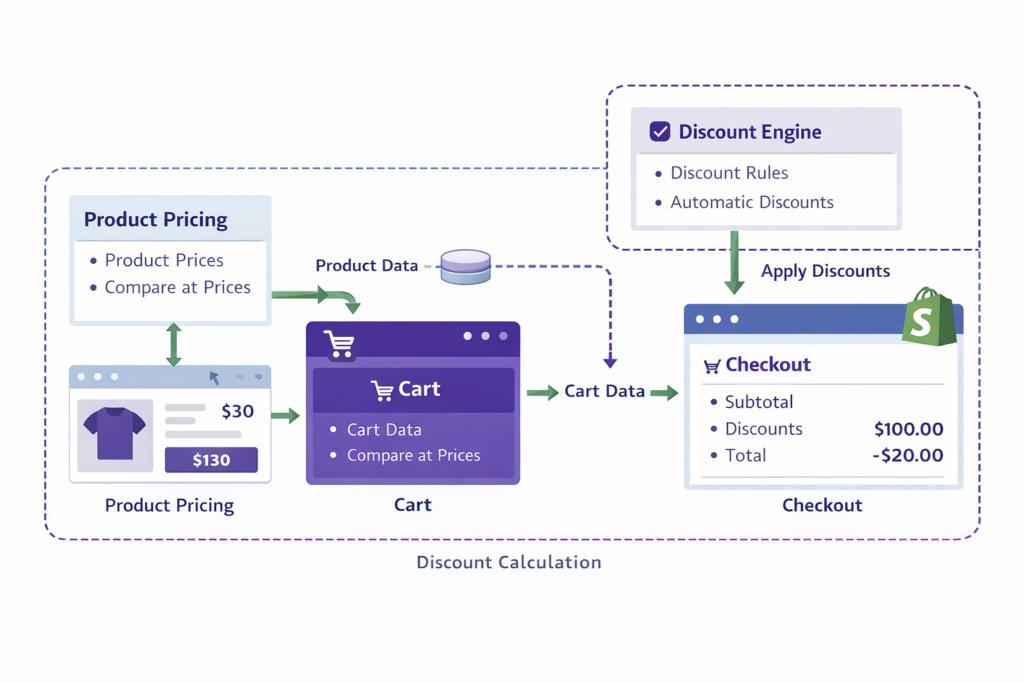
Adsgun doesn’t fight Shopify’s architecture, it works with it.
Shopify’s discount system evaluates discounts at checkout. Adsgun does the same thing, but on product pages. It pre-calculates what the discount will be at checkout and displays it early. Then when the customer reaches actual checkout, Shopify’s system applies the same discount.
This is elegant because:
- Adsgun doesn’t interfere with checkout. Checkout still works exactly as designed.
- The discount shown on product pages matches the discount at checkout. No discrepancy.
- It works with all discount types. Adsgun reads the discount engine just like checkout does.
- It’s future-proof. When Shopify updates discounts, Adsgun automatically adapts.
Ready to Fix This?
Your Shopify discounts are powerful. But if they’re only visible at checkout, you’re leaving revenue on the table. The fix is simple: show them earlier.
Try Adsgun free for 7 days. Display your discounts on product pages, collections, and cart. See how much revenue you’ve been leaving behind.
If your sale badge is missing on collections, see shopify sale badge not showing




