Shopify Bulk Discount Codes: Generate Unique Codes for Influencer & Email Campaigns
Learn how to generate Shopify bulk discount codes for Klaviyo email and influencer campaigns. Track unique codes per subscriber and prevent fraud.
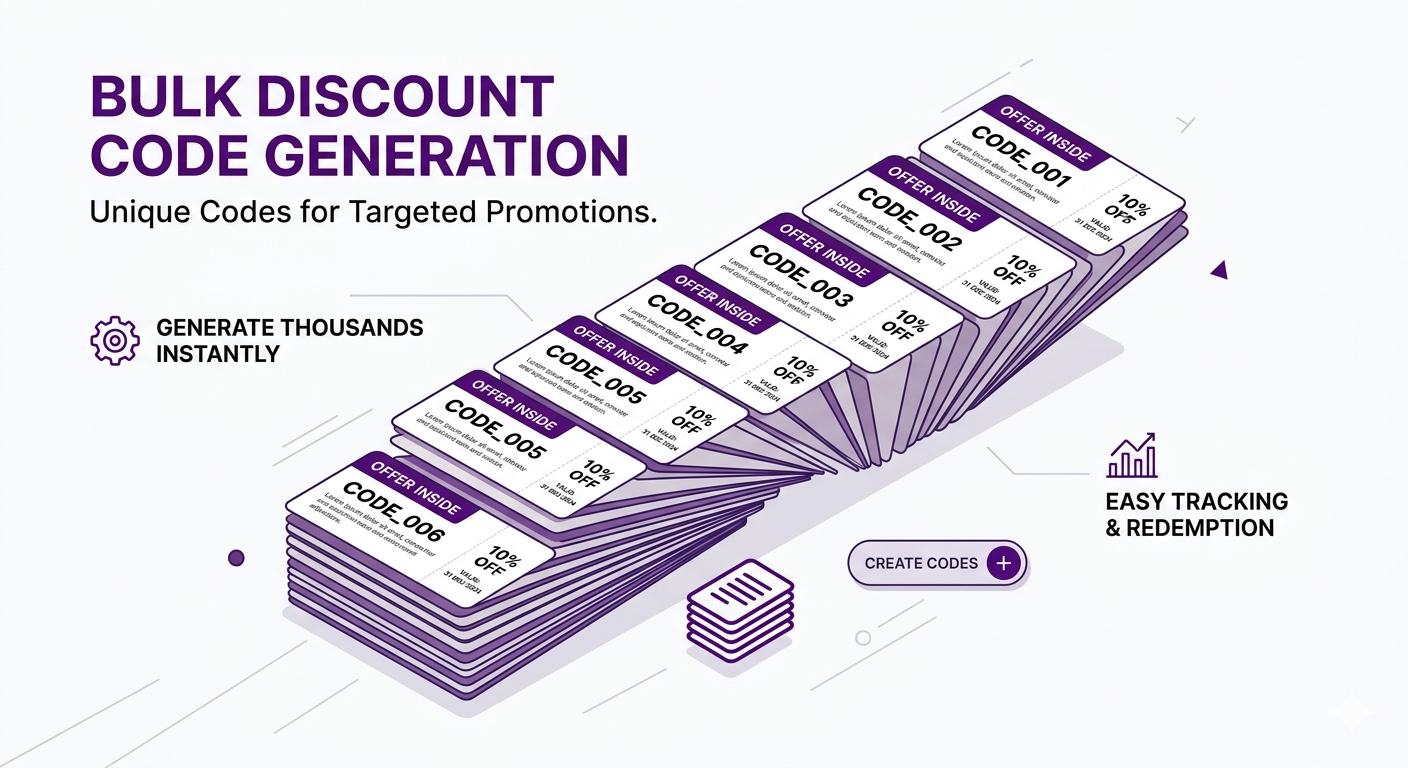
You’re running an email campaign to 10,000 subscribers. You’re using Klaviyo, which has a merge tag `{{discount_code}}` that inserts a unique code into each email. This is where Shopify bulk discount codes become essential, because each of your 10,000 subscribers needs a different code even though they’re all part of the same campaign.
This setup serves two purposes:
- Fraud prevention: If a subscriber shares their code with friends, you know one code is generating 5 uses across 1 subscriber’s household. That’s a signal of sharing or fraud, and you can rate-limit or monitor it.
- Attribution: You can see which subscriber’s code drove orders (did their friends buy?), and if the same code is reused across multiple orders (another fraud indicator).
But here’s the challenge: Shopify doesn’t natively support bulk code generation with unique codes. You’d have to manually create each code in Shopify admin: CODE_1, CODE_2, CODE_3, all the way to CODE_10000. That’s absurd.
Adsgun’s Bulk Discount Codes feature solves this. You define the promotion once and generate 10,000 unique codes in seconds.
When Shopify Bulk Discount Codes Matter Most
Shopify bulk discount codes unlock four high-impact marketing scenarios that are impossible (or painfully manual) with single shared codes. Each use case below shows a different way unique codes help you attribute revenue, reward loyalty, and catch fraud before it costs you.
Use Case 1: Email Marketing with Klaviyo, Omnisend, and Mailchimp
Email platforms support dynamic code insertion. Each subscriber sees a unique code in their email.
Example Klaviyo email:
“Hi {{first_name}}, here’s your exclusive 15% off code: {{discount_code}}”
Subscribers see:
- “Hi Sarah, here’s your exclusive 15% off code: SARAH_SUB_001”
- “Hi Mike, here’s your exclusive 15% off code: MIKE_SUB_002”
- etc.
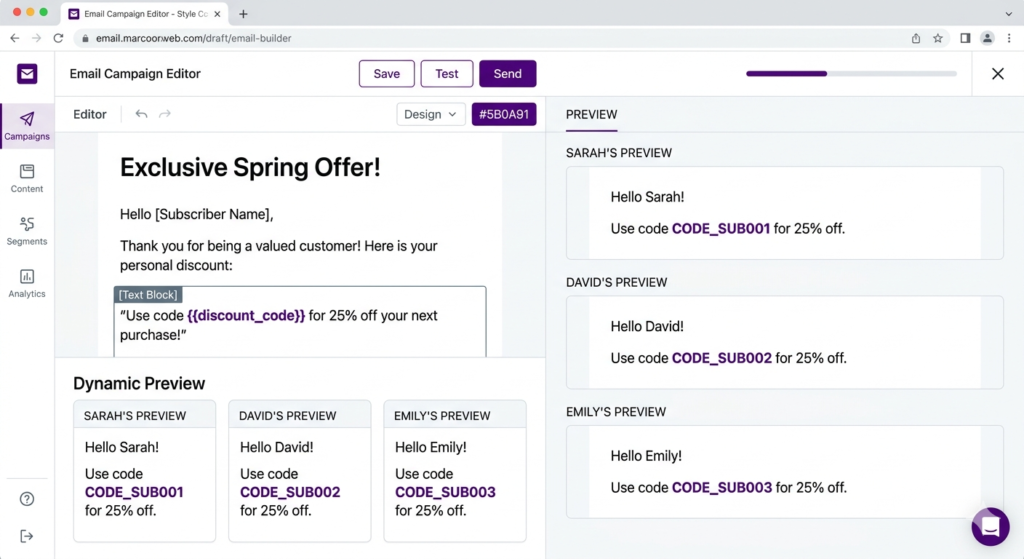
Shopify then tracks each code separately, so you see which subscriber’s code drove orders. For a deeper look at email platforms that integrate cleanly with unique codes, check our best email marketing for Shopify comparison.
Use Case 2: Influencer Partnerships With Per-Follower Tracking
You work with 50 influencers. Each influencer has 100 followers on average (5,000 total audience).
Instead of giving all followers the same code (INFLUENCER_DISCOUNT), you could: =
- Give Influencer 1 a batch of 100 codes (INFLUENCER1_001 through INFLUENCER1_100)
- Give Influencer 2 a different batch of 100 codes *
- And so on.
Now, if INFLUENCER1_042 generates an order, you know:
- It came from Influencer 1’s audience
- Specifically from their follower #42
- You can track repeat purchases from that follower, offer exclusive perks to loyal followers, and more.
If your main goal is attribution at the influencer level, our guide on how to track which influencer drove sales on Shopify walks through the full attribution setup.
Use Case 3: Referral Programs
You have 500 customers in a referral program. Each customer gets a unique referral code.
- Customer A’s referral code: REFERRAL_JOHN_001
- Customer B’s referral code: REFERRAL_JANE_002
When their friends use their code, you track it. John referred 3 people; Jane referred 1. You reward John accordingly.
Use Case 4: Affiliate Networks
You have 200 affiliates. Each gets a unique code.
- Affiliate 1: AFFILIATE_001
- Affiliate 2: AFFILIATE_002
You track revenue per affiliate, calculate commissions, and optimize partnerships based on performance.
How Adsgun Generates Shopify Bulk Discount Codes
Step 1: Create a Promotion
Define the discount (for example, 15% off, free shipping). Name it “Email Campaign 15% Off.”
Step 2: Access Bulk Code Generator
In Adsgun, go to the Bulk Codes or Generate Codes section within the promotion.
Step 3: Specify How Many Codes
Enter a number: 10000 (or however many you need).
Step 4: Choose Naming Convention
- Option A: Auto-generated – Adsgun creates: CODE_001, CODE_002, … CODE_10000
- Option B: Custom prefix – You type a prefix (e.g., “CAMPAIGN_SPRING”), and Adsgun creates: CAMPAIGN_SPRING_001, CAMPAIGN_SPRING_002, etc.
- Option C: Upload list – You provide a list of names (customer names, influencer names), and Adsgun generates: JOHN_001, JANE_002, etc.
Choose based on your use case.
Step 5: Generate
Adsgun generates all codes instantly, or within seconds for very large batches.
Step 6: Export
Download the codes as a CSV file. Contains two columns:
- Code (e.g., CAMPAIGN_SPRING_001)
- (Optional) Use Count (initially all zero)
Step 7: Import to Email or Distribution System
For Klaviyo:
- Go to your Klaviyo account
- Create a custom property called
discount_code - Upload the CSV with subscriber email addresses + their unique code
- In your email template, use
{{discount_code}}merge tag
Each subscriber automatically sees their unique code. (Klaviyo also supports dynamic unique coupons natively, which you can read about in their unique coupon codes documentation)
Step-by-Step: Shopify Bulk Discount Codes for an Email Campaign
Scenario: “Spring Sale 20% Off” Email Campaign (10,000 subscribers)
Step 1: In Adsgun, Create Promotion
- Open Adsgun
- Click Create New Promotion
- Name: “Spring Sale 20% Off (Email)”
- Discount: 20% off all products
- Save (but don’t publish yet)
Step 2: Generate Bulk Codes
- In the promotion, click Bulk Codes or Generate Codes
- Specify count: 10000
- Choose naming: Custom prefix → “SPRING_SALE”
- Adsgun generates: SPRING_SALE_0001, SPRING_SALE_0002, …, SPRING_SALE_10000
- Download as CSV
Step 3: Prepare Your Email List
In a spreadsheet, you have:
- Column A: Subscriber email (sarah@email.com, mike@email.com, etc.)
- Column B: (empty)
Add the generated codes so Column B becomes:
- sarah@email.com | SPRING_SALE_0001
- mike@email.com | SPRING_SALE_0002
- etc.
Save as CSV.
Step 4: Upload to Klaviyo
- In Klaviyo, go to your email list
- Click Manage Profiles
- Upload your CSV with email + discount_code columns
- Klaviyo matches emails and assigns codes
Step 5: Create Email Template
In Klaviyo, draft your email:
Subject: “Spring Sale: 20% Off With Your Personal Code”
Body:
“Hi {{first_name}},
We’re running a Spring Sale: 20% off everything, sitewide.
Your personal code: {{discount_code}}
Enter it at checkout or [click here to auto-apply].”
Step 6: Publish and Send
Klaviyo sends the email. Each subscriber receives their unique code (SPRING_SALE_0001, SPRING_SALE_0002, etc.).
Step 7: Track in Shopify
In Shopify admin, go to Discounts, then view the “Spring Sale 20% Off (Email)” discount.
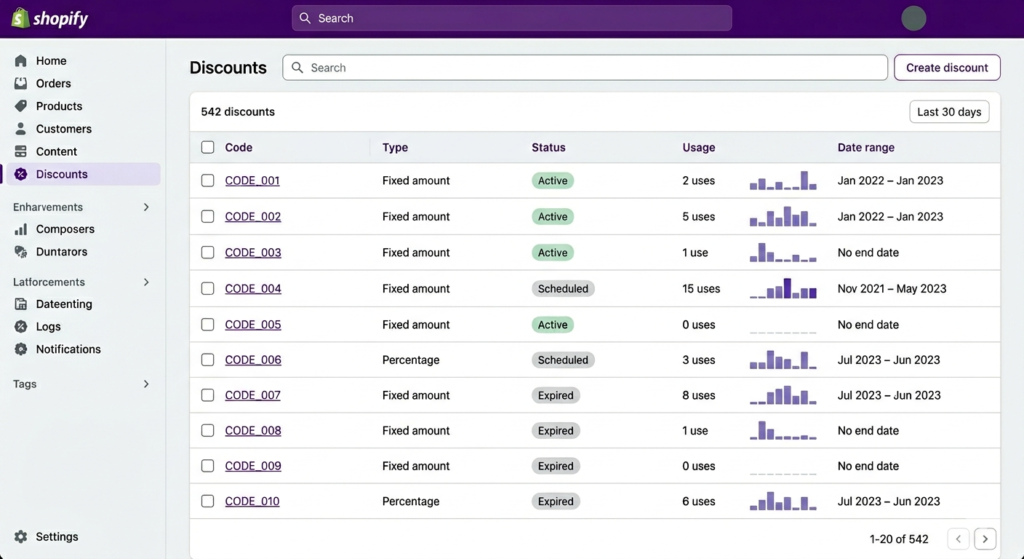
You’ll see usage per code:
- SPRING_SALE_0001: 2 orders, $180 revenue
- SPRING_SALE_0002: 1 order, $75 revenue
- SPRING_SALE_0003: 0 orders
- etc.
Now you can see which subscriber codes drove the most revenue.
Combining Bulk Codes With Influencer Campaigns
For influencer campaigns, the setup is similar but with a twist:
Setup:
- Create promotion: “Summer Influencer Campaign 20% Off”
- Generate bulk codes with influencer names:
- 100 codes for Influencer A: INFLUENCER_A_001 through INFLUENCER_A_100
- 100 codes for Influencer B: INFLUENCER_B_001 through INFLUENCER_B_100
- 100 codes for Influencer C: INFLUENCER_C_001 through INFLUENCER_C_100
- Distribute to influencers:
- Send Influencer A their 100 codes (ask them to share with followers or use codes as tickets for a giveaway)
- Same for B and C
- Track performance:
- See which influencer’s codes generated the most orders
- See total revenue per influencer
- Calculate ROI (influencer payment vs. revenue generated)
This is more powerful than giving each influencer one shared code, because you can track:
- How many of Influencer A’s followers actually used a code
- If followers are using multiple codes (fraud detection)
- Repeat purchase patterns per influencer
If you’re running several parallel promos, you may also want to read how to run different promotions for different ad campaigns without stepping on your own attribution.
Fraud Prevention With Unique Codes
Unique codes have built-in fraud detection:
Scenario: You generate 10,000 codes and email them to 10,000 subscribers. You notice:
- SPRING_SALE_0042: Used 47 times in 24 hours
- All from different IP addresses
- All for high-value orders ($200+)
Conclusion: Subscriber 42 shared or sold their code. Someone is using it to make fraudulent bulk purchases.
Action: You can:
- Rate-limit that code to 1 use per customer
- Flag the orders for review
- Reach out to the subscriber
With a shared code, you’d have no way to know which subscriber leaked it.
One-Use-Per-Customer Limits on Shopify Bulk Discount Codes
When generating bulk codes, you can set limits:
- One-use per code: Each code works once, period. Then it expires.
- One-use per customer per code: A customer can use the code once. But if they log out and log back in, they can’t reuse it.
- Unlimited: The code works indefinitely (useful for ongoing referral programs).
For email campaigns, one-use-per-code is common to prevent sharing.
FAQ: Bulk Discount Codes
Q: Can I generate 100,000 codes?
A: Yes. Adsgun can generate thousands of codes. There’s no practical limit.
Q: Do I need to manually create all codes in Shopify first?
A: No. Adsgun generates them directly as part of the promotion. No manual work.
Q: Can I export the codes for external tracking?
A: Yes. Download the codes as CSV and track them in your own systems, or use Shopify’s built-in discount analytics.
Q: What if I generate 10,000 codes but only use 8,000?
A: No problem. Unused codes simply never activate. No waste.
Q: Can I track which customer used which code?
A: Yes. In Shopify, you see orders with discount codes applied. You can filter by code to see all orders from a specific code.
Ready to Generate Bulk Codes at Scale?
Bulk unique codes enable sophisticated attribution, fraud prevention, and personalization. They’re especially powerful for email and influencer marketing.
With Adsgun’s bulk code generator, creating 10,000 codes takes seconds. No manual work. No errors.
Start your free 7-day trial and generate your first batch of bulk codes today. No credit card required.