
Shopify Flash Sale Guide: How to Create Urgency That Actually Converts
A Shopify flash sale without visible pricing is just a timer. Learn the psychology behind urgency, the seven elements every high-converting flash sale needs, and how to set the whole thing up in under an hour.
Shopify Flash Sale: Setup, Psychology, and Urgency That Converts
A Shopify flash sale without visible pricing is just a timer. Visible strike-through pricing combined with a countdown and limited stock messaging is the trinity of urgency. This guide breaks down each element and shows you exactly how to set it up.
What Makes a Shopify Flash Sale Psychologically Effective
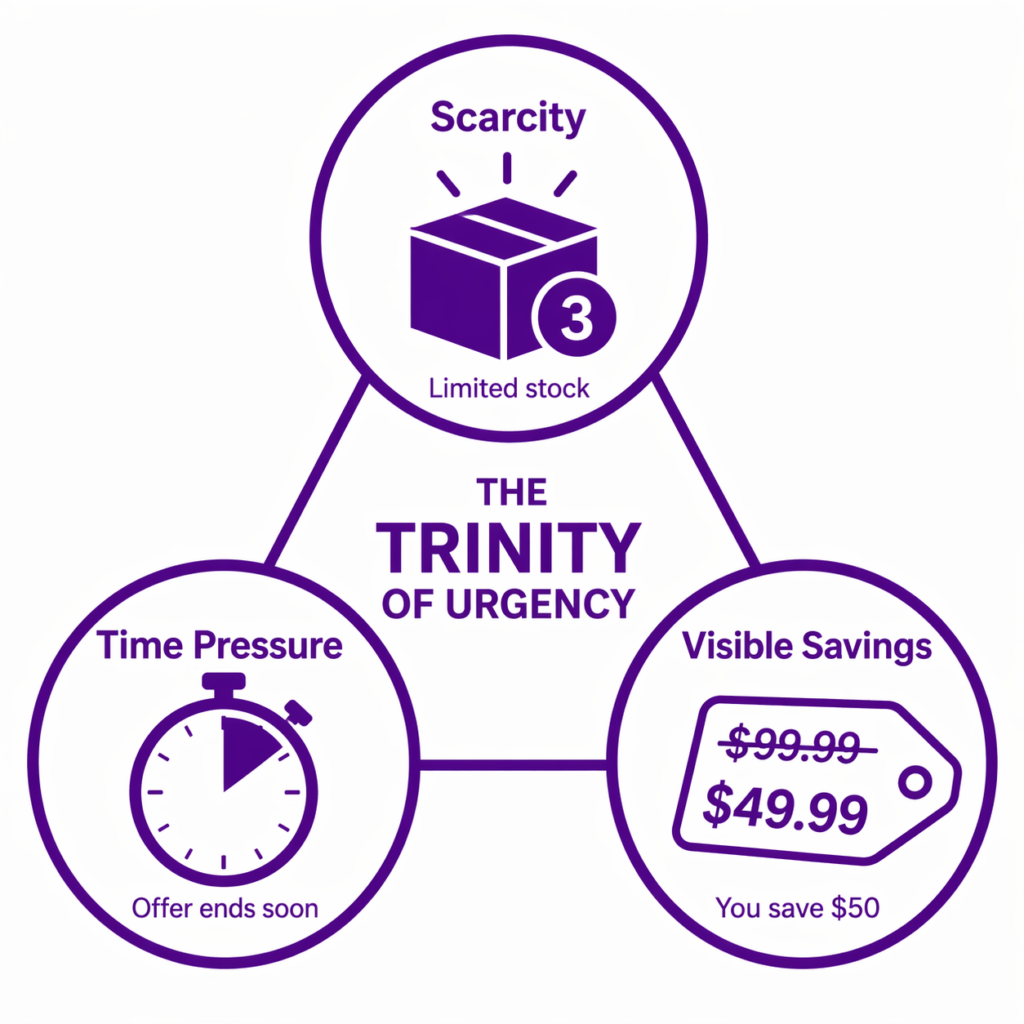
A flash sale is a limited-time, usually deeper-discount offer designed to create urgency. The psychology behind it comes down to four forces:
Scarcity. “This deal ends in 12 hours” makes the customer feel they might miss out. That perceived loss is a more powerful motivator than any potential gain.
Time pressure. A countdown clock triggers loss aversion. Customers are significantly more likely to buy when they feel they might lose the opportunity. Research shows that countdown timers on product pages increase same-session conversion rates by 8 to 18%.
Savings visibility. When a customer sees “$50, was $62.50, you save $12.50,” the concrete dollar amount is more powerful than “25% off.” They know exactly what they are getting without doing any mental math.
Social proof. When others are visibly buying, through real-time purchase notifications, the urgency compounds. One A/B test found that adding social proof badges alongside a countdown timer lifted conversion by 22% in seven days.
When all three are present, scarcity, time pressure, and visible savings, conversion typically increases 20 to 50% over baseline. When any one is missing, the effect drops significantly.
The Most Common Flash Sale Mistake
Most Shopify stores make the same error: they announce a flash sale, set the discount code, run ads, and the prices on the product pages do not change.
The customer clicks an ad that says “25% Off Flash Sale.” They land on the store. They see a product at $50. No discount visible, no strike-through, no “save $12.50” message.
They do not feel the urgency because they do not see the saving.
Maybe they add to cart. They navigate to checkout. Only then do they see the discount applied and realize they were getting a deal.
By then, many have already bounced. The urgency has evaporated.
The fix is straightforward: display the discount on product pages and collections, not just at checkout. This single change increases flash sale conversion by 15 to 30% because the customer feels the deal from the first click. For a deeper look at why Shopify hides discounts until checkout by default, see why Shopify discounts don’t show until checkout and how to fix it.
The Anatomy of a Perfect Shopify Flash Sale
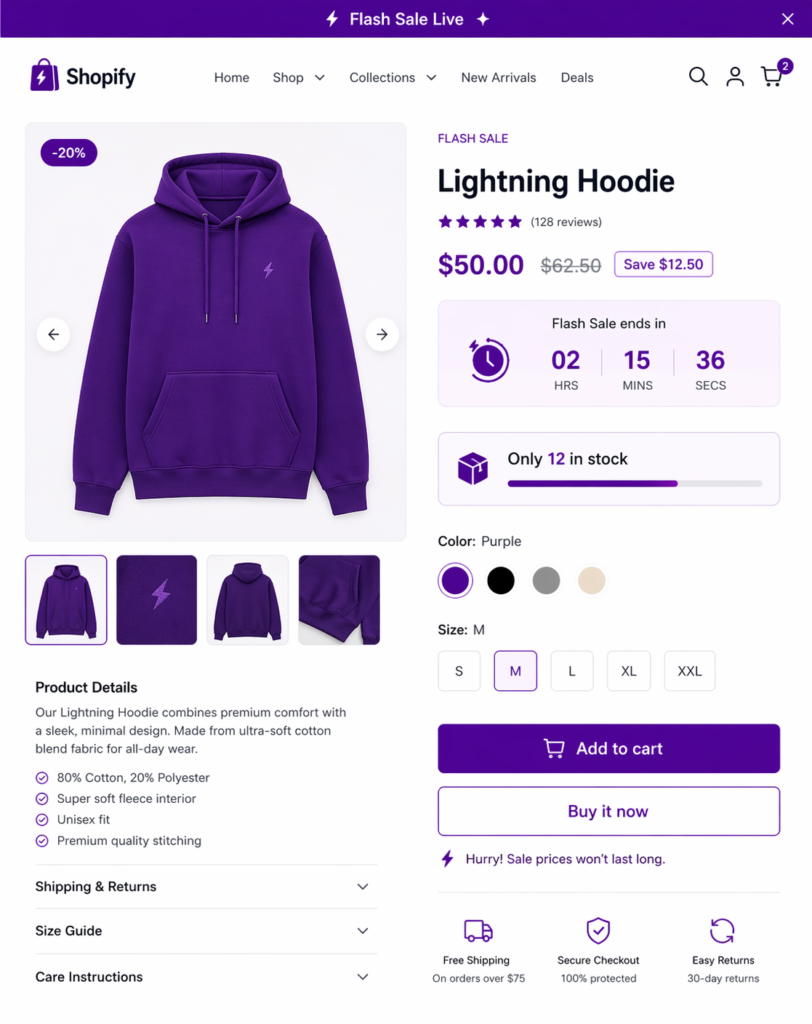
A high-converting flash sale has seven components working together.
1. Visible Strike-Through Pricing Everywhere
Product pages: $50, was $62.50, Save $12.50. Collection pages: same. Cart: same. Checkout: applied as a discount line.
The customer sees the savings at every step. This redundancy is intentional because buying decisions do not happen at a single touchpoint. For a complete breakdown of how to show strike-through pricing across your store, see how to show strike-through pricing for Shopify discount codes.
2. Countdown Clock
Place a countdown timer on product pages, the cart page, and checkout. “Sale ends in 8 hours 23 minutes.”
A real-time countdown creates urgency that a text message simply cannot replicate.
3. Announcement Bar
Top of the site: “Flash Sale Live: 25% Off Everything — Ends Tonight at Midnight.” Use a high-contrast color. Make it impossible to miss.
Adsgun shows and hides the announcement bar automatically based on the promotion schedule. When the flash sale is active, the bar appears. When it ends, the bar disappears without any manual work.
4. Limited Stock Messaging
If you have inventory limits, show them: “Only 12 in stock — 8 already claimed.”
This is a secondary urgency driver. Not every product needs this; use it on bestsellers or products with genuinely limited inventory.
5. Email Announcement
When the flash sale goes live, send an email immediately: “Flash Sale Alert: 25% Off Everything — 24 Hours Only.”
Include a direct auto-apply link to the sale. For a full breakdown of how to structure that email, see the Shopify email discount strategy guide.
6. Clear End Time
“Sale ends December 5 at midnight EST.”
Specific, no ambiguity. Customers know exactly when it is over. Vague end times kill urgency.
7. Real-Time Social Proof
Optional but powerful: show real-time purchase notifications. “Sarah just bought the Summer Tee — Save $12.50.”
This triggers FOMO and shows active buying behavior, which reinforces that the deal is real and others are acting on it.
Step-by-Step: Setting Up a Shopify Flash Sale With Adsgun
Let’s set up a 24-hour flash sale: Saturday at 6pm to Sunday at midnight, 30% off everything.
Step 1: Create the Promotion
- Open Adsgun in your Shopify admin
- Click “Create Promotion”
- Name it: “Weekend Flash Sale”
- Set the discount: 30% off
- Visibility: Public (everyone sees it)
- Channels: Product pages, collections, cart, checkout (all enabled)
Step 2: Configure the Scheduler
- Click “Add Schedule”
- Choose “One-Time Schedule” (not recurring; this is a specific weekend)
- Select the date and start time: Saturday at 6:00pm
- Select the end time: Sunday at 11:59pm
- Timezone: Your store’s timezone
- Save
The Adsgun promotion scheduler handles activation and deactivation automatically with no manual work.
Step 3: Configure Announcement Bar
- In Adsgun, under “Announcement Bar,” enable it
- Set the text: “24-Hour Flash Sale: 30% Off Everything — Ends Tomorrow at Midnight”
- Set the color: Bold purple or red
- Position: Top of page
- Save
The announcement bar automatically shows during the flash sale window and hides when it ends.
Step 4: Communicate
- Email subscribers: Send 2-3 hours before the sale starts. “Flash sale goes live in 2 hours! Get ready.”
- Social media: Post on Instagram, TikTok, Facebook. “Flash sale live now.”
- Ads: Run retargeting ads to warm traffic. “Don’t miss the flash sale.”
Step 5: Launch
- Publish the promotion
- Confirm Adsgun is active on your store
- At the scheduled time, the promotion automatically activates (no manual work)
- Adsgun displays strike-through pricing everywhere
- Announcement bar appears
- Discounts apply in real-time
Step 6: Monitor
Monitor in real-time:
- Product page conversion rates
- Cart abandonment rate
- Average order value
- Total revenue
If you see a spike in any of these, the flash sale is working.
Step 7: Automatic Closeout
At the end time (Sunday midnight), Adsgun automatically deactivates the promotion:
- Strike-through pricing disappears
- Announcement bar disappears
- Prices revert to normal
- Discounts no longer apply
No manual work. The system handles it.
Multi-Channel Flash Sale: One Promotion, Different Links
A flash sale’s reach multiplies when distributed across channels. Use the same 30% promotion across all of them:
- Email: Send to your subscriber list with an auto-apply link.
- Instagram Stories: Link in bio or swipe-up to the sale.
- TikTok: Link in bio.
- Google Ads: Flash sale ads pointing to your product page with strike-through pricing visible.
- Facebook Ads: Same.
- SMS: Text subscribers with a link.
- Organic Social: Post on feed with the link.
All channels drive traffic to the same promotion. All visitors see the same 30% discount displayed the same way. Analytics then show which channel drove the most traffic, conversions, and revenue, so you know where to invest next time.
Advanced: Flash Sales Based on Product Performance
You can run flash sales on specific categories or products to target outcomes:
Inventory-Clearing Flash Sale. Products over 90 days old get 40% off for 12 hours. New inventory gets 10% off. This clears old stock while protecting new product margins.
Bestseller Flash Sale. Your top 10 bestsellers get 35% off for 24 hours to drive volume and generate social proof.
Underperforming Category Flash Sale. If your “Accessories” category averages low conversion, run a 25% off flash sale on accessories only to boost visibility and test demand.
Each uses the same Adsgun setup. You simply define which products the promotion applies to in the promotion settings.
Common Flash Sale Mistakes to Avoid
Mistake 1: Running flash sales too frequently. If you run a flash sale every week, they stop feeling special. Customers learn to wait for the next one. Research suggests the most successful ecommerce stores run 4 to 6 major flash sales per year, with at least 2 to 4 weeks between each one. More frequent than that and the training effect kicks in: urgency declines by roughly 20% with each additional sale.
Mistake 2: Discounts that are not deep enough. A 5% flash sale does not feel urgent. 20 to 30% is the minimum to genuinely shift buyer behavior. Go to 35 to 40% if you want rapid inventory movement.
Mistake 3: No time limit. “Flash sale until stock runs out” is not urgent. “Flash sale for 12 hours” is. Always set a specific end time, even if inventory is not actually limited.
Mistake 4: Not announcing the sale. Email, social, and paid ads are all required. Organic discovery alone is not enough to make a flash sale perform.
Mistake 5: Forgetting to turn off the promotion. If your flash sale is supposed to end Sunday at midnight but is still active Monday morning, your credibility takes a hit. Use Adsgun’s promotion scheduler to automate the end time and eliminate this risk entirely.
The Psychology of What Happens After
After a flash sale ends, expect a brief dip in conversions the next day. This is normal. Customers bought during the sale window. Now they are in a waiting mode.
To avoid training customers to perpetually wait for discounts, run flash sales with intention rather than arbitrarily:
- Weekly flash sales (same day and time): Customers come to expect it. “Flash sale is Friday at 6pm.” Consistency builds habit without destroying urgency.
- Seasonal flash sales: Black Friday, holiday season, summer sale. Anchored to seasons, not random dates.
- Occasional surprise flash sales: A random 24-hour sale announced with no warning creates genuine buzz and feels exclusive. Keep these infrequent so they still land.
A mix of predictable and surprising keeps customers engaged without training them to wait indefinitely.
Flash Sales as a Customer Acquisition Tool
Flash sales are one of the most cost-effective ways to acquire new customers.
New customers tend to be price-sensitive. A flash sale ad, “30% Off This Weekend,” attracts shoppers who may never have heard of your brand but are motivated by the deal.
The goal is straightforward: acquire them at a discount, then retain them through email marketing and loyalty programs at full margins. The math typically works in your favor:
New customer acquisition cost via flash sale ad: $25. Flash sale purchase value: $80 versus $100 regular price. Margin impact: $20. Break-even: that customer needs to spend $100 more in the next 6 months.
With consistent email retention, most new customers do cross that threshold. The flash sale acquisition pays off over the customer’s lifetime.
Run Your Next Shopify Flash Sale With Precision
A flash sale is a short, intense event designed to create urgency and move volume. The difference between a forgettable flash sale and one that actually converts is how visible the discount is throughout the entire funnel.
Strike-through pricing on product pages, collections, and cart turns a time-limited offer into genuine, felt urgency. Customers feel the deal from the first click, not just at checkout.
Set it up once in Adsgun, let the promotion scheduler handle the timing, and your conversion rates take care of themselves.




