
Why Your Shopify Gross Revenue Looks Wrong (It’s Your Compare at Price)
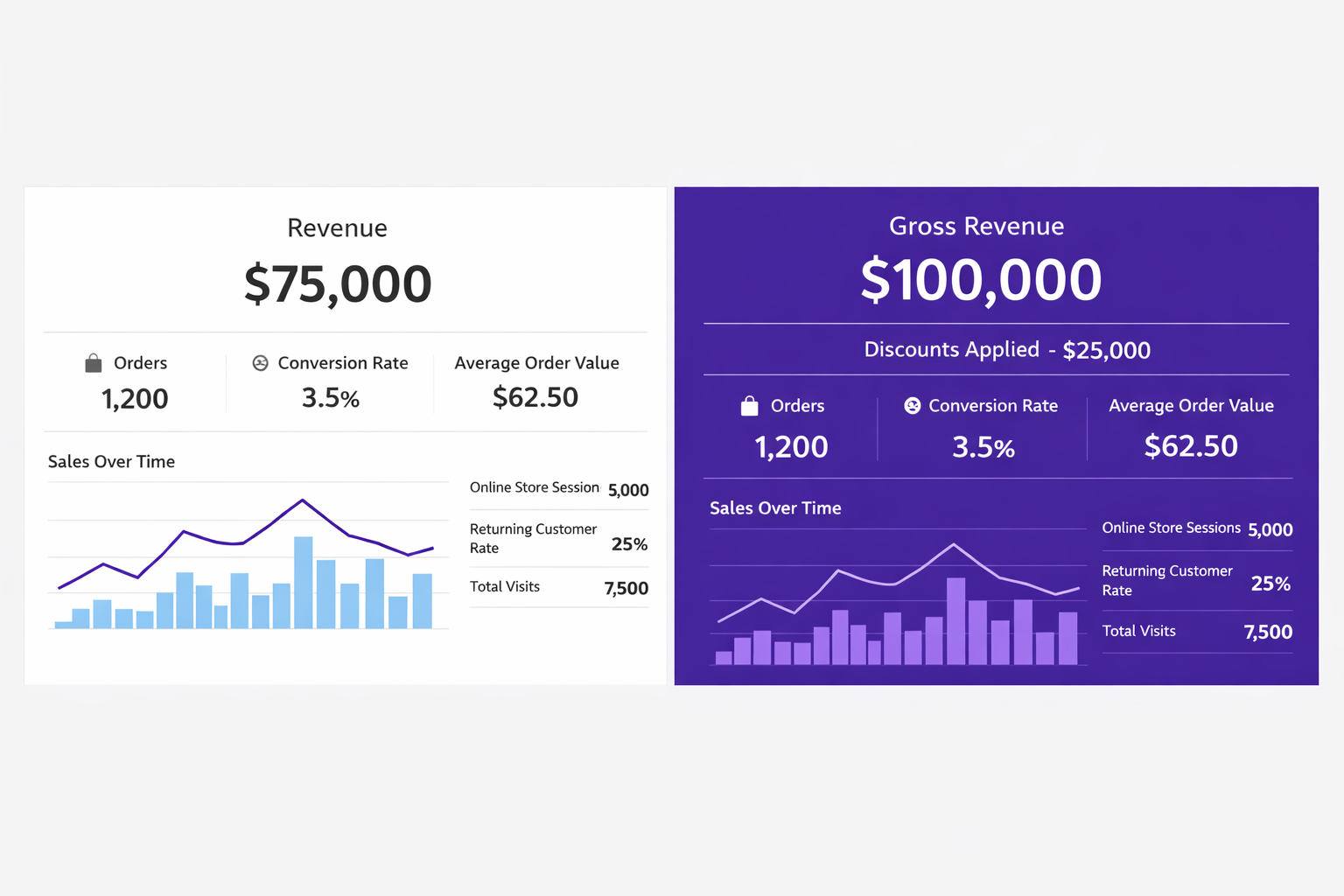
When you use compare at price instead of real Shopify discounts, your analytics show $75K revenue instead of $100K gross with $25K discounts tracked. This breaks your financial reporting and makes discounts invisible in analytics.
The Real Reason Your Shopify Gross Revenue Is Wrong
You’ve been using compare at price to show discounts on your Shopify store. It’s simple, it’s free, and it looks fine on your product pages. But if your Shopify gross revenue is wrong, this setup might be the reason, breaking your financial reports in a way that will hurt you when you scale.
Here’s what’s happening behind the scenes:
Correct accounting (with real Shopify discounts):
- Gross revenue: $100,000
- Discounts applied: -$25,000
- Net revenue: $75,000
Your accounting (with compare at price):
- Gross revenue: $75,000
- Discounts applied: -$0
- Net revenue: $75,000
The net number is the same, but the structure is completely different. And that difference causes problems.
The Scale Problem: When Shopify Gross Revenue Is Wrong
Let’s say you sell 1,000 units per month at a $100 list price. You run a 25% discount. Over a month, you’re selling these at $75. This is exactly where Shopify gross revenue wrong reporting becomes visible at scale.
If you use real Shopify discounts:
Your Shopify analytics report shows:
- Gross revenue: $100,000 (1,000 units × $100 list price)
- Discounts applied: -$25,000 (1,000 units × $25 discount)
- Net revenue: $75,000 (what you actually received)
If you use compare at price:
You set compare at price to $100 and selling price to $75 on each product. Shopify records each sale at the selling price.
Your Shopify analytics report shows:
- Gross revenue: $75,000 (1,000 units × $75 selling price)
- Discounts applied: -$0 (Shopify doesn’t record a discount)
- Net revenue: $75,000
The net number matches. But the gross revenue is wrong by $25,000.
Why This Matters
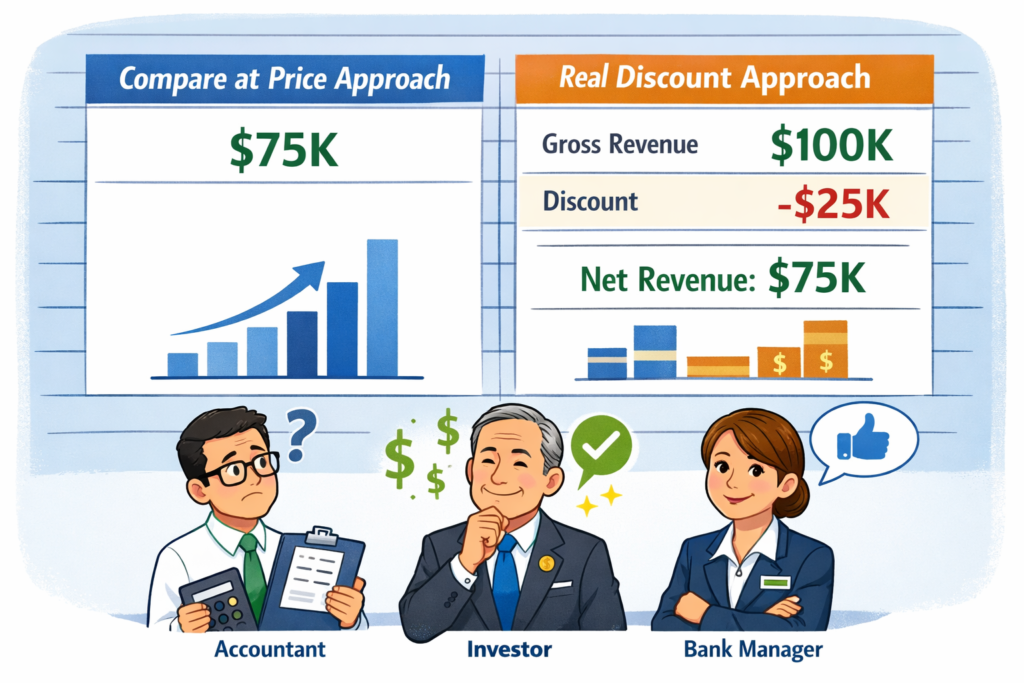
If your Shopify gross revenue is wrong, the difference might feel small at first, especially if you’re a $100K/year store. But as you scale, it breaks several things:
1. You Can’t Measure ROI When Shopify Gross Revenue Is Wrong
With real discounts, you can see: “We applied $25,000 in discounts and made $75,000 in net revenue. That’s a 3x return on our promotional spend.”
With compare at price, you can’t measure anything. You don’t know if your “discounts” are working. You just see revenue. Are people buying more units at the discounted price, or fewer units? You can’t tell. You might be losing money on your promotion and not realize it.
2. Your Financial Reports Are Wrong When Shopify Gross Revenue Is Incorrect
When you show investors, accountants, or bank lenders your Shopify analytics, compare at price makes your revenue look lower than it is.
- Actual gross revenue: $100,000
- Reported gross revenue: $75,000
To anyone looking at your books, you’re a $75K/year business. You’re not getting credit for the $25K in gross sales that you discounted. If you’re raising funding or applying for a line of credit, this hurts you.
3. You Can’t Isolate Product Performance
Let’s say you sell 10 products. Nine use real Shopify discounts, one uses compare at price.
In your Shopify an
al
ytics, nine products will show a discount line item (“Applied: -$500”), and one will show nothing. You’ll think one product is more profitable (because it has no discount line), but it’s actually just tracking wrong.
You can’t make good inventory or pricing decisions when your data is inconsistent across products.
4. Tax & Accounting Gets Complicated
If you’re calculating sales tax, recording sales for tax purposes, or working with an accountant, wrong gross revenue is a mess. This is another reason why Shopify gross revenue wrong data leads to serious accounting issues over time.
Compare at price makes your gross revenue ambiguous. An accountant needs to know: “You made $100K in sales and gave $25K in discounts.” Not “You made $75K in sales.” The former is accurate. The latter is incomplete.
5. You Can’t Track Discount Performance Over Time
With real discounts, you can run a report: “How much discount did we apply in January vs. February?” You can see which discounts are being used most, which are the most profitable, etc.
With compare at price, you have no history. You just set the prices. You don’t know which periods had more discount activity.
The Switch: From Compare at Price to Real Discounts
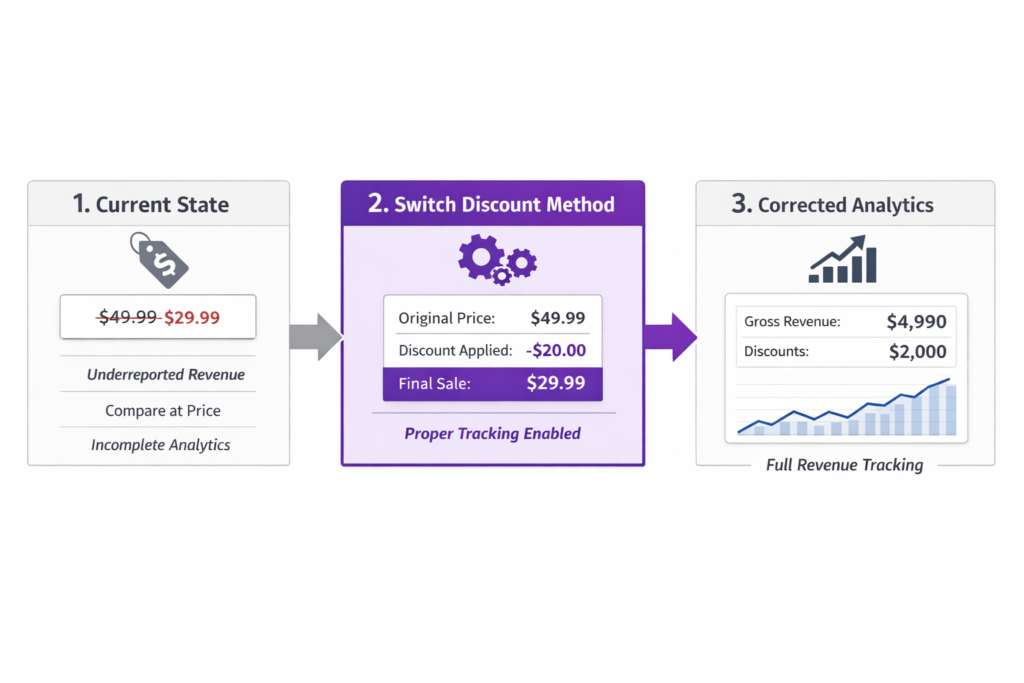
If you’ve been using compare at price, here’s how to switch to real Shopify discounts (and why Adsgun helps):
Step 1: Create a Real Shopify Discount
Instead of setting compare at price, create an automatic discount in Shopify: Settings > Discounts > Create discount. Set it to “15% off all products” (or whatever your discount is). This is a real discount in Shopify’s system.
Step 2: Set Selling Price Equal to Discounted Price
Change your product selling prices to reflect the discounted amount. If you were selling at $75 with a $100 compare at price, set the selling price to $75 and leave compare at price empty.
Step 3: Show the Discount on Product Pages with Adsgun
Now Shopify is recording the right numbers in analytics. But your product page only shows $75 with no indication of the discount. Customers don’t see the “Was $100” strike-through.
Install Adsgun, create a promotion that shows the strike-through pricing, and suddenly your product pages show both the real discounted price AND the original price (struck through). Your analytics are accurate AND your product pages are compelling.
Step 4: Check Your Analytics
After the switch, your Shopify analytics will show the correct gross revenue and discount line items. You’ll have accurate data going forward.
The Real Cost of Compare at Price
Beyond analytics, compare at price has practical limits:
- Manual updates – Every time you change a discount, you have to manually update compare at price on every product
- Variant inconsistency – You have to set compare at price for every variant, and they often get out of sync
- Can’t express complex logic – You can’t represent “15% off for VIP customers” with compare at price. You can with real discounts
- No historical tracking – You don’t know when it was set or what it was before
Real Shopify discounts handle all of this automatically.
How Adsgun Makes the Switch Painless
If you’ve been using compare at price and want to switch to real discounts, Adsgun makes it seamless:
- Keep your existing compare at price (Adsgun supports it)
- Create a real Shopify discount to gradually replace it
- Create a promotion in Adsgun that shows the discount on product pages
- Over time, migrate away from compare at price completely
Adsgun reads both compare at price and real Shopify discounts, so you can be in a hybrid state while you transition. And when you’re fully on real discounts, your analytics will be clean and accurate.
Ready to Fix Your Analytics?
If your Shopify gross revenue is wrong, it’s likely because you’ve been using compare at price, and your financial data isn’t telling you the truth. Switch to real Shopify discounts and clean up your reporting.
Adsgun makes this transition easy by showing your real discounts on product pages. Try it free for 7 days and see accurate revenue reporting with clear discount ROI.




