
Shopify Wholesale Pricing: Show Different Prices to B2B Customers
B2B customers are logged in. Use customer tags to automatically show them Shopify wholesale pricing. Different customers see different prices, no manual spreadsheets, no Shopify Plus required.
The B2B Pricing Problem on Shopify
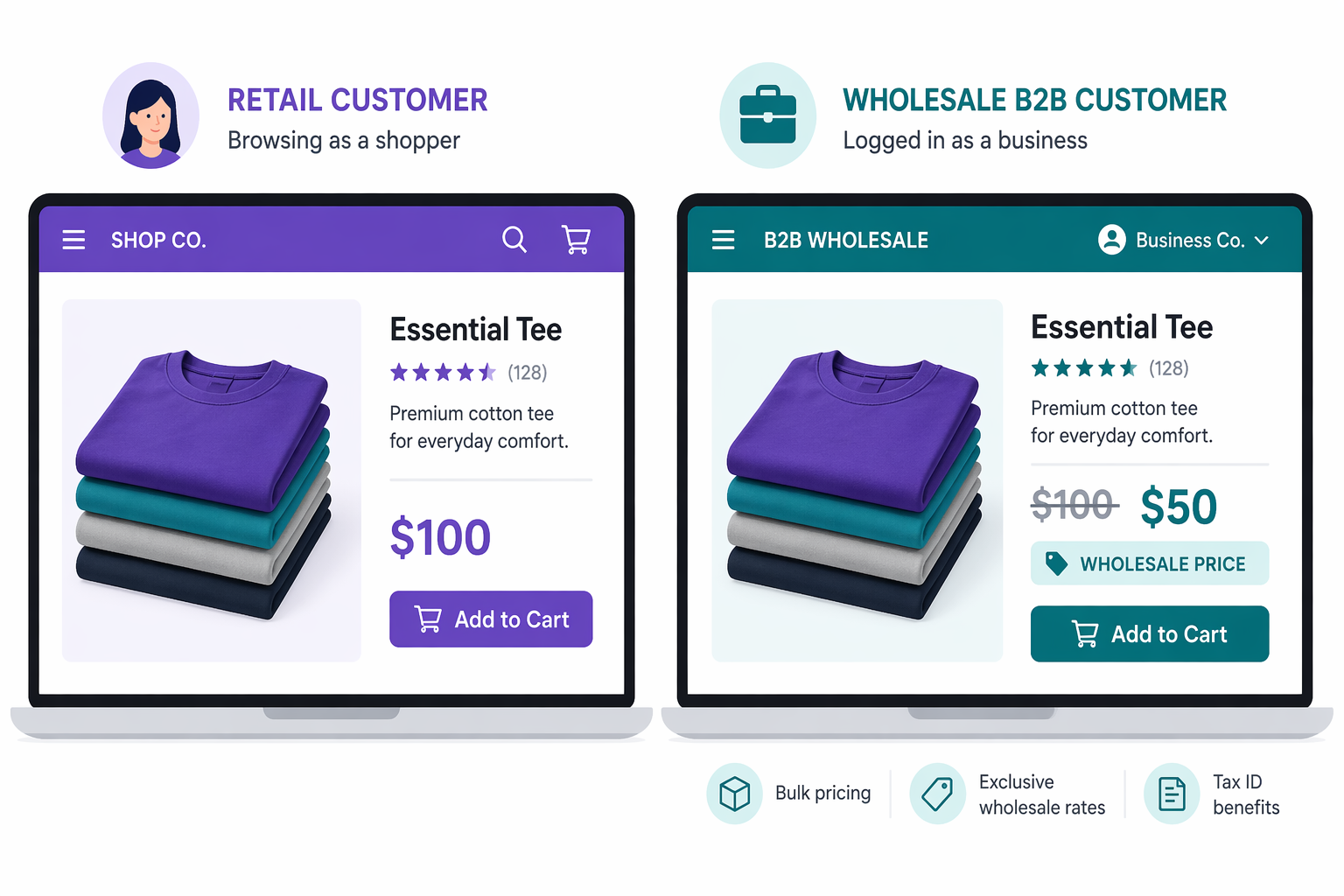
If you sell to both retail and B2B customers, pricing gets complicated fast. Your retail customer buys 1 tee for $50. Your wholesale customer (a boutique, a corporate buyer, a reseller) buys 100 tees at $25 each. Shopify’s standard pricing does not handle this natively, and the options for setting up shopify wholesale pricing all come with trade-offs.
Here are the four paths most merchants consider:
Option 1: Shopify B2B (Shopify Plus only)
- Cost: starts at $2,300 per month on a 3-year contract, $2,500 on 1-year, plus a 0.25% revenue share on monthly GMV above $1M
- Functionality: full B2B portal with company accounts, catalogs per customer group, net payment terms, PO numbers, and quote workflows
- Problem: only worth it for stores already doing $1M+ in annual revenue. Overkill for simple wholesale discounts.
Option 2: Manual price lists or spreadsheets
- Cost: Free
- Functionality: you maintain a separate price sheet for B2B customers and quote prices manually
- Problem: tedious, error-prone, customers need to reference the sheet constantly. No on-site pricing. Not a seamless UX.
Option 3: Bulk pricing apps
- Cost: $20 to $50 per month
- Functionality: show different prices based on quantity
- Problem: quantity-based, not customer-based. Does not distinguish between “retail customer buying 5” and “wholesale customer buying 5.”
Option 4: Customer tag-based promotions via Adsgun
- Cost: included with any Adsgun plan (including the free tier for one promotion)
- Functionality: tag wholesale customers, apply automatic discounts that display on their product pages as strike-through pricing
- Problem: requires customer login, but that is usually desirable for B2B anyway
For mid-market Shopify stores that want automated wholesale pricing without paying for Plus, Option 4 is usually the winner.
How Adsgun Customer Account Promotions Power Your Shopify Wholesale Pricing
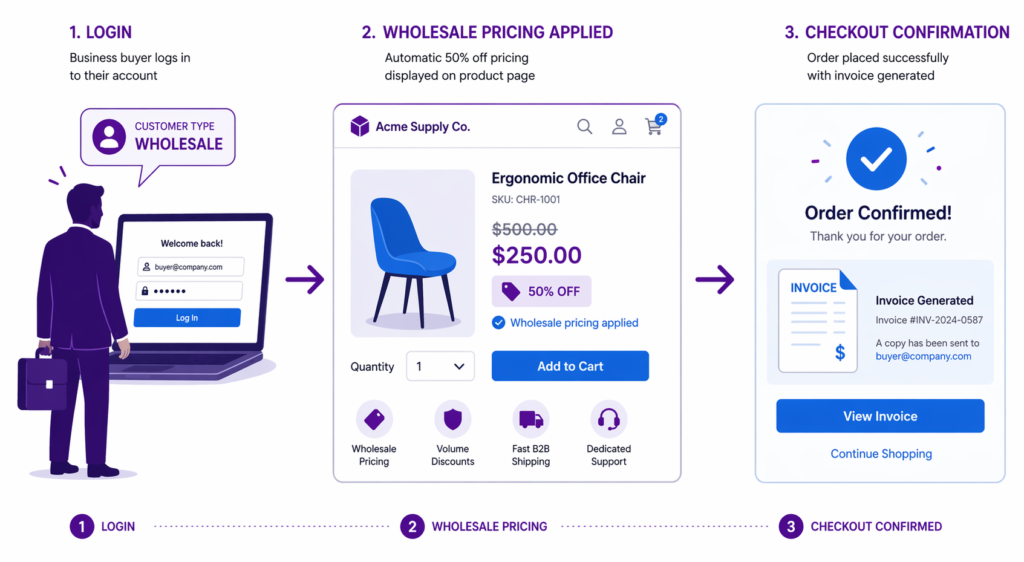
Adsgun’s Customer Account promotion type is purpose-built for this scenario. It drives your entire shopify wholesale pricing system off Shopify’s native customer tags, which means you manage everything in the customer record and the pricing handles itself.
Here is the flow:
- You tag a customer (or bulk-tag many customers) with “wholesale”
- You create an Adsgun promotion called “Wholesale Pricing 50% Off” (or whatever your wholesale margin is)
- You set it as a Customer Account promotion, targeting customers with the tag “wholesale”
- The wholesale customer logs into your store
- Adsgun detects the tag and activates the promotion
- They see “$50
$100You save $50″ on every product, the wholesale price alongside retail as strike-through - They checkout at the discounted price with the discount already applied
Retail customers without the tag see full pricing. Wholesale customers with the tag see their discounted pricing. Same product page, two different prices, driven by login status and tag.
This is the same underlying mechanic as VIP customer pricing by tag, just dialed up for the B2B use case and with larger discount percentages.
Step-by-Step: Setting Up Shopify Wholesale Pricing
Let us set up a concrete system: “Wholesale customers get 50% off everything.”
Step 1: Tag Your B2B Customers for Shopify Wholesale Pricing
- Go to Shopify Admin and open Customers
- For each wholesale customer, add the tag “wholesale”
- For more than a handful of customers, use Shopify’s native customer CSV import, which supports a Tags column. You can tag hundreds of customers in one upload.
- You can also bulk-edit tags directly from the Customers list in the Shopify admin, without touching a CSV, for smaller batches
Step 2: Create the Promotion in Adsgun
- Open Adsgun
- Click “Create Promotion”
- Name it “Wholesale Pricing”
- Attach a 50% discount code (or whatever your wholesale margin is)
- Set promotion type to Customer Account
- In the Tags field, enter “wholesale”
- Set visibility to apply on product pages, collection pages, cart, and checkout
- Publish
Step 3: Verify the Setup
- Log in as a non-wholesale customer
- View a product page, you should see the full $100 price
- Log out
- Log in as a wholesale customer (tagged with “wholesale”)
- View the same product, you should now see “$50
$100“
If that works, the system is live.
Step 4: Optional, Set a Time Limit
If wholesale pricing is seasonal (for example, B2B pricing only in Q4), use the Adsgun scheduler:
- In the promotion settings, add a schedule
- Set dates, for example “Oct 1 to Dec 31”
- Outside these dates, the promotion is inactive
This way wholesale pricing is only active when it is relevant.
Hybrid Stores: Different Pricing for Different Segments
Most stores have more than two customer segments, each deserving different pricing:
- Retail customers: no discount, full $100 price
- Wholesale customers: 50% off, $50 price
- VIP customers: 35% off, $65 price
- Drop-shippers: 60% off, $40 price
You can run multiple Customer Account promotions in parallel, each tied to a different tag:
- Wholesale promotion, target tag “wholesale”
- VIP promotion, target tag “vip”
- Dropshipper promotion, target tag “dropshipper”
- Retail, no promotion needed (the default)
When a customer logs in, Adsgun reads their tags and applies the matching promotion. Analytics show which segment drives the most revenue, and you can optimize margin and volume segment by segment.
Advanced: Tiered Wholesale Pricing
If you run multiple wholesale tiers, create separate promotions with separate tags.
Bronze Tier Wholesale (small orders, starting resellers)
- Discount: 35% off
- Tag: “wholesale_bronze”
- Target customer: small boutiques, starting resellers
Silver Tier Wholesale (medium orders, established boutiques)
- Discount: 45% off
- Tag: “wholesale_silver”
- Target customer: established boutiques, mid-size retailers
Gold Tier Wholesale (large orders, major accounts)
- Discount: 55% off
- Tag: “wholesale_gold”
- Target customer: major retailers, chains, distributors
Each tier gets a different promotion applied automatically based on the customer tag. A customer in the Gold tier logs in and sees 55% off. A customer in the Bronze tier logs in and sees 35% off. The pricing is automatic, transparent, and consistent across the store.
Setting Up Bulk Codes for Wholesale Customers Without Accounts
Some wholesale customers do not have (or refuse to use) a Shopify login. For them, fall back on bulk discount codes:
- In Adsgun, create a promotion called “Wholesale 50% Off”
- Generate bulk codes, one per customer
- Email each customer their unique code
- Customer uses the code at checkout, where it auto-applies
This lets you run both systems at once: logged-in B2B customers get automatic tag-based pricing, and occasional B2B buyers get a personal code. Unique codes also give you per-customer attribution, since each code is tied to one buyer.
Displaying Shopify Wholesale Pricing on Your Store
When showing wholesale pricing on the storefront, a few presentation choices help customers understand what they are looking at:
- Clear labeling: Adsgun can show “Wholesale Price” or a custom label next to the discounted figure so logged-in B2B customers understand why they are seeing different pricing.
- About page transparency: Explain that you offer wholesale to qualified resellers. Set clear thresholds: “Minimum order: 50 units” or “Qualification required by application.”
- B2B contact form: Include a “Wholesale Inquiry” form so interested retailers can request an account. You review the application, tag them appropriately, and they get access.
- Volume bonuses: Add a line to your footer or About page: “Wholesale pricing available for qualified resellers. Contact us to apply.” This turns visitors into B2B leads.
This approach builds trust, manages expectations, and makes your wholesale program feel like a real program instead of an ad-hoc discount.
Comparing Shopify Wholesale Pricing Options
| Feature | Manual Spreadsheet | Shopify B2B (Plus) | Bulk Codes | Adsgun Customer Account |
|---|---|---|---|---|
| Cost | Free | $2,300+/month | Included with Adsgun | Included with Adsgun |
| Setup time | 30 min | Days to weeks | 1 hour | 15 min |
| Customer experience | Poor | Excellent | Good | Excellent |
| Automation | Manual | Full | Partial | Full |
| On-site visible pricing | No | Yes | No | Yes |
| Multiple tiers | Tedious | Yes | Complex | Easy |
| Scaling | Poor | Excellent | Good | Excellent |
For mid-market stores that want automated wholesale pricing without jumping to Shopify Plus, Adsgun’s Customer Account promotion is the strongest fit. Stores already on Plus can still use Adsgun for strike-through price display, since Plus B2B alone does not always show the wholesale savings as strike-through on the product page.
Common Wholesale Pricing Mistakes
Mistake 1: Forgetting to tag customers
If you create the promotion but do not tag your wholesale customers, the promotion activates for nobody. Every wholesale customer must have the matching tag.
Mistake 2: Showing wholesale prices to retail customers
If your promotion is misconfigured to “all customers” instead of “customers tagged wholesale,” retail customers see the deep discount. That is a direct hit to margin.
Mistake 3: Inconsistent wholesale tiers
If you offer some customers 40% and others 50% without a clear rule, you create resentment when one wholesale customer finds out another is getting more. Define tiers and stick to them.
Mistake 4: Not communicating the wholesale application process
If potential wholesale customers do not know how to apply, you leave B2B revenue on the table. Make the application form visible.
Mistake 5: Changing wholesale pricing without notice
If you reduce wholesale discounts, inform customers first. A sudden 10% margin reduction on their end affects their whole business model and damages the relationship.
Best Practices for Shopify Wholesale Pricing
- Create clear wholesale tiers: Define what qualifies for each tier (minimum order, reseller status, industry, annual revenue).
- Tag consistently: Use standardized tag names. “wholesale” rather than “Wholesale” or “wh_customer” or “ws.” Adsgun (and Shopify segmentation) is case-sensitive in places.
- Communicate terms: Include a Wholesale Terms page covering MOQ, payment terms, return policy, and what happens if tier qualifications change.
- Automate account approval: When someone applies for wholesale, use Shopify Flow or a Zapier workflow to tag them and send a welcome email automatically.
- Monitor wholesale performance: Track revenue by customer segment. Are Gold tier customers actually more profitable than Silver after discount, or is volume masking a margin problem?
- Periodically review tiers: As your business scales, what counted as a large order last year might be average now. Update tier thresholds annually.
Start Offering Shopify Wholesale Pricing Today
If you sell to B2B customers without offering tiered pricing, you are almost certainly leaving money on the table. Wholesale buyers expect volume discounts, and they will go to a competitor who offers them automatically instead of over email.
By automating pricing with customer tags and Adsgun Customer Account promotions, you eliminate manual spreadsheets, remove human error, and create a professional B2B experience without paying Shopify Plus pricing.
Setup takes about 15 minutes. The impact on B2B revenue growth tends to compound quickly, because once a wholesale relationship is frictionless, those accounts reorder.




