
Shopify Discount Analytics: Track Revenue, AOV & ROI
Compare at Price quietly breaks your Shopify discount analytics. Learn how it distorts gross revenue and AOV, plus how to track real discount ROI accurately.
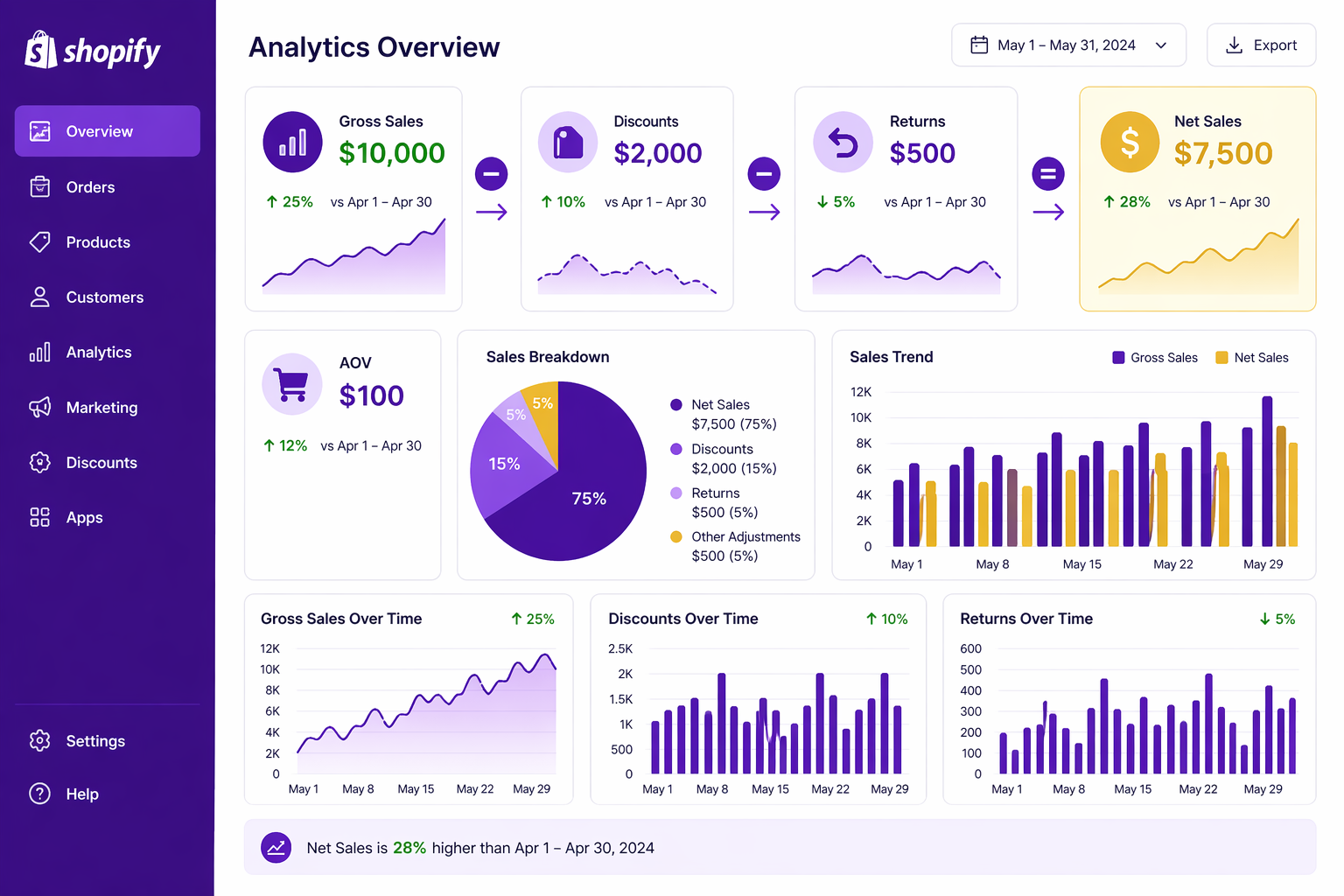
If you sell on Shopify, your dashboard probably looks healthy at a glance. Gross sales, discounts, returns, net sales, AOV: all the numbers are there. But shopify discount analytics break the moment you switch from real discounts to Compare at Price, and most merchants never realize it. The net revenue stays the same, the dashboards still load, and the discount column quietly reads $0 even when you’re running a 25% off promotion. This guide walks through every metric, why Compare at Price distorts the picture, how to set up clean tracking, and how to actually calculate discount ROI.
The Key Metrics and What They Mean
Strong shopify discount analytics start with knowing exactly what each number represents. Shopify’s Orders and Sales reporting shows several related metrics:
- Gross Sales: The total value of all orders before deductions. If 100 customers bought at $100 each, gross sales = $10,000.
- Discounts: The total value of all discounts applied. If those 100 customers had $20 average discounts, discounts = $2,000.
- Returns: The total value of all returned items. If 10 customers returned items worth $50 each, returns = $500.
- Net Sales: Gross sales, minus discounts, minus returns equals your actual take-home. $10,000 − $2,000 − $500 = $7,500 net.
- Average Order Value (AOV): Gross sales divided by number of orders. $10,000 / 100 = $100 AOV.
- Tax: Sales tax collected (not revenue, but tracked separately).
- Shipping: Shipping fees collected (varies by store model: some collect separately, some include in price).
All of these metrics roll up from individual orders. When a customer checks out, Shopify records the gross price, applies any discounts, records the net price, and reports all three. You can read the full breakdown in Shopify’s official sales reports documentation.
The Compare at Price Problem in Shopify Discount Analytics
This is where analytics gets tricky. Many stores use Shopify’s Compare at Price feature, which displays a struck-through original price on product pages and at checkout.
Here’s what Compare at Price does. When you set a product’s price to $79 and Compare at Price to $99, Shopify displays: $99 $79.
But in Shopify’s reporting:
- Gross sales: $79 (the actual selling price)
- Discounts: $0 (because no discount was applied, the price was just $79)
- Net sales: $79
This is technically accurate (the customer paid $79), but it’s analytically wrong. You’ve hidden the $20 discount from your reporting.
Why does this matter?
- Problem 1: Discount Invisibility
If you’re using Compare at Price as your primary discount mechanism, your analytics show zero discounts. You can’t measure discount ROI because discounts don’t appear in your discount report. This makes it impossible to answer: “Is this discount driving incremental conversions, or just cannibalizing full-price sales?”
- Problem 2: AOV Distortion
If your real selling price is $79 (after the Compare at Price discount) but you want to attribute some of that sale to the discount, AOV gets distorted downward. You think your AOV is $79 when it’s actually “regular customers at $99 plus discounted customers at $79” which blends to maybe $87 in reality.
- Problem 3: Margin Miscalculation
When discounts are invisible, your reported gross sales looks lower than it actually is, and your reported discount cost is $0. This makes it look like you’re getting better margins than you actually are, which is a bigger issue when you scale (and one we cover in detail in Shopify gross revenue wrong: blame Compare at Price).
Real Shopify Discounts vs. Compare at Price
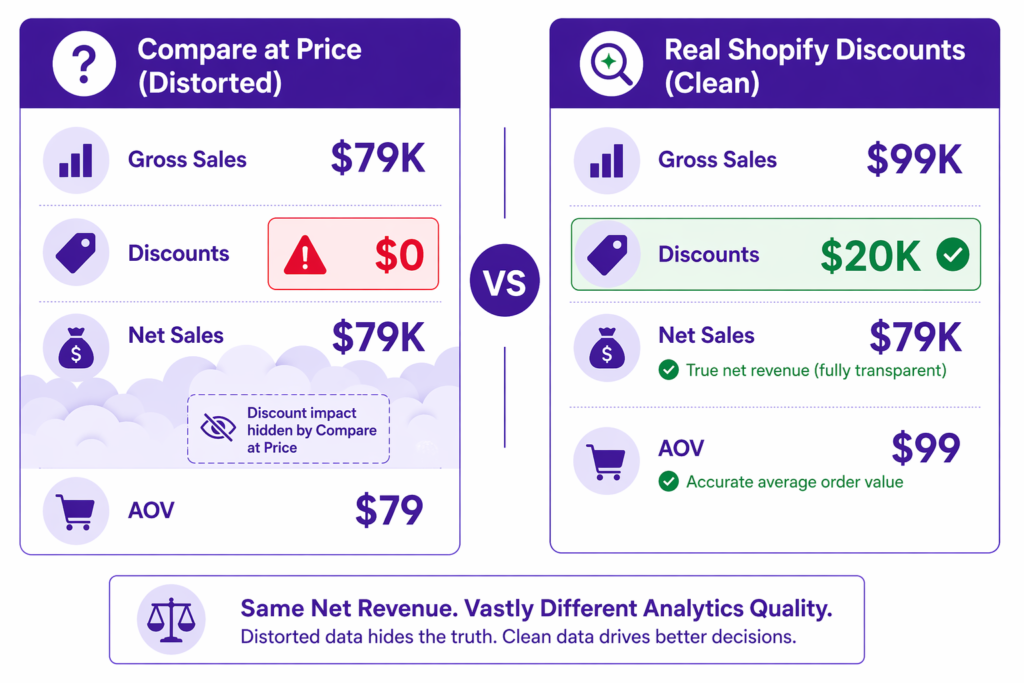
Real Shopify discounts (automatic discounts or discount codes) appear in reporting correctly:
- Gross sales: $99 (the original price)
- Discounts: $20
- Net sales: $79
This is clean. You can see exactly how much discount you gave and calculate ROI. The difference is simple: Compare at Price is a display hack (show a struck-through price on the product page). Real Shopify discounts are system-level promotions that apply an actual discount at checkout and track it. We break this down further in Shopify Compare at Price vs Discount Code.
Why Accurate Discount Tracking Matters
Here’s a side-by-side scenario.
Store A (using Compare at Price):
- 1,000 orders/month
- “Gross sales”: $79,000
- Discounts: $0
- Net sales: $79,000
- Reported AOV: $79
- Reported margin: 50% (if costs are $40K)
Store B (using real Shopify discounts):
- 1,000 orders/month
- Gross sales: $99,000
- Discounts: $20,000
- Net sales: $79,000
- Reported AOV: $99
- Reported margin: 50% (if costs are $40K)
Same net take-home. But Store A can’t measure which discount drove which sales. Store B can segment performance by discount type, channel, customer type.
Six months later, Store B knows that “First Time Customer 20% Off” has a 2x ROI, while “Spring Email Campaign 10% Off” has a 1.2x ROI. They reallocate budget to the first-time customer discount. Store A can’t do this analysis. They’re flying blind.
Setting Up Shopify Discount Analytics Correctly
Step 1: Use Real Shopify Discounts (Not Compare at Price)
Create automatic discounts or discount codes in Shopify’s Discounts section.. Don’t rely on Compare at Price for promotions. If you’re not sure which type to choose, see our Shopify automatic discount vs discount code comparison.
Step 2: Name Discounts Clearly
Use channel, audience, and value in the name: INSTAGRAM_FIRST_20, EMAIL_JULY_15, VIP_MEMBERS_30. This makes filtering in analytics easier.
Step 3: Check Your Discount Report Regularly
Navigate to Apps and Sales > Discounts. View each discount’s performance. This is your source of truth for discount ROI.
Step 4: Create Custom Reports for Shopify Discount Analytics
In Shopify Analytics, you can create custom reports that filter by discount code, product, collection, traffic source, etc. Use these to answer specific questions:
- What was my ROI on email discounts vs. paid ads discounts?
- Which collections convert best with discounts?
- What’s my repeat purchase rate for customers who used a first-time discount?
Step 5: Track Attribution
Link your discount codes to your marketing channels in your marketing platform (Google Ads, Meta, email tool). This lets you see the full funnel: ad spent → discount code used → revenue. For influencer campaigns specifically, unique discount codes per influencer make attribution effortless.
The AOV Calculation: Why It Matters
AOV is a key metric for evaluating store health. But it only tells the full story if discounts are tracked correctly.
Scenario:
- January: 1,000 orders, $100 AOV, $100K gross sales, $10K discounts = $90K net
- February: 1,000 orders, $95 AOV, $95K gross sales, $15K discounts = $80K net
Your AOV dropped from $100 to $95. But if you’re using Compare at Price, you’d see:
- January: 1,000 orders, $90 AOV, $90K net sales
- February: 1,000 orders, $85 AOV, $85K net sales
You’d think your AOV declined by $5, when in reality your discounting increased by $5 (from $10K to $15K in total discount cost).
With real discount tracking, you’d see the increase in discount activity and can diagnose it. Is it because you ran a promotion, is customer spending down or is something broken?
Without it, you’re chasing a metric that’s actually a distortion of reality. That same dynamic plays out in conversion data too, which we covered in how Shopify discounts affect conversion rate.
Calculating Discount ROI in Shopify
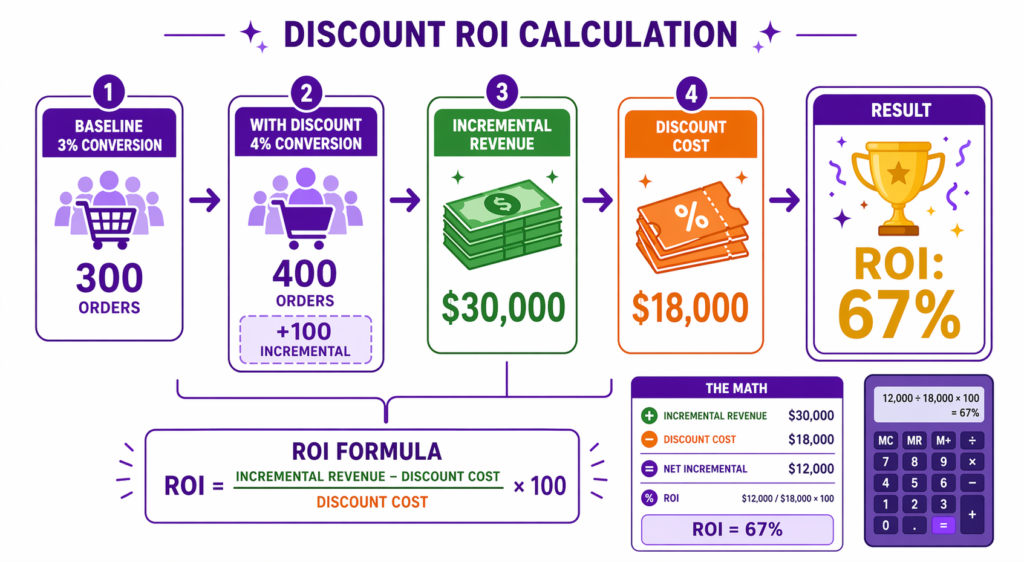
Formula: Discount ROI = (Incremental Revenue − Discount Cost) / Discount Cost
Incremental Revenue is the revenue you wouldn’t have had without the discount. This is hard to measure precisely, but you can estimate it:
- Measure your baseline conversion rate (no discount)
- Run a discount and measure new conversion rate
- Incremental orders = (new conversion rate − baseline) × traffic
- Incremental revenue = incremental orders × AOV
- Discount cost = total discount given across all orders (from Shopify)
- ROI = (incremental revenue − discount cost) / discount cost
Example:
- 10,000 sessions, baseline 3% conversion = 300 orders
- With 15% off discount, 4% conversion = 400 orders
- Incremental orders: 100
- AOV: $300
- Incremental revenue: 100 × $300 = $30,000
- Discount cost: 400 orders × average $45 discount = $18,000
- ROI: ($30,000 − $18,000) / $18,000 = 67%
This means the discount was worth it. For every $1 spent on discounts, you netted $0.67 in profit.
Why Adsgun Preserves Clean Discount Analytics
Adsgun reads real Shopify discounts and displays them visually across product pages, collections, cart, and checkout. Because Adsgun isn’t manipulating prices through Compare at Price, all your discount data in Shopify stays clean and traceable.
You can set a discount in Shopify, enable it in Adsgun for visibility, and your analytics remain accurate throughout the entire customer journey. That’s the whole point: customers see the deal everywhere they shop, and your reports still show the truth.
FAQ: Shopify Discount Analytics
Can I export my discount data to a spreadsheet?
Shopify has built-in CSV export for orders and reports, but not a one-click export for discount-only data. You can manually copy from the discount report, or use a third-party tool like Zapier to sync discount data to Google Sheets automatically.
How do I see which products were discounted?
In Shopify Analytics, create a custom report filtering by product and date. Then cross-reference with your discount list to see which products were on promotion.
Does AOV include shipping and tax?
Shopify’s standard AOV in the Sales reports is calculated from total sales, which typically includes shipping but excludes taxes. The exact definition can vary by report, so always check the report description before drawing conclusions.
How far back does Shopify keep analytics data?
For most stores, analytics data is retained for the lifetime of the store, although certain detailed reports and retention windows depend on your Shopify plan. Higher-tier plans (Advanced, Plus) get longer detailed reporting history.
Can I change discount tracking retroactively?
No. Once an order is recorded, its discount is fixed. But future orders will reflect any discount changes you make.




