
Shopify Automatic Discount vs Discount Code: Full 2026 Comparison
The automatic discount vs discount code decision shapes how customers see your offers and how cleanly your analytics track them. Both are real Shopify discounts, both can stack together, and each has scenarios where it clearly wins. Here is how to pick.
What Is the Difference?
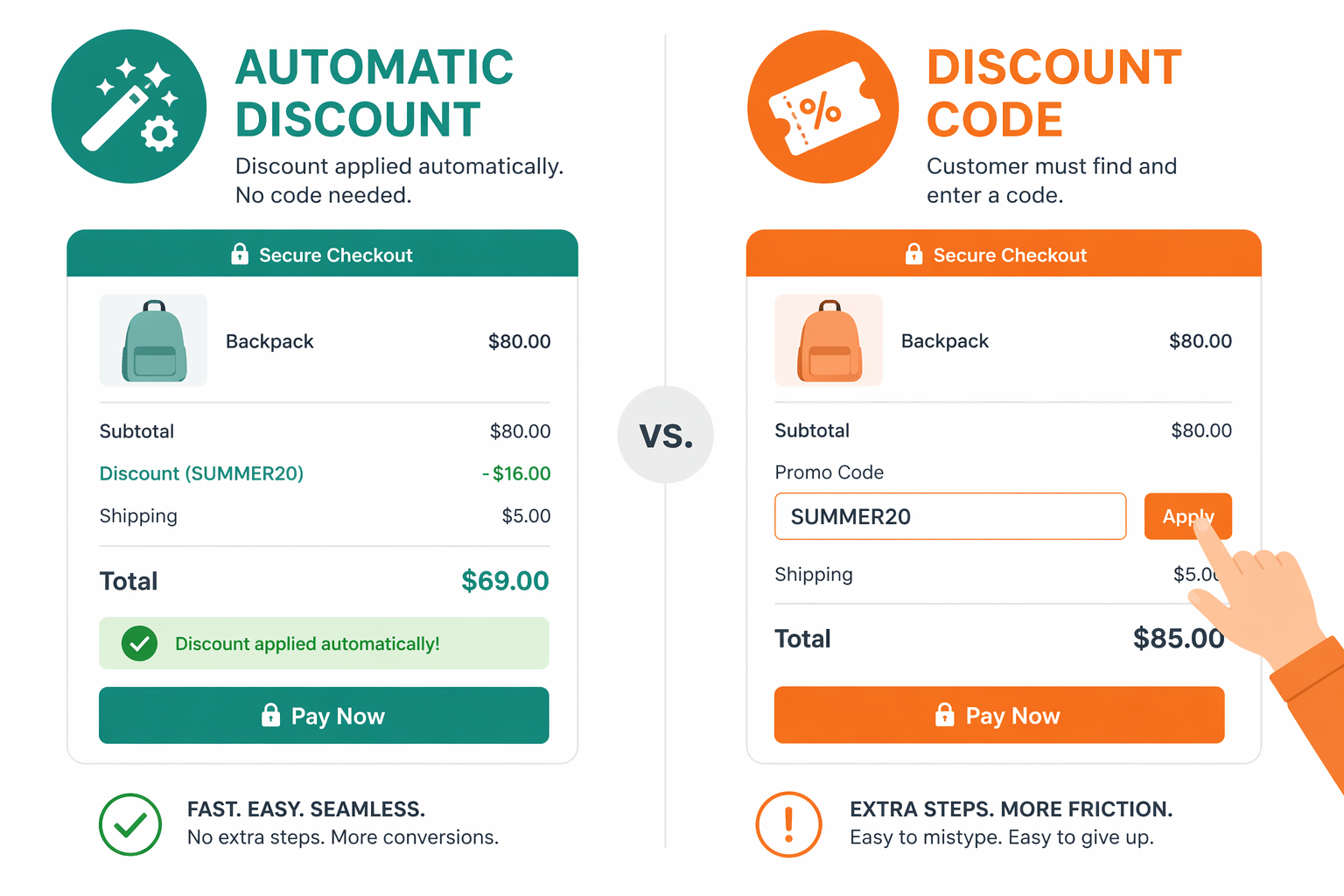
The automatic discount vs discount code decision is one of the most common pricing-strategy choices Shopify merchants face. Both options create real Shopify discounts, both reduce the final price the customer pays, and both are tracked properly in Shopify Analytics. The difference lives in how each one reaches the customer.
Automatic discount: applied automatically when cart conditions are met. The customer does nothing.
Example: “Everyone who spends $50 or more gets free shipping” applies on its own at checkout.
Discount code: the customer enters a code at checkout (or arrives via a link that pre-applies it).
Example: the customer enters ‘SUMMER20’ and gets 20% off.
Both are real Shopify discounts, unlike compare at price modifications which distort gross revenue reporting, both reduce the final price, both show up correctly in analytics.
The key difference is friction. Automatic discounts require zero customer action. Discount codes require the customer to know about the code, remember it, and type it into the right field at checkout.
How Automatic Discounts Work
Automatic discounts trigger based on cart conditions:
- Cart value: “Everyone with $100 or more in cart gets 10% off”
- Product type: “All shoes get 15% off”
- Collection: “Items from the Clearance collection get 20% off”
- Customer tags: “Customers tagged VIP get 15% off” (the same mechanic powering tag-based VIP customer discounts)
- Quantity: “Buy 3, get 10% off”
When a customer’s cart matches the condition, the discount applies automatically at checkout. No code needed.
Advantages:
- Zero friction (no code entry)
- Near-100% redemption among carts that qualify
- Ideal for broad, inclusive promotions
Disadvantages:
- Hard to make some customers get 20% and others 10% without overlapping rules
- Limited per-channel attribution because the trigger is the cart, not the source
- Shopify caps you at 25 active automatic discounts at once, which becomes a real constraint during peak seasons
How Discount Codes Work
Discount codes are fixed offers that customers (or pre-filled URLs) activate at checkout. You define:
- The discount amount (percentage, fixed dollar, BOGO, free shipping)
- The code string (‘SUMMER20’, ‘VIP10’, ‘INFLUENCER_SARAH’)
- Conditions (minimum cart value, specific products, specific customer segments)
- An expiration window
The customer types the code at checkout. If valid, the discount applies.
Advantages:
- Highly trackable (Shopify reports the exact code used)
- Per-channel attribution (each channel or influencer gets their own code)
- Personalizable (different codes for different audiences)
- Flexible across email, social, paid ads, influencer programs via bulk codes, and more
Disadvantages:
- Customer friction: typing a code in the checkout flow drops conversion compared to automatic
- Lower redemption: shoppers who do not see the code prominently never enter it
- Hidden by default: the discount applies only at checkout, not on product pages, unless you use a visibility layer
The Stacking Update: How Combining Discounts Actually Works
Here is the part most articles get wrong. Shopify did not “unlock stacking in 2024.” Shopify rolled out the discount combinations system in stages starting in 2022, expanded it in 2023, and refined it through 2024 and beyond. As of today, the rules look like this, straight from Shopify’s documentation:
- Up to 5 product or order discount codes per order, plus 1 shipping discount code
- One automatic discount can also apply alongside codes, provided “Combines with” settings are configured correctly on every discount involved
- Up to 25 automatic discounts can be active in your store at once
- Multiple shipping discounts cannot stack on a single rate. One shipping discount per order is the cap.
- Buy X Get Y discounts have their own constraint: products inside a BXGY discount cannot also receive an additional product discount
So a real-world stacked checkout might look like this:
- Automatic discount 1: Free shipping (triggered by “orders over $50”)
- Discount code 1: 10% off for VIP customers (entered or auto-applied via link)
- Discount code 2: 15% off for email subscribers (entered or auto-applied via link)
Three discounts, all active, all applied. Shopify computes the final price by walking through them in a defined order. The full mechanics of how that order works in practice are unpacked in our Shopify discount stacking guide.
Automatic Discount vs Discount Code: The Comparison Table
Here is the head-to-head automatic discount vs discount code breakdown across the dimensions that matter when picking which type to use.
| Feature | Automatic Discount | Discount Code | Winner |
|---|---|---|---|
| Friction | None (applies automatically) | High (customer types code) | Automatic |
| Redemption rate | Near 100% on qualifying carts | Lower, depends on code awareness | Automatic |
| Trackability | Moderate (by discount name) | Excellent (per-code attribution) | Code |
| Channel-specific use | Difficult | Perfect (one code per channel) | Code |
| Analytics granularity | Good | Better (per code, per source) | Code |
| Customer experience | Seamless | Requires customer action | Automatic |
| Visibility on product pages | None natively | None natively | Tie |
| Personalization | Limited (tags / cart conditions only) | Excellent | Code |
| Setup complexity | Easy | Moderate | Automatic |
| Active limit | 25 automatic discounts max | Up to 5 product/order codes + 1 shipping per order | Code |
The pattern: automatic wins on customer experience and redemption, codes win on attribution, personalization, and channel granularity. Most growing stores end up using both.
When to Use Automatic Discounts
Automatic discounts are the right call for:
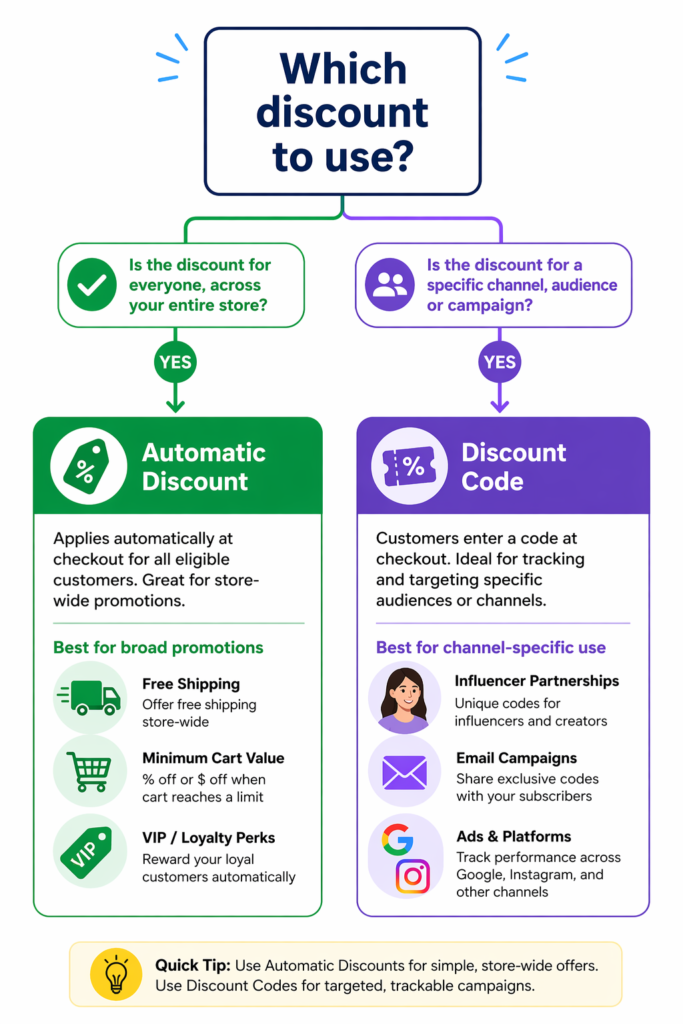
- Broad, inclusive promotions. “20% off everything this weekend” works automatically. Everyone who lands on your store gets it.
- Cart-value offers. “Free shipping on $50+” is the canonical automatic use case.
- Customer-segment offers. “VIP members get 15%” tied to a customer tag, the same approach used in loyalty program tier discounts.
- Product-type or collection offers. “Clearance items get 30% off” with a collection condition.
- Quantity incentives. “Buy 2, get 10% off” or “Buy 3, get 1 free.” The customer triggers it through normal shopping behavior.
The common thread: when the offer should reach everyone who qualifies without anyone having to think about it, automatic is the right tool.
When to Use Discount Codes
- Channel-specific promotions. Each traffic source gets its own code so you can attribute revenue. Google Ads: ‘GOOGLEADS20’. Instagram: ‘INSTAGRAM15’. Email: ‘NEWSLETTER10’.
- Influencer partnerships. Each influencer gets a unique code so you know exactly which one drove revenue.
- Email campaigns. Newsletter, win-back, VIP launches: each one a distinct code with its own reporting.
- Limited exclusivity. “VIP members only” or “First 100 customers” works as a code with a usage cap.
- Per-customer privacy or wholesale. Each B2B customer gets a unique code generated through bulk code workflows.
The common thread: when you need to know who used the discount or restrict it to a specific audience, codes give you the data and control automatic discounts cannot.
How to Combine Both for Maximum Impact
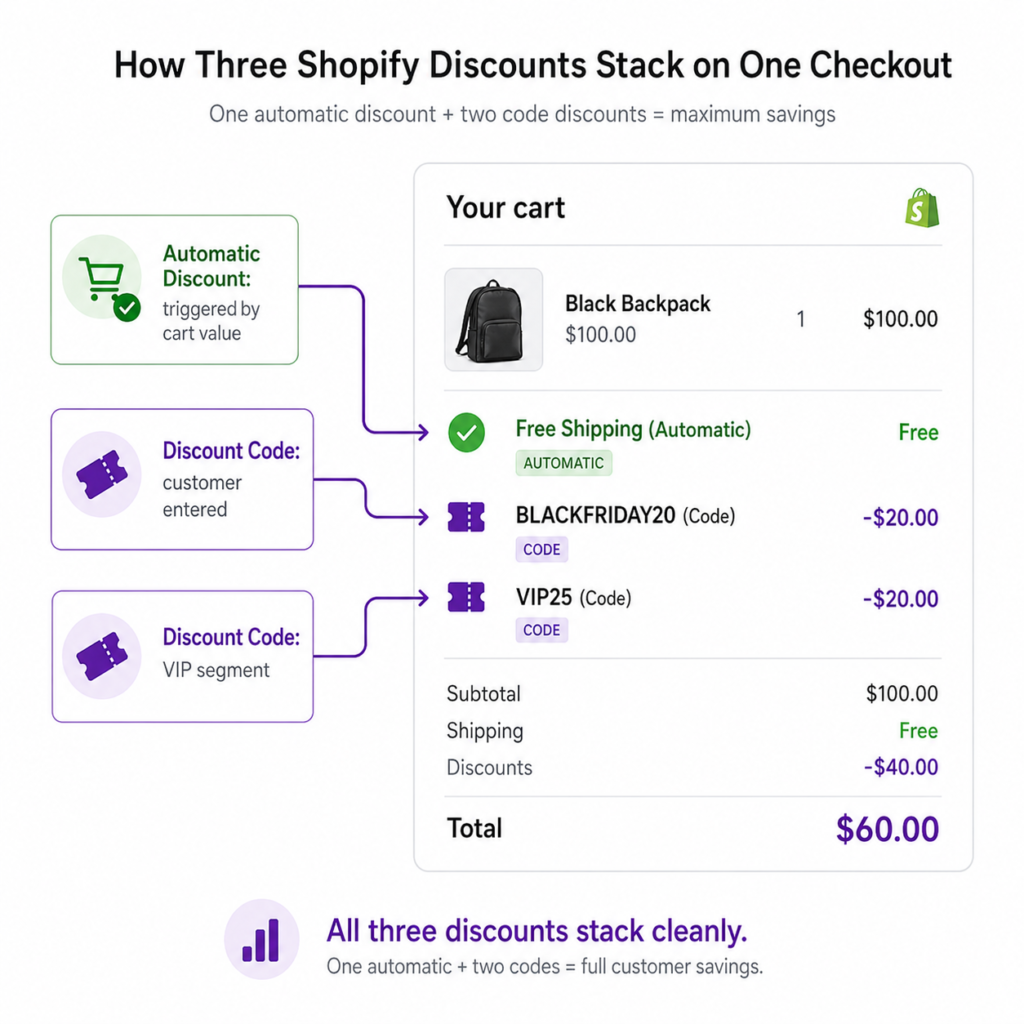
Now that the combinations system supports both types together, you can layer offers without conflict.
Example: a Black Friday strategy using all three layers
- Automatic discount: Free shipping on orders over $50 (applies to everyone, no code needed)
- Discount code 1: ‘BLACKFRIDAY20’ for 20% off (anyone with the code, distributed via email and social)
- Discount code 2: ‘VIP25’ for 25% off (only customers tagged “vip” can use it)
The result at checkout:
- Walk-in customer with no code: free shipping only
- Customer with ‘BLACKFRIDAY20’: free shipping + 20% off
- VIP customer with ‘VIP25’: free shipping + 25% off (their tag plus the code unlock the deeper offer)
All three coexist cleanly because each one is a different type and targets a different audience. The customer experience stays simple: enter one code if you have one, free shipping handles itself.
For the cleanest customer experience, also pair this with Adsgun’s scheduler so all three discounts auto-disable on December 1 without manual cleanup.
The Visibility Problem Both Types Share
Whether you use automatic discounts, discount codes, or both, native Shopify shares one limitation: the discount applies only at checkout.
A customer browses product pages and sees full prices. They add items to cart. At checkout, the discount finally appears. By then, 70% of carts have been abandoned, often because the price the customer expected and the price they thought they would pay never matched until it was too late.
Apps like Adsgun fix this by displaying the discount as strike-through pricing on product pages, collection pages, and the cart, for both automatic discounts and discount codes. The customer sees the savings before adding to cart, the analytics stay clean because real Shopify discounts are still doing the work, and there are no checkout surprises.
Attribution and Analytics
For automatic discounts:
- Shopify tracks the discount name in the analytics report
- You can see “Free Shipping” or “VIP 15% Off” in the discounts column
- Channel attribution is harder because nothing about the cart tells you where the visitor came from
For discount codes:
- Shopify tracks the exact code used
- ‘INFLUENCER_SARAH’, ‘NEWSLETTER15’, and so on each appear as their own line
- Per-channel and per-influencer revenue attribution is straightforward
For a multi-channel marketing operation, codes give you the cleaner attribution, for broad sitewide promotions, automatic gives you the better redemption, for most stores, the answer is “use both, for what each one does best.”
FAQ: Automatic Discount vs Discount Code Stacking
Q: Can I stack two automatic discounts?
In most cases no. Two automatic discounts of the same class (two product discounts on the same items, for example) cannot stack. Different classes (one automatic product discount plus one automatic free shipping discount) can combine if “Combines with” is set correctly.
Q: Can I stack one automatic discount and one discount code?
Yes. This is the most common modern stacking pattern: an automatic free shipping plus a code-based percentage off.
Q: Can I stack multiple discount codes?
Yes, up to 5 product or order codes plus 1 shipping code per order. Each code must have its “Combines with” settings configured to allow combinations with the relevant classes.
Q: How does Shopify decide which discounts apply when more than one could?
When discounts could apply but cannot combine, Shopify displays a message (“Some discount codes couldn’t be used together. We applied the best combination.”) and applies whichever combination produces the largest customer-side discount.
Q: What about Buy X Get Y discounts?
Products that are part of an active Buy X Get Y discount cannot receive an additional product discount. If a customer applies a code that would also apply to those products, Shopify removes the BXGY and uses the code instead. Plan accordingly: keep BXGY discounts and other product discounts on different products or collections.
Best Practices
- Use automatic for broad, unconditional promotions. “Everyone gets free shipping” should never require a code.
- Use codes for channel-specific attribution. One code per channel, one code per influencer, one code per email segment.
- Stack strategically. Combine an automatic baseline (free shipping) with a code-based primary offer (percentage off). The customer feels rewarded twice.
- Display all discounts visibly. Pair automatic discounts and codes with strike-through pricing on product pages so customers see the savings before adding to cart.
- Monitor your active discount count. With a 25-automatic cap and a 5-code-per-order ceiling, complex promotional calendars need active management. Audit your discounts page monthly.
- Test combinations before going live.Add items to a test cart and run through checkout with each expected code combination. Catch “Some discount codes couldn’t be used together” errors in QA, not on Black Friday.
Migrate Off Compare at Price First
If you are still using compare at price for promotions, neither automatic discounts nor discount codes will fix your underlying analytics problem. Compare at price modifications distort gross revenue reporting because they overwrite your product price instead of recording a discount. Real Shopify discounts (automatic or code) keep gross revenue accurate and discount spend tracked as its own line item.
The right architecture for any growing store: real Shopify discounts plus a visibility layer that displays them across product pages, collections, and cart. The automatic discount vs discount code question becomes a strategy choice instead of a workaround for hidden pricing.




