
Shopify Automatic Discounts: Complete Guide for 2026
Native Shopify automatic discounts apply at checkout but never show on product pages. Learn setup, types, limits, and how to fix the visibility gap.
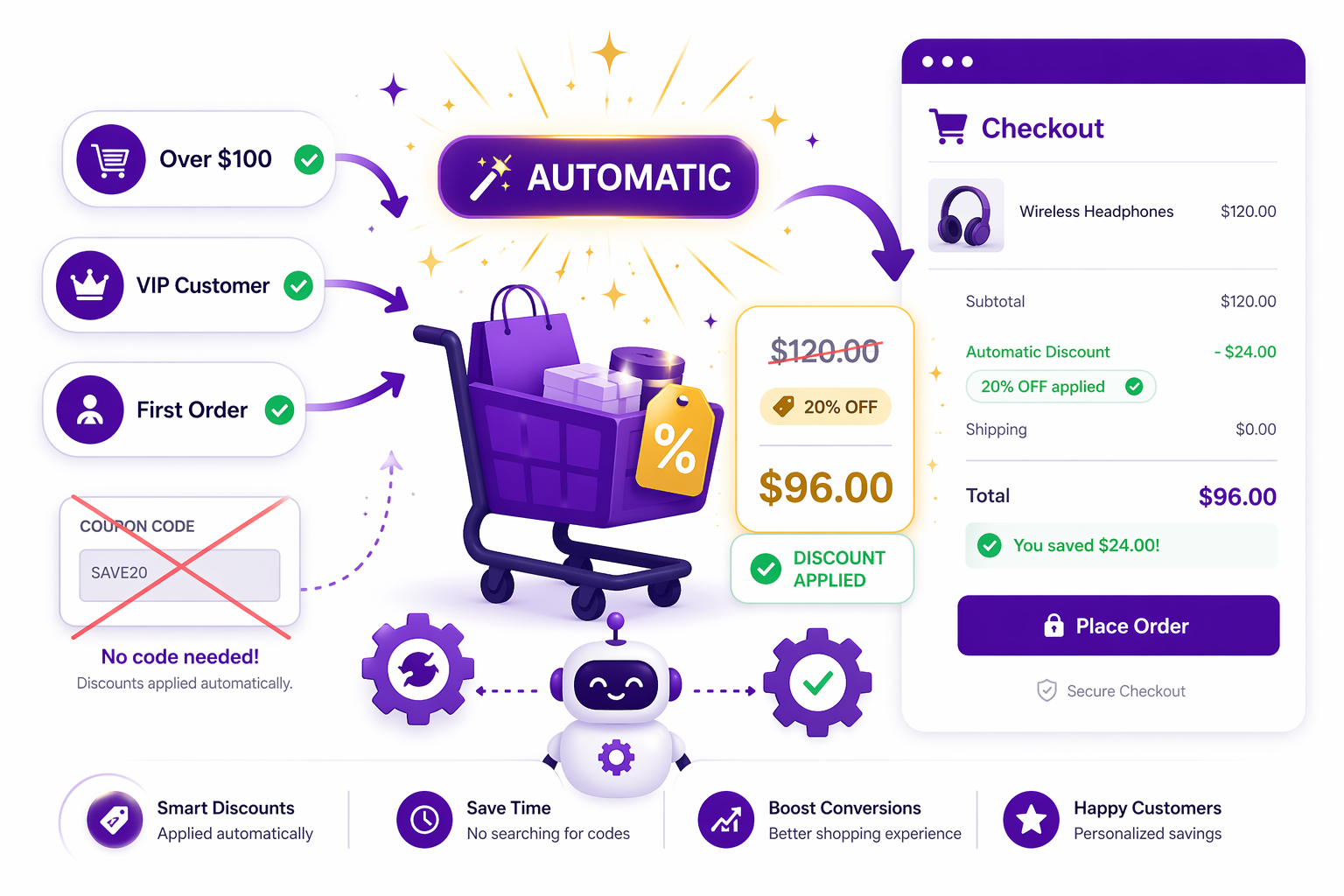
What Are Shopify Automatic Discounts?
Shopify automatic discounts are promotions that apply themselves at checkout, with no coupon code required. Instead of asking customers to enter a code, you configure cart conditions like “if cart total is over $100”, and the discount triggers automatically when those conditions are met. This is fundamentally different from discount codes, which require customer action.
Native Shopify automatic discounts were designed to solve a specific problem: merchants wanted to run promotions that did not depend on customers knowing about or remembering a code. An automatic discount for “spend over $100, get 15% off” applies to any customer whose cart meets that condition, whether they know a code exists or not.
The appeal is obvious. No friction, no abandoned codes, no confusion. But there is a critical limitation that catches most merchants off guard, and it changes how you should think about automatic promotions entirely.
The Biggest Limitation: Why Shopify Automatic Discounts Only Show at Checkout
Here is the problem that defines the automatic discount experience in 2026. Shopify automatic discounts only become fully visible at checkout. They do not appear on product pages. They do not appear on collection pages. They show in the cart only as a single line below the subtotal, not on the individual product prices. The shopper only sees the full impact of the discount once they reach the final payment step.
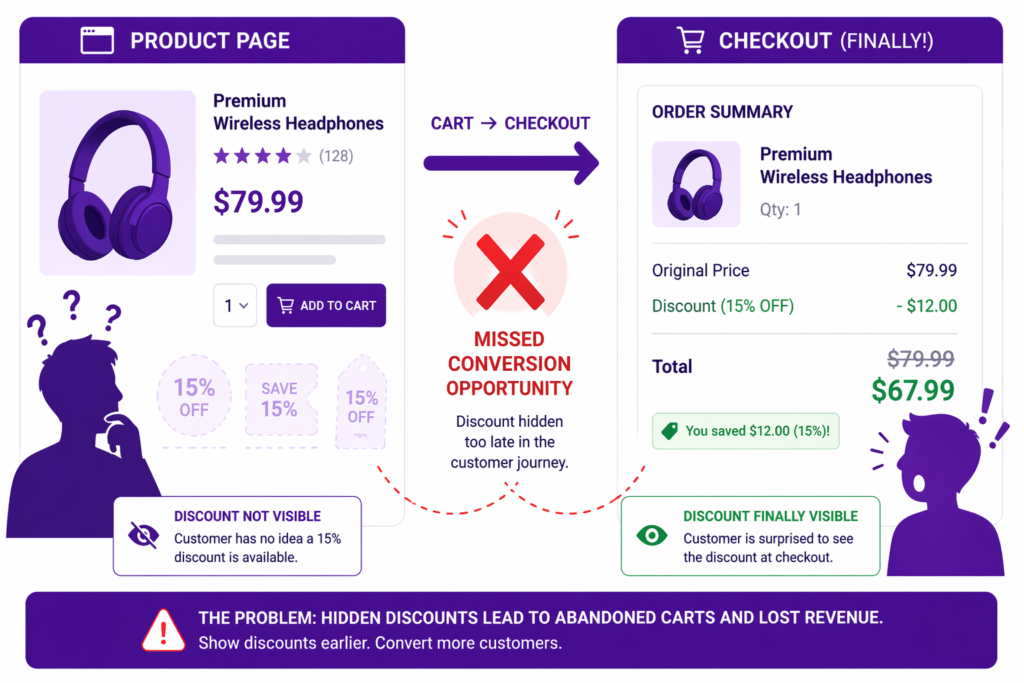 >>rcset=”https://dev.adsgun.com/wp-content/uploads/2026/04/shopify-automatic-discounts-guide-img2-1024×683.png 1024w, https://dev.adsgun.com/wp-content/uploads/2026/04/shopify-automatic-discounts-guide-img2-300×200.png 300w, https://dev.adsgun.com/wp-content/uploads/2026/04/shopify-automatic-discounts-guide-img2-768×512.png 768w, https://dev.adsgun.com/wp-content/uploads/2026/04/shopify-automatic-discounts-guide-img2.png 1536w” alt=”Side-by-side comparison showing a Shopify product page with no visible discount and a checkout page where the 15% Shopify automatic discount is finally revealed, with a ‘missed conversion opportunity’ marker between them.” width=”1024″ height=”683″ />
This creates a perception problem. A customer browsing your store sees a product at full price. They add it to their cart. They proceed to checkout. Only then do they see that they are getting a discount because their cart is over $100. By that point, they have already made the decision to buy. The discount is not influencing the purchase decision, it is just a pleasant surprise at the end.
This is why Shopify’s native approach to automatic discounts works for margin protection (the discount is already baked in by the time they decide) but fails for conversion optimization (the discount is not visible when it matters most, which is when the shopper is deciding whether to buy at all). For a deeper look at the architectural reasons behind this, see our breakdown of why Shopify discounts don’t show until checkout.
Types of Shopify Automatic Discounts
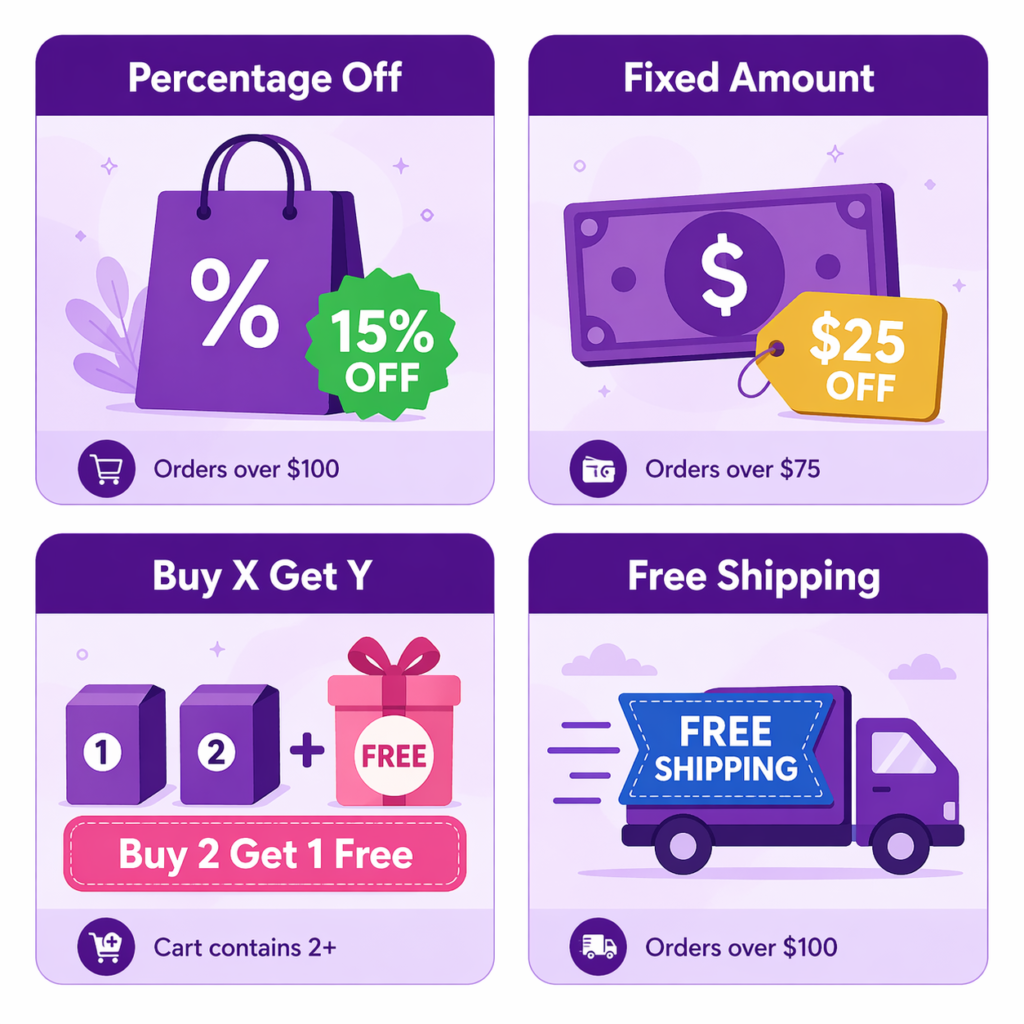
Shopify offers four types of automatic discounts in the admin, each triggered by different cart or customer conditions.
Percentage Discounts
The most common type. “15% off orders over $100” applies a percentage reduction to qualifying carts. These work well for encouraging higher order values because the incentive scales with basket size. Bigger basket means bigger savings.
Fixed Amount Discounts
“$15 off orders over $75” appeals to merchants who want to control the margin hit precisely. Instead of losing 15% on a $200 order ($30), you lose a flat $15. Fixed amounts are also easier for customers to calculate in their head, which can help with perceived clarity.
Buy X Get Y Discounts
“Buy 2 of Product A, get 1 free” or “Buy any 2 items, get 25% off a third” are powerful for inventory management and cross-selling. They cannot be applied freely to every item in the cart. They require triggering conditions like “customer has 2 specific products in cart.” For a step-by-step setup, see our lass=”underline underline underline-offset-2 decoration-1 decoration-current/40 hover:decoration-current focus:decoration-current” href=”https://adsgun.com/shopify-bogo-setup-guide/” target=”_blank” rel=”noopener”>Shopify BOGO promotion guide.
Free Shipping Discounts
- “Free shipping on orders over $100” is increasingly important as merchants compete on total cost.
- Free shipping is psychologically more powerful than an equivalent dollar amount, even if the math is identical.
How to Set Up an Automatic Discount in Shopify Admin
The setup process is straightforward but requires attention to detail. Shopify’s official documentation on automatic discounts covers every field, but here is the practical flow.
Step 1: Navigate to Discounts
In your Shopify admin, go to Discounts in the left sidebar. Click “Create discount.” Choose “Automatic discount” (not “Discount code”).
Step 2: Choose the Discount Type
Select percentage, fixed amount, buy X get Y, or free shipping.
Step 3: Set the Discount Value
Enter 15 for 15% off, or $25 for $25 off. For buy X get Y, specify the conditions: buy quantity, get quantity, and what is discounted.
Step 4: Define Eligibility
This is critical. You can restrict the discount to specific customers (by tag), specific product collections, specific products (by product ID), specific countries, or specific sales channels (Shopify store, Amazon, Facebook Shop, and so on). Most merchants leave eligibility wide open, which means the discount applies to everyone. You can also exclude specific items or collections.
Step 5: Set Minimum Requirements
Define the condition that triggers the discount: minimum order value (“Orders over $100”), quantity of specific items (“Cart contains 2 or more of these products”), or leave blank to apply to all qualifying customers.
Step 6: Combination Rules
This controls whether the automatic discount stacks with others. You can choose to allow it to combine with product, order, or shipping discounts, or block combinations entirely.
Combinations are nuanced. Shopify groups discounts into three classes (product, order, shipping), and the system lets you decide which classes can combine. For most merchants stacking is fine, but if you are running concurrent promotions you need to prevent conflicts. For example, if you have “15% off all orders” and “20% off orders over $150”, both could apply, and the customer gets both. Great for the customer, bad for your margin on $151 orders. For a full breakdown, see our Shopify discount stacking guide.
It is also worth knowing the hard limits set by Shopify: you can have a maximum of 25 active automatic discounts at one time across the store, and a single customer can use up to 5 product or order discount codes plus 1 shipping discount code on the same order.
Step 7: Set Active Dates
Choose when the discount is active. Options include immediate start, scheduled start date, or end date. You can also pair this with our Shopify promotion scheduler guide for recurring weekend or weekly sales.
Step 8: Review and Create
Shopify shows a summary. Click “Save” and the discount is live.
All four types require defining eligibility rules: which customers, which products, which countries, which sales channels. And crucially, all four apply only at checkout in Shopify’s native interface.
The Limitation in Action: Why Visibility Matters
Let’s walk through a real scenario.
A customer lands on your product page. The product is listed at $79.99. They see no indication of a discount. They add it to their cart. Their cart now has $150 of products. They proceed to checkout.
At checkout, the automatic discount triggers: “Spend over $100, get 15% off.” Their order total drops from $150 to $127.50. They see the savings and complete the purchase.
But here is what did not happen. The visibility of that discount never changed their product decision or encouraged them to add more items. If they had seen “Was $79.99, now $67.99” on the product page, they might have been more likely to buy. If they had seen in the cart that they were $5 away from hitting the $100 threshold, they might have added another item to qualify. That dynamic is exactly what drives cart abandonment, and it is why most high-converting Shopify stores combine automatic discounts (for margin control and convenience) with visible pricing (to drive conversion). The visible pricing is what causes the conversion lift.
Combining Shopify Automatic Discounts with Adsgun
This is where the gap between what Shopify offers natively and what actually converts closes.
Adsgun reads active Shopify discounts, including automatic discounts, and displays them in real time on product pages, collection pages, and the cart. When you create an automatic discount in Shopify (“15% off orders over $100”), Adsgun detects it and evaluates whether it applies to the current shopper’s cart. If it does, Adsgun shows the discounted price with strike-through original pricing everywhere on your store.
The process is automatic. You do not need to configure anything twice. Set up the discount in Shopify, and it appears across your storefront instantly.
Here is the result. Your customer sees the discounted price on the product page. The discount is already visible in their mind before they add to cart. In the cart, they see the ongoing savings. At checkout, the discount applies as expected. This removes the “surprise discount at checkout” dynamic and replaces it with “I’m getting a great deal, let me buy this.” For more on how that shift moves the numbers, see our analysis of the revenue impact of showing discounts earlier in the funnel.
Best Practices for Automatic Discounts
When to Use Shopify Automatic Discounts vs Discount Codes
Automatic discounts shine for first-time customer incentives (“Give everyone 10% off their first order”), order-value thresholds (“15% off orders over $100”), channel-specific rules (automatically apply higher margins to organic traffic), and timing-based campaigns (seasonal or flash sales, which support scheduling).
Discount codes are better for attribution (when you need to track which channel or influencer drove the sale), exclusivity (VIP codes, influencer codes), and testing (it is easier to remove a code than an automatic discount). We have a full comparison in our automatic discount vs discount code breakdown.
Stacking Rules
Multiple automatic discounts can combine across discount classes, which is powerful but risky. Consider this scenario:
- Automatic discount 1: 10% off the order for carts over $75 (order class)
- Automatic discount 2: Free shipping for orders over $100 (shipping class)
A $150 order gets both: 10% off plus free shipping. That is great for the customer, but you need to margin this correctly. Check your combination rules. If you want exclusivity, configure the discount so it cannot combine with the other class.
Timing and Scheduling
Automatic discounts support recurring schedules (daily, weekly, seasonal). Set a discount to run only on weekends, or only on Fridays. This is useful for weekend warrior promotions, flash sales that repeat weekly, and seasonal campaigns (holiday, back-to-school).
Margin Monitoring
With multiple automatic discounts active, it is easy to accidentally over-discount. Track your effective margins weekly. If automatic discounts are eating more than your target margin (for example, you want 40% margin and discounts bring you to 35%), adjust the value or reduce the scope.
Analytics: Tracking Automatic Discount Performance
Shopify’s discount reporting shows how much revenue is tied to each discount. Navigate to Discounts, find your automatic discount, and Shopify displays times applied, gross savings (total discount value), and discounted revenue (revenue after discount).
Use this to calculate discount ROI. If a 15% off automatic discount led to $50,000 in discounted revenue with $7,500 in total discount cost, you gave up $7,500 to capture $50,000. That is a 6.67x return, but only if that revenue would not have happened otherwise.
Here is the catch. If 80% of that $50,000 would have sold anyway (at full price), then your actual incremental revenue is only $10,000, and your ROI on the discount alone is negative. This is why visible discounts matter. They drive incremental conversions that would not have happened at full price, which is what our deep dive on Shopify discounts and conversion rate impact shows with real data.
FAQ: Automatic Discounts
Can I set an automatic discount to apply only to a specific product?
Yes. In the eligibility section, select “Specific products” and choose the products you want.
What happens if two automatic discounts apply to the same order?
If both belong to combinable classes (for example, one order discount and one shipping discount) and both have combination enabled, they both apply. If you set “Cannot combine with other discounts” on one, that one takes priority and the other does not apply. Two product discounts cannot stack on the same line item.
Can automatic discounts be applied retroactively?
No. They apply only to orders placed while the discount is active.
How do I delete an automatic discount?
Go to Discounts, find the automatic discount, click it, and click “Delete.” It stops applying immediately.
Do automatic discounts show on my product page?
Not in Shopify’s native interface. This is the core limitation of Shopify automatic discounts. You need an app like Adsgun to display them on product pages and collections. See our guide on why an automatic discount may not be showing on the product page.
Can I use automatic discounts with Shopify Markets?
Yes, and you can set different automatic discounts for different markets and currencies.
What is the maximum discount Shopify allows?
Shopify does not cap the percentage value of a discount. You can technically offer 100% off if you want. Practically, your margin is the real limit. There is, however, a cap on the number of active automatic discounts (25 at a time).
Do automatic discounts affect my analytics?
Shopify tracks automatic discounts separately from revenue, so your “Net Sales” is always accurate. But if you use the compare at price workaround instead, the discount becomes invisible in reporting and your gross numbers get distorted.
Start Showing Your Discounts Everywhere
Automatic discounts are powerful, but only if customers know they exist. The merchants winning in 2026 are combining Shopify automatic discounts with Adsgun’s visible pricing. You get the best of both: margin control through Shopify, conversion lift through visibility.
Your next step is to audit your active automatic discounts. If you have them, install Adsgun and watch your conversion rate improve. If you do not, consider where automatic discounts could protect your margin while you use visible pricing to drive incremental sales.




