
Shopify Discount vs Sale: What’s Actually the Difference?
Shopify treats sale price and discount as two different things, even though merchants use the words interchangeably. The shopify sale price vs discount choice affects whether customers see savings on product pages, whether your analytics stay accurate, and how easily you can end the promotion. Here is what each one actually means and when to reach for which.
Why “Sale” and “Discount” Mean Different Things on Shopify
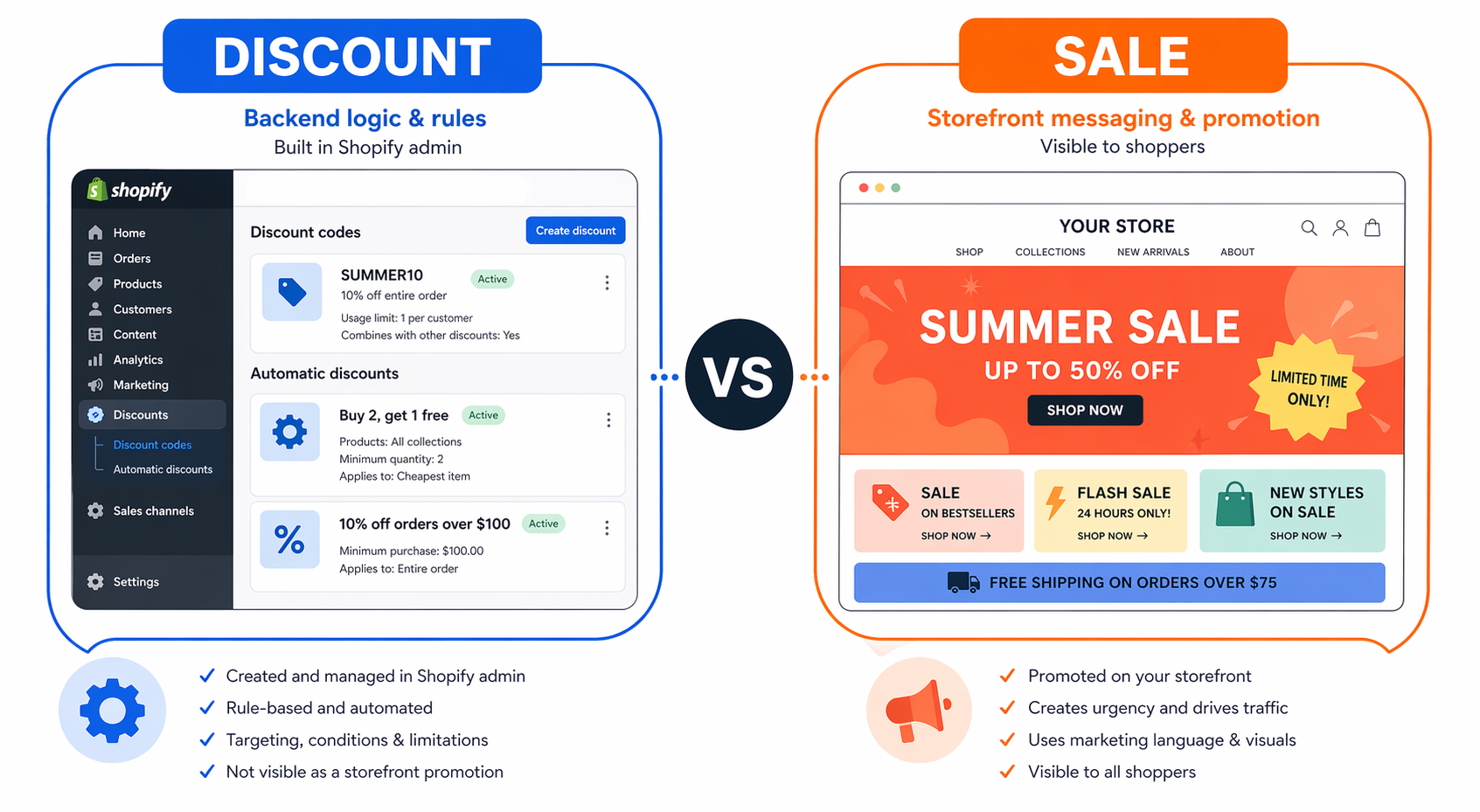
Most merchants use “sale” and “discount” interchangeably, especially when discussing Shopify sale price vs discount. In normal marketing language they are the same thing, both describe a price reduction designed to drive purchases.
Inside Shopify, they are not.
Shopify’s own documentation is explicit about this: “Using sale prices is different from setting up discounts.” The two terms describe two different mechanisms with two different effects on your store. Picking the wrong one for the wrong situation creates real problems, hidden discounts customers never see, distorted analytics that misrepresent your actual revenue, and end-of-sale cleanup work that scales linearly with your product catalog.
The Shopify sale price vs discount decision is one of the first pricing-strategy choices every Shopify merchant has to make, even if they do not realize they are making it. This guide breaks down what each one means, what each one does at the storefront and analytics level, and when to reach for which.
What Is a “Sale Price” in Shopify?
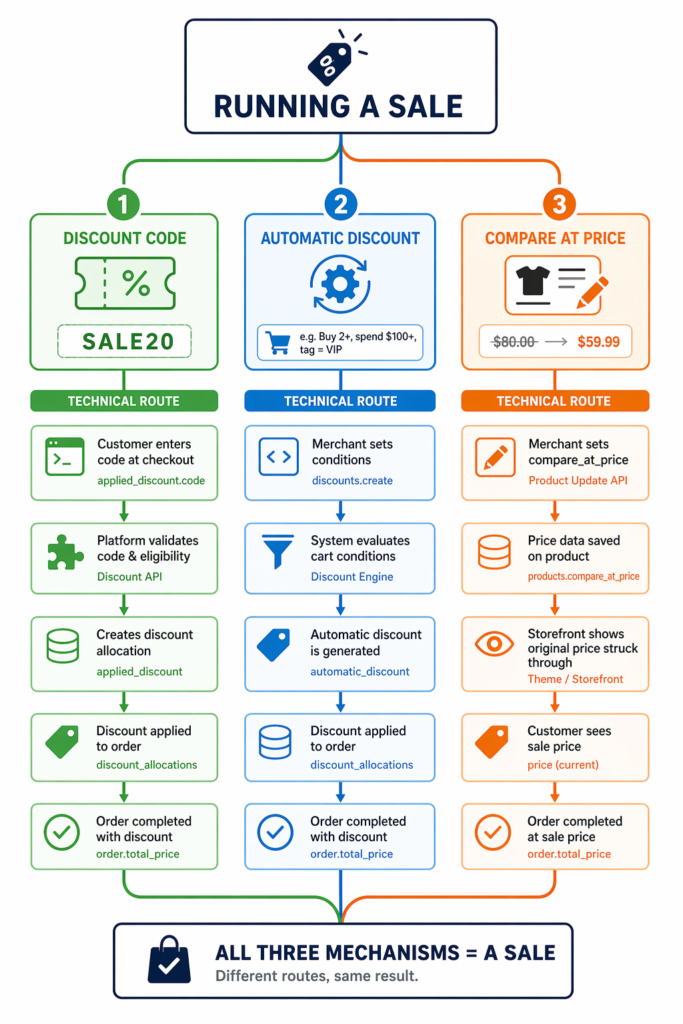
In Shopify’s terminology, a sale price is created by manipulating two product fields directly: Price and Compare-at price. You drop the Price down to your sale figure and set Compare-at price to the original figure. The theme then renders the higher Compare-at price with a strikethrough next to the new lower Price.
This is not configured through any “Sale” feature. There is no dedicated Sale menu in Shopify. There is only the Compare-at price field on the product details page, and the moment that field is filled in correctly, your store is considered to be running a sale on that product.
How it works:
- Go to Products in your Shopify admin
- Edit a product
- Set Price to the sale amount (for example, $40)
- Set Compare-at price to the original amount (for example, $50)
- Save
The product now displays as $50 $40 on the product page and (depending on your theme) on the collection page.
Where sale prices show up:
- Product pages, with strikethrough on the original
- Collection pages, on most themes (provided variant prices are consistent)
- Cart, on some themes
- Search results, on some themes
- Checkout, the sale price is what the customer actually pays
Where they do not show up:
As a discount line item in Shopify Analytics. The lower price becomes the new “regular” price as far as Shopify reporting is concerned.
This last point is the most common misunderstanding about Shopify sale prices, and it is why this whole comparison matters.
What Is a “Discount” in Shopify?
A discount is a separately tracked price reduction managed through the Discounts menu in your Shopify admin (Shopify > Discounts). The product’s Price field stays at the original amount. The discount applies as its own line item at checkout.
Discounts come in two flavors:
- Discount codes – the customer types a code at checkout (‘SUMMER20’, ‘VIP15’, and so on). Useful when you want per-channel attribution or restricted access. Covered in depth in our automatic discount vs discount code guide.
- Automatic discounts – apply themselves when cart conditions are met (for example, “10% off carts over $100” or “20% off for customers tagged VIP”). No code entry required.
Both are real Shopify discounts. Both reduce the final price the customer pays. Both show up in Shopify Analytics as their own line items, with the original product price preserved as gross revenue.
Where discounts show up:
- At checkout, applied as a tracked line item
- In Shopify Analytics under Sales by discount
- In financial reports, as a distinct discount-spend figure
Where they do not show up by default:
- On product pages
- On collection pages
- In the cart (on most themes)
The discount stays invisible until checkout unless you use a third-party app to display it earlier. Shopify’s own help docs confirm this: “To display savings from discounts with crossed-out (strikethrough) prices on product pages and collection pages, you need to use a third-party discount app, or hire a Shopify Partner to build a custom solution for you.”
That single line is the entire reason apps like Adsgun exist.
Shopify Sale Price vs Discount: The Real Trade-Offs
The shopify sale price vs discount choice is not really about which one is better. Each one wins on a different axis. Here is what you actually trade when you pick one.
Trade-Off 1: Visibility
Sale price wins. Compare-at price renders strikethrough pricing on product pages and collection pages out of the box on most themes. Customers see the savings before they ever reach the cart, which is exactly when buying decisions get made.
Discounts lose. Native Shopify discounts only appear at checkout. Customers browsing your store at full price never know there is a deal active until they have already committed to add-to-cart. 70% of carts get abandoned, and most of those visitors never even reach the cart, so a hidden discount is invisible to the audience that needed to see it most.
Trade-Off 2: Analytics Accuracy
Sale price loses. When you drop the Price field, Shopify treats the new lower number as the product’s actual price. A $50 product sold at $40 shows as $40 in gross revenue, with no discount line item. Multiply this across a big sale and your reported revenue runs 25 to 40% lower than it actually is, and your discount spend disappears entirely from reporting.
Discounts win. A real Shopify discount preserves the full $50 as gross revenue and records the $10 as discount spend on its own line. Same money in the bank, completely accurate reporting. If you ever plan to raise capital, sell the store, pay franchisees, or just trust your own dashboard, this matters.
Trade-Off 3: Reverting at the End of the Promotion
Sale price wins on a single product. Edit two fields, save, done.
Discounts win on scale. One discount applied to a collection covers thousands of products with no per-product editing. Compare-at price requires touching every product or relying on bulk CSV operations.
Shopify Sale Price vs Discount: When to Use Each
Use a Sale Price (Compare-at Price) for:
- Permanent price reductions. Your costs dropped, your strategy shifted, the product is now $40 forever. Compare-at price documents the old retail value.
- End-of-line clearance. $100 jeans down to $25, never going back up. Compare-at price stays set indefinitely.
- Seasonal markdowns that effectively become the new price. End-of-season inventory you do not plan to revert.
- Brand repositioning. You moved a product into a lower price tier as a strategic decision.
The common thread: any price change you would not be reverting in two weeks.
Use a Discount (Code or Automatic) for:
- Time-limited promotions. A weekend flash sale, a month-long campaign, a 24-hour drop. Anything with a defined end.
- Channel-specific offers. Email subscribers get one rate, paid-ad traffic gets another, Instagram followers get an exclusive third option.
- Influencer partnerships. Each influencer gets a unique code so you can attribute revenue per partner.
- Customer-segment offers. VIPs see 20%, wholesale sees 50%, retail sees full price, all on the same product page based on customer tag.
- Stacked promotions. Free shipping plus 20% off plus a $10 referral credit all combining at checkout, which is only possible with discounts using Shopify’s combinations system.
The common thread: any price change you intend to end, target, or stack.
The Hybrid Trap: Mixing Sale Price and Discount Codes
Some stores run both at the same time, a sale price already set on the product, plus a discount code applied at checkout. This combination almost always creates customer confusion.
The product page shows $50 $40 (compare-at price reduction). At checkout, the discount code applies an additional 20% off, taking the total to $32. The customer’s mental math goes: “Was this $40 or $32? Am I getting both? Was the original ‘sale’ even real?”
This hesitation costs conversions on motivated buyers. The cleaner approach is to pick one mechanism per product and stick to it. For a deeper look at when each one wins, see our compare at price vs discount code analysis.
The Best of Both Worlds: Real Discounts Plus Visible Display
The honest summary of the shopify sale price vs discount comparison is that neither one alone is ideal. Sale price gives you visibility but distorts your analytics and is painful to reverse. Discounts give you clean analytics and easy reversal but stay invisible until checkout, by which point most of your traffic has already left.
What you actually want is the visibility of a sale price combined with the analytics integrity and flexibility of a real Shopify discount. That combination is exactly what Adsgun is built to provide.
Adsgun reads your real Shopify discounts (codes and automatic) and renders them as strikethrough pricing on product pages, collection pages, cart, and checkout – all without touching your product’s Price or Compare-at price fields. The customer sees the same `$50 $40 Save $10` display they would get from a sale price, but the discount lives in Shopify’s discount engine, so:
- Gross revenue reports show $50 with $10 discount spend tracked separately
- Reverting is a one-click toggle, no product cleanup
- Multiple discounts can stack and target different audiences simultaneously
- The promotion has a clean end date that fires automatically
That is the combination most growing Shopify stores want, the visibility merchants reach for sale prices to get, plus the analytics and operational flexibility they would have lost.
Best Practice: Use the Right Terminology in the Right Context
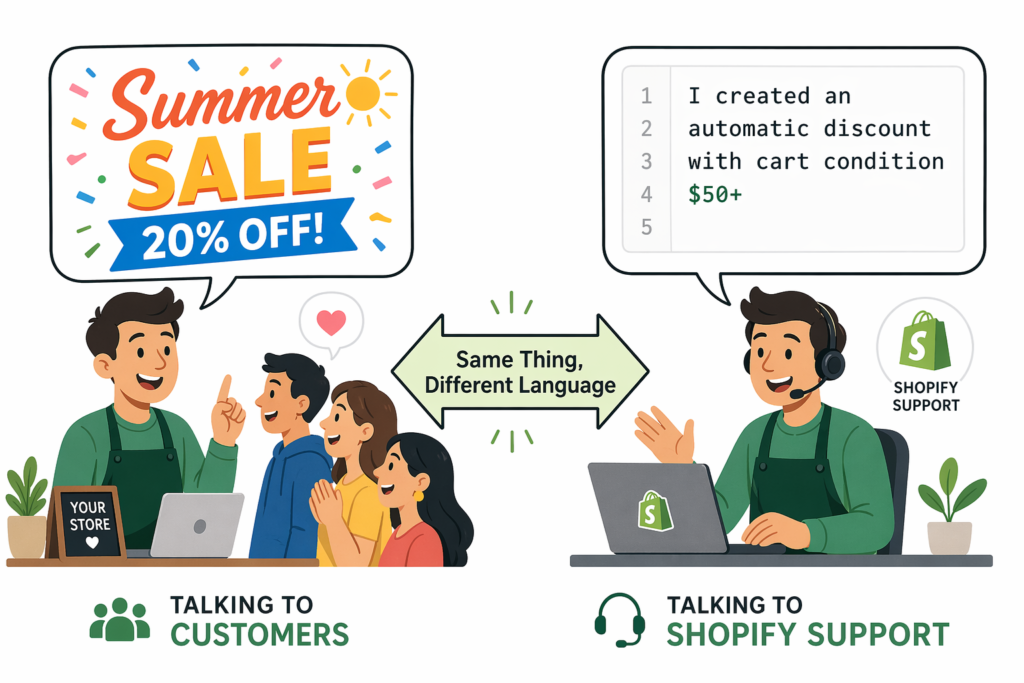
There is no need to teach customers the difference between a sale price and an automatic discount. To them, it is all the same thing, a price reduction during a specific window. Marketing copy should stay simple and emotional: “Summer Sale,” “Flash Sale,” “VIP Pricing.” Customers respond to those terms, not to the underlying mechanic.
But internally, with your team, your developers, and especially with Shopify support, use the technical term that matches what you actually built. If you opened a ticket saying “my sale is not showing” and you actually mean “my discount code is not displaying as strikethrough on product pages,” the support agent is going to spend half the conversation just figuring out what mechanism you used. Saying “I created an automatic discount with a cart-value condition” gets you to the answer faster.
Use one language with customers, the other with Shopify. The Shopify sale price vs discount distinction matters where the technical mechanic actually does the work, not in your storefront copy.
FAQ: Sale Price vs Discount on Shopify
Q: Are “sale price” and “compare at price” the same thing?
In Shopify terminology, the sale price is what you set in the Price field, and the compare-at price is what you set in the Compare-at price field. They work together, the lower Price is the sale price the customer pays, and the higher Compare-at price is the strikethrough reference. Many merchants and third-party guides use “sale price” loosely to mean the entire compare-at-price mechanism.
Q: Does Shopify track sale prices in analytics?
Not as discounts. Shopify treats the Price field as the product’s actual price, so a sale price shows up in Sales reports as gross revenue at the lower amount, with no discount line item. This is why running active promotions through compare-at price distorts your reporting.
Q: Can I run a discount code on a product that already has a sale price set?
Technically yes, but it usually creates customer confusion (the hybrid trap described above). For active promotions, pick one mechanism. Reserve sale prices for permanent reductions and use real discounts for everything else.
Q: Can I show a sale price for one customer segment but not another?
No. Compare-at price is a single value per variant, visible to all visitors who land on the product page. To show segment-specific pricing (VIP, wholesale, email subscribers), you need real Shopify discounts targeted by customer tag, URL parameter, or login state.
Q: Why does Shopify’s documentation use “sale price” if there is no Sale feature?
Because the strikethrough rendering on the storefront is what shoppers and merchants alike call “putting something on sale.” The mechanism is technically compare-at price + Price modification, but the customer-facing label has always been “sale.” Shopify’s docs reflect both, the term shoppers use (“sale price”) and the field name in admin (“Compare-at price”).
Q: If I want sale-price visibility AND clean analytics, what do I do?
Use real Shopify discounts (codes or automatic) for the discount itself, and use an app like Adsgun to render the strikethrough display on product pages. That gives you visibility equivalent to a sale price without touching the underlying product data, and analytics stay accurate.
The Takeaway
In Shopify, sale price modifies product data directly and gives you visible strikethrough pricing at the cost of distorted analytics and painful reverts. Discount lives in a separate system, preserves analytics, reverts cleanly, and supports targeting and stacking, but stays invisible until checkout unless you add a display layer.
Use sale price for permanent reductions and clearance. Use discounts for everything time-limited, audience-targeted, or stackable. And if you want both visibility and clean data on the same campaign, run a real discount and display it visibly with Adsgun. That is how the trade-off resolves for most growing Shopify stores.




