
Best Shopify Discount App: Buyer’s Guide for 2026
Picking the best Shopify discount app is harder than it looks. Two apps can promise the same flash sale and behave very differently under the hood. This buyer's guide walks through the 8 criteria that actually matter, so you can evaluate any app on the App Store with confidence.
Why Choosing a Discount App Is Harder Than It Looks
The Shopify App Store has dozens of discount apps. They all promise similar things: flash sales, scheduled discounts, strike-through pricing, urgency timers. From the outside, they look interchangeable. They are not. The right way to find the best Shopify discount app for your store is not to read review counts or compare feature lists. It is to understand the architectural choices each app makes under the hood, because two apps that show the exact same “$50 $62.50” on a product page can produce wildly different outcomes for your analytics, your scheduling flexibility, and your ability to scale beyond simple flash sales.
This buyer’s guide gives you a concrete 8-criteria framework to evaluate any discount app on the Shopify App Store. Run any candidate through these criteria, and the right answer for your store will become obvious.
The Core Architectural Question Every Discount App Answers
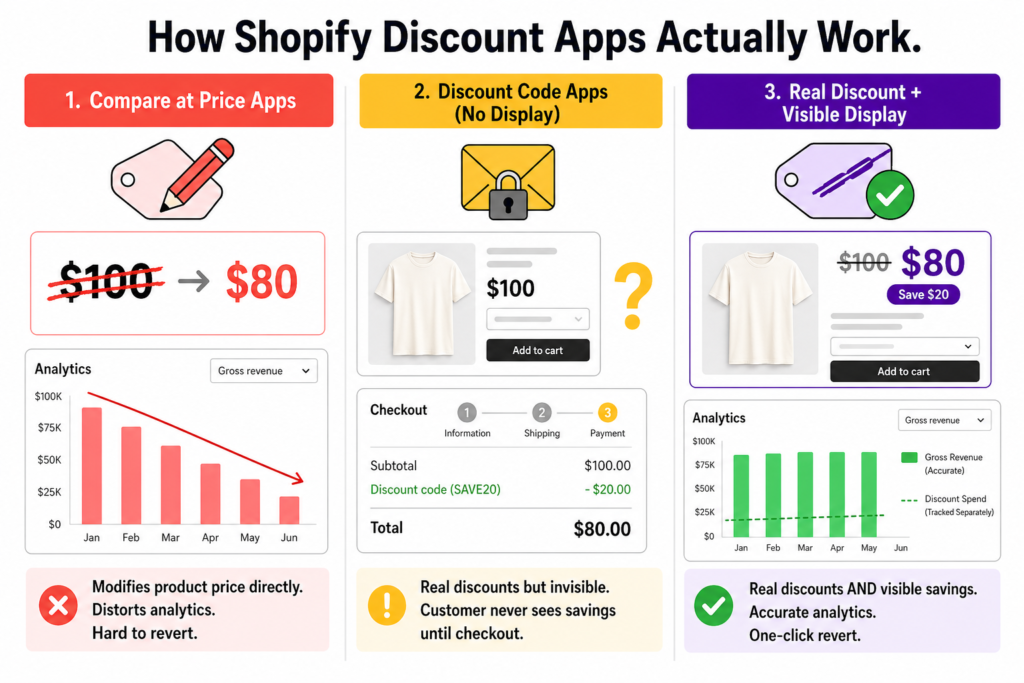
Before getting to the criteria, there is one question that determines almost everything else about a discount app: how does the app create the discount in the first place?
There are three approaches in the market, and each has real consequences:
Approach A: Compare-at-price-based apps
These apps rewrite your product’s actual selling price and use Shopify’s compare at price field to display the original. The strike-through is real because the price is literally lower in your product database.
The trade-off: when the actual price changes, Shopify’s analytics report the new lower price as gross revenue. Discount spend disappears as a tracked metric. Reverting requires manually restoring every modified product, which can leave stuck prices behind if anything goes wrong.
Approach B: Discount-code-based apps with no display layer
These apps create real Shopify discounts (codes or automatic discounts) but rely on Shopify’s default behavior, which means the discount stays hidden until checkout. Analytics stay clean, but customers never see the savings on product pages or in the cart.
The trade-off: most shoppers never reach the cart page, so a hidden discount might as well not exist.
Approach C: Real-discount apps with a visibility layer
These apps use real Shopify discounts (preserving analytics) AND inject strike-through display on product pages, collection pages, and cart. Customers see the savings up front, the analytics stay accurate, and reverting is a single toggle.
This is the architecture Adsgun uses, and it is also the architecture you want when picking the best Shopify discount app for any store that values both customer experience and clean financial reporting.
Now that you know what to look for at the architectural level, here are the 8 criteria to score any candidate app.
The 8 Criteria for the Best Shopify Discount App
Criterion 1: Discount Mechanism (Real Discount vs Compare at Price)
The single most important question to ask any app: does it modify the product’s price, or does it create a real Shopify discount?
- Why it matters: apps that modify compare at price look fine on day one, but six months later your gross revenue reports under-state your actual product value, your discount spend is invisible, and uninstalling the app can leave stuck sale prices on your products.
- What to look for: the app should create real Shopify discounts (codes or automatic discounts) and never overwrite your product’s selling price.
- How to test: install the app on a development store, run a 20% off promotion, then check Shopify Analytics → Reports → Sales by Discount. Real discounts appear as line items here. Compare at price modifications do not.
Criterion 2: Display Layer Across the Storefront
Even if the app uses real discounts, customers will not see the savings unless something renders strike-through pricing on product pages, collection pages, and the cart.
- Why it matters: 70% of carts are abandoned, and most of those visitors never even reached the cart in the first place. If the discount is invisible until checkout, it is doing nothing for your add-to-cart rate.
- What to look for: the app should display savings on every page where price is shown, not just at checkout. This includes product pages, collection pages, the cart, and checkout itself.
- How to test: set up a test promotion and view a product page in an incognito window. The strike-through should be visible without entering a code.
Criterion 3: Promotion Type Variety
A real flash sale is the simplest case. The best Shopify discount app supports many more.
- Why it matters: as your store grows, “20% off everything” stops being your only campaign. You need Instagram-exclusive offers, Google Ads landing-page discounts, VIP customer pricing by tag, B2B wholesale pricing, and loyalty tier discounts. One-trick apps cannot grow with you.
- What to look for: at minimum, the app should support public promotions, URL-targeted promotions, customer-tag-based promotions, and private link promotions.
- How to test: ask the support team or check documentation for “promotion types.” If the only answer is “scheduled discounts,” the app is single-trick.
Criterion 4: Scheduling and Automation
You should not have to be awake at midnight to flip a sale on or off.
- Why it matters: time-limited promotions are the most common pattern, and manual toggling introduces human error every time. A 24-hour flash sale that runs 26 hours because nobody disabled it on time is a margin leak.
- What to look for: scheduled start and end dates, recurring promotions (weekly or monthly), and the ability to chain promotions back to back.
- How to test: schedule a promotion to start in 5 minutes and end 5 minutes later. Verify it activates and deactivates without manual intervention.
Criterion 5: Analytics Accuracy
Your year-end financial reports depend on this one.
- Why it matters: if the app distorts gross revenue (Approach A above), every margin calculation, every COGS report, and every investor or franchisee report you generate will be wrong. Compounded over a year, the gap between reported and actual revenue can run into tens of thousands of dollars.
- What to look for: Shopify Analytics should show the full product price as gross revenue and the discount as a tracked discount spend. Both numbers visible, both accurate.
- How to test: run a sample promotion for 7 days, then pull Shopify’s “Total sales” and “Discounts” reports. If discounts column shows $0, the app is distorting your data.
Criterion 6: Multi-Channel Capability
Most stores sell across at least three channels: paid ads, email, and social. Each channel deserves its own discount strategy.
- Why it matters: a single “20% off sitewide” code that works for Instagram followers, paid Google traffic, and email subscribers is not really three campaigns, it is one campaign you cannot measure separately. You need different links, different parameters, and different tracking per channel.
- What to look for: URL-targeted promotions (so paid traffic sees a specific deal), private links for social audiences, and the ability to attribute revenue back to each channel.
- How to test: check whether the app can create three different promotions that each activate based on a different URL parameter (gclid, utm_campaign, etc.).
Criterion 7: Stacking and Combination Logic
Real promotional strategies stack: a sitewide percentage, a free shipping offer, a VIP bonus, and a referral incentive often need to coexist.
- Why it matters: Shopify natively supports up to 5 product/order discount codes plus 1 shipping code per order, but each code needs explicit “Combines with” settings, and not every app gets this right. Apps that bypass Shopify’s discount engine often cannot stack at all.
- What to look for: the app should respect Shopify’s native combination rules and let you configure how each promotion combines with others.
- How to test: create two promotions, set them as combinable, and verify they actually stack at checkout without overwriting each other.
Criterion 8: Revert Effort and Risk
What happens when you uninstall the app or end a sale?
- Why it matters: apps that modify product data leave traces. App Store reviews of compare-at-price-based apps frequently mention “stuck sale prices” that remained after uninstall, requiring manual cleanup of every affected product. Apps that use real Shopify discounts revert with a single toggle because they never touched your product data.
- What to look for: the app should be reversible with one click, and uninstalling should not leave any modifications on your products.
- How to test: read the most recent 1-star reviews on the Shopify App Store listing. Look for the words “stuck,” “still showing,” or “after uninstall.” If you see those, the app modifies product data and revert is risky.
The Buyer’s Scorecard
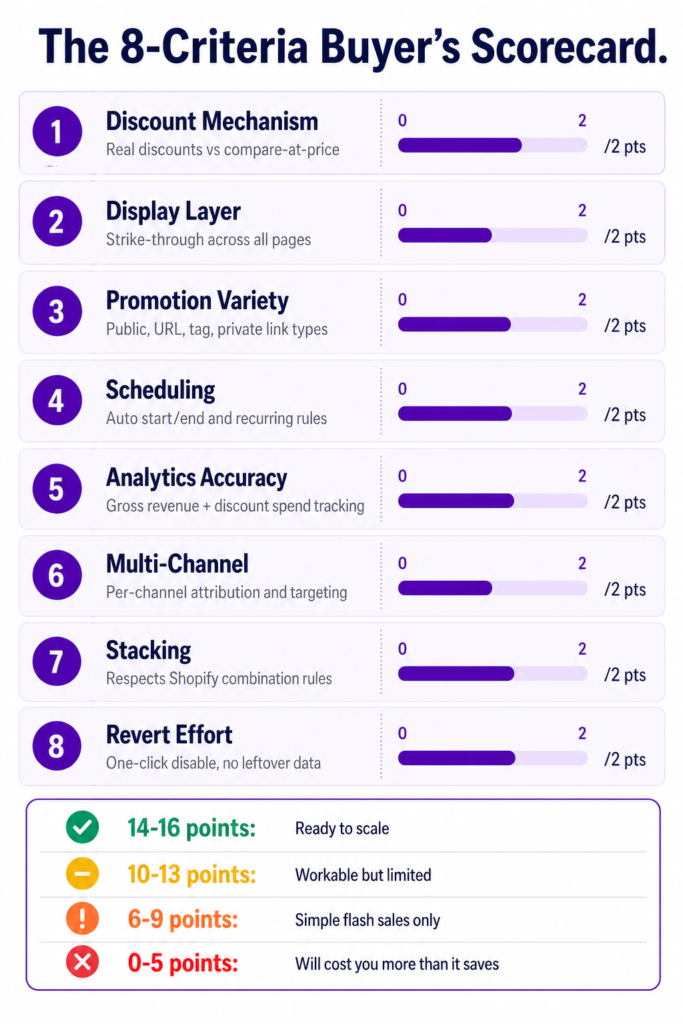
Run any discount app you are considering through this scorecard. Award 0-2 points per criterion (0 = fails, 1 = partial, 2 = passes cleanly).
| # | Criterion | Question to Ask | Max Points |
|---|---|---|---|
| 1 | Discount Mechanism | Does it create real Shopify discounts without modifying product prices? | 2 |
| 2 | Display Layer | Does it show strike-through pricing on product pages, collections, and cart? | 2 |
| 3 | Promotion Variety | Does it support public, URL, customer-tag, and private-link promotions? | 2 |
| 4 | Scheduling | Does it support scheduled and recurring promotions without manual toggling? | 2 |
| 5 | Analytics Accuracy | Does Shopify Analytics show gross revenue + discount spend correctly? | 2 |
| 6 | Multi-Channel | Can each marketing channel have its own targeted promotion and attribution? | 2 |
| 7 | Stacking | Does it respect Shopify’s native combination rules and stack cleanly? | 2 |
| 8 | Revert Effort | Is uninstalling or disabling a one-click action with no leftover data? | 2 |
Scoring guide:
- 14-16 points: ready to scale. This is the architecture you want for a serious store.
- 10-13 points: workable for now, but expect friction as you grow.
- 6-9 points: acceptable only for the simplest single-channel flash sales.
- 0-5 points: the app is going to cost you more than it saves once you grow past hobby-store volume.
How Adsgun Scores on the 8 Criteria
For full transparency, here is how Adsgun answers each criterion. The point of the scorecard is not “Adsgun wins”, it is for you to apply the same rigor to every app you consider.
| # | Criterion | Adsgun Approach | Score |
|---|---|---|---|
| 1 | Discount Mechanism | Real Shopify discounts. No compare at price modifications. | 2/2 |
| 2 | Display Layer | Strike-through pricing on product pages, collections, cart, and checkout | 2/2 |
| 3 | Promotion Variety | Public, URL-targeted, Customer Account, and Private link types | 2/2 |
| 4 | Scheduling | Scheduled start/end and recurring rules | 2/2 |
| 5 | Analytics Accuracy | Real discounts show as line items in Shopify Analytics | 2/2 |
| 6 | Multi-Channel | URL parameters per channel (gclid, fbclid, utm_*) with attribution | 2/2 |
| 7 | Stacking | Respects Shopify’s native combination rules | 2/2 |
| 8 | Revert Effort | One-click disable, no product data modifications | 2/2 |
Total: 16/16. That is what an architecture-first discount app looks like.
This is not the only way to build a discount app, and there are scenarios where simpler tools fit better (single-channel flash sale stores with no analytics requirements, for example). But for any store planning to grow beyond pure flash sales, the 16/16 architecture is what you want to be running on.
What to Do Next
If you are evaluating discount apps right now, here is the workflow:
- Shortlist 3-4 apps from the Shopify App Store that fit your basic needs (flash sales, scheduling, etc.)
- Score each one against the 8 criteria above. Ask the support team direct questions if the documentation is unclear.
- Test the top scorer on a development store. Run a real promotion. Pull the Shopify Analytics reports afterward and verify the data looks clean.
- Read recent 1-star reviews of each candidate. Look for warning signs: “stuck prices,” “sales not ending,” “analytics not showing,” “support not responding.”
- Pick the highest-scoring app that also has clean reviews. Score and reviews together tell you what you need to know.
If you go through this process and end up choosing Adsgun, great. If you end up with a different app, even better. The goal of this guide is not to push a single name. It is to make sure that whatever you pick, you picked it for the right structural reasons, not because it had the prettiest screenshots on the App Store listing.
The best Shopify discount app for your store is the one that scores 14+ on this rubric and still has 4.5+ stars on the App Store. That intersection is small, but it is where the right tools live.




