Shopify Black Friday 2026: Start Preparing Now (Complete Strategy)
BFCM 2026 prep doesn't start in October. The merchants who win Black Friday plan in July. Here's your complete 12-week countdown.
Why Your BFCM 2026 Strategy Needs to Start 3 Months Early
A strong BFCM 2026 strategy isn’t built on willpower. It’s built on lead time. Every component below has a fixed runway, and skipping that runway is what turns a planned campaign into a panicked one
SEO Content
A blog post takes time to rank in Google. If you publish a post in October about “black friday tips,” it won’t rank for the search term “black friday deals” by November. But if you publish it in August, Google has 3 months to crawl, index, and build authority. It ranks during peak search season. Most sites need 3 to 6 months for SEO content to reach results, which is exactly why August is the latest reasonable starting point.
Email List Building
Your email list is your most profitable traffic channel during BFCM. But building it takes time. If your current list is 5,000 subscribers and you want 15,000 for VIP early access, you need months of content, lead magnets, and organic growth.
System Testing
If you implement a new discount system (like Adsgun) three weeks before BFCM, you’ll be learning it under pressure. You’ll make mistakes. You’ll have to fix things while traffic is peaking. If you implement it in July, you’ll have tested it on summer sales, ironed out all the bugs, and gone live on BFCM with absolute confidence.
Inventory Planning
Buying inventory for BFCM happens in summer. If you don’t know what conversion improvement to expect (because you haven’t tested new discount strategies), you’ll under-buy or over-buy. Testing in July and August informs your August to September buying decisions.
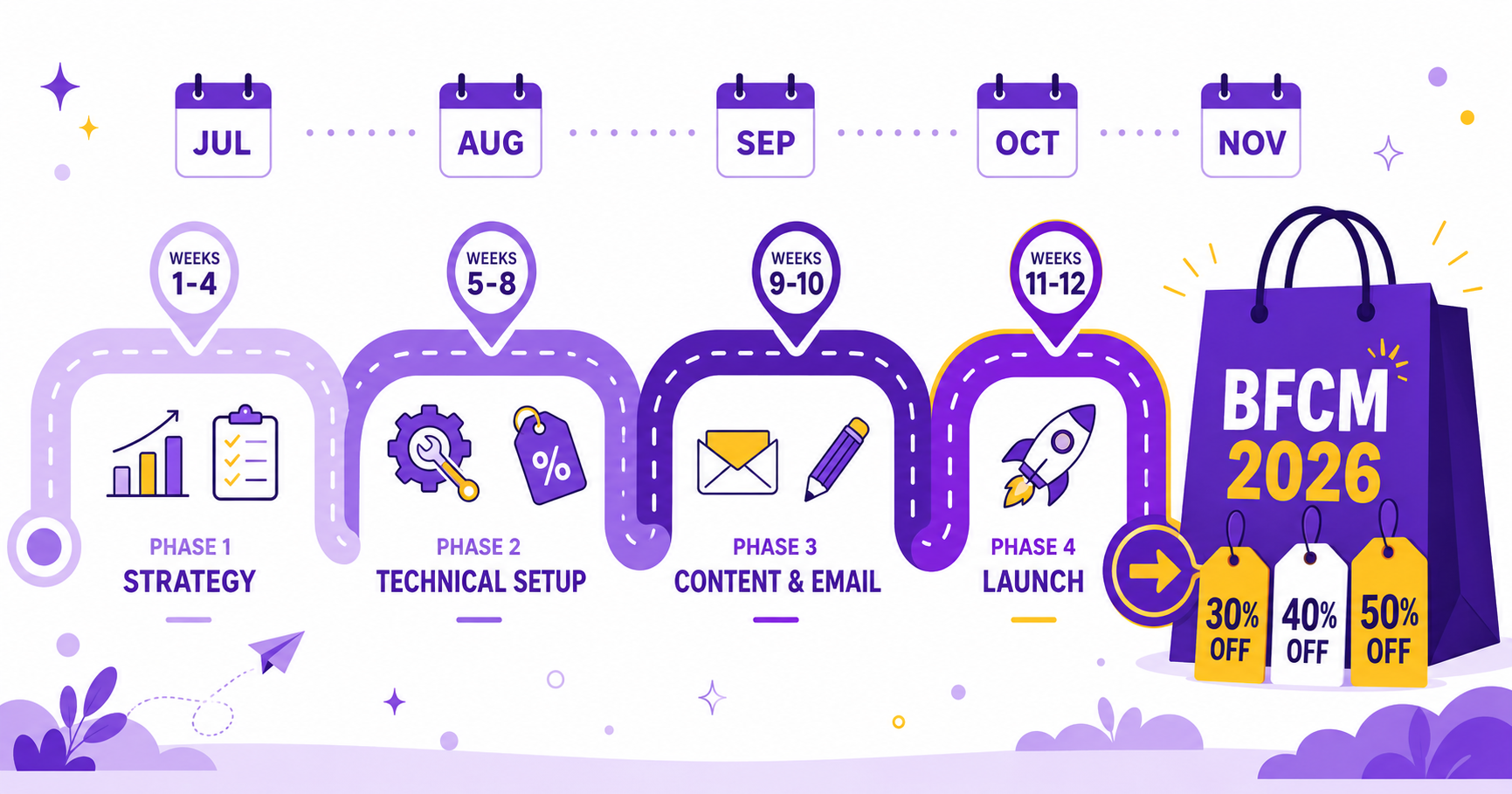
The 12-Week BFCM 2026 Countdown
This is the playbook that separates merchants who scramble from merchants who scale. Each phase below builds on the previous one, so don’t skip ahead.
Weeks 1 to 4: Strategy Phase (July 1 to 31)
Week 1: Analyze Last Year
Pull last year’s BFCM data. Don’t estimate. Look at the actual numbers:
- Total visitors during BFCM window
- Conversion rate
- AOV
- Total revenue
- Top-performing products
- Top-performing traffic channels
- Cart abandonment rate
This is your baseline. Every improvement you make will be measured against it. For inspiration, see how Tire Streets generated $37,800 more revenue on Black Friday without buying a single extra click of traffic.
Week 2: Define Discount Strategy
Decide on your discount approach for BFCM 2026. What will be your structure?
Recommended approach (3-tier):
- VIP Early Access: 24 hours before public sale. Email subscribers only. 40% off.
- Public Sale: 4-day weekend. 30% off everything. Heavy promotion across all channels.
- Last Minute Clearance: Final 2 days before the end. 50% off remaining inventory. High urgency.
Why this structure? It captures high-LTV customers (email subscribers) at premium margins first. Then it captures price-sensitive customers at public discount. Then it clears remaining inventory aggressively before the season ends.
Assign percentages and dates to each tier.
Week 3: Project Impact and Inventory
Based on your baseline and your discount strategy, what do you expect?
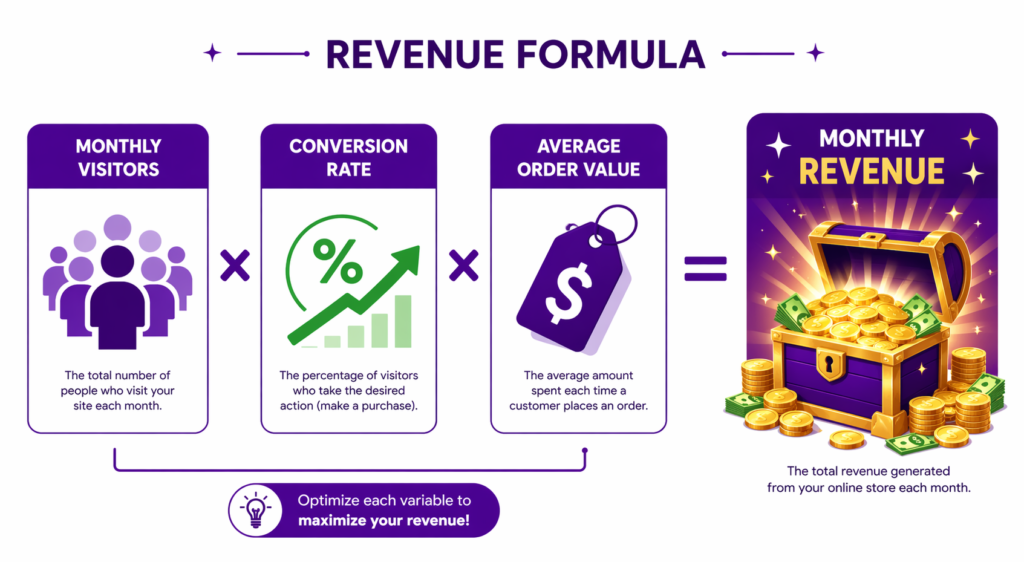
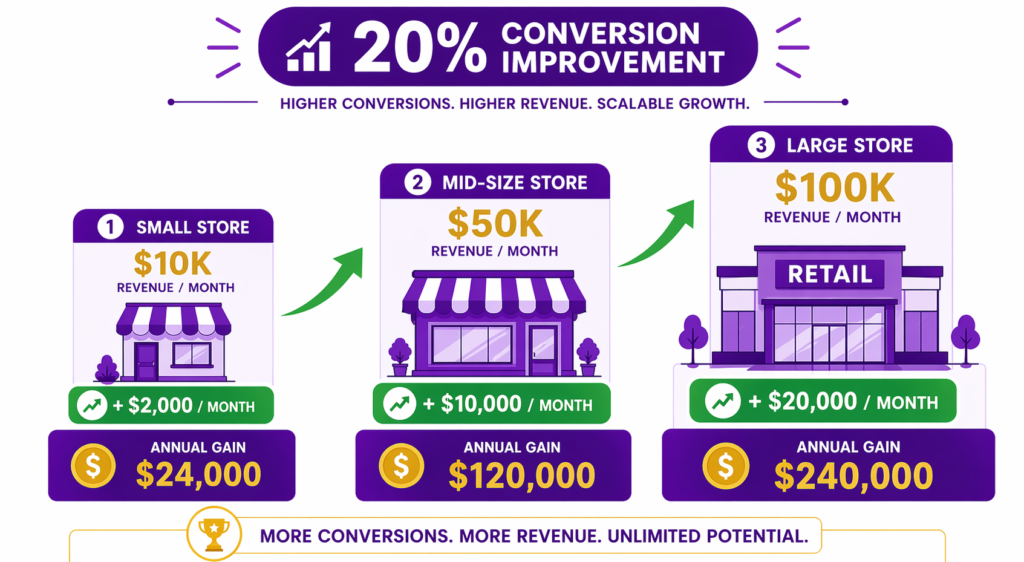
If last year’s conversion was 2.8% and you implement visible discount pricing (which delivers around 20% improvement on average), what’s your new conversion rate? About 3.36%. If your AOV was $200 last year, what might it be with free gift thresholds? Perhaps $240 (20% increase from bundling).
Project out:
- Expected visitors (same as last year, or growth estimate)
- Projected conversion rate (with discount strategy improvements)
- Projected AOV (with gift thresholds and bundles)
- Projected revenue (multiply it out)
- Projected orders
This informs inventory buying. If you project 40% more orders than last year, you need 40% more inventory of top SKUs. For more on the conversion math, here’s how to grow Shopify conversion rate without spending more on traffic.
Week 4: Map the Customer Journey
Write down the entire customer journey:
- Where does traffic come from? (email, paid ads, organic, social)
- What message does each channel carry? (email says “VIP early access,” Instagram says “40% off”)
- What does the customer see on landing? (product pages, collection pages, homepage)
- At what point do they see the discount? (product page, cart, checkout)
- How is urgency communicated? (countdown timer, “limited inventory,” deadline)
- Where do they convert? (checkout completion)
According to Baymard Institute, around 70% of all online shopping carts are abandoned, and one of the biggest reasons is unexpected costs at checkout. Document every step of the journey in detail. This becomes your implementation roadmap.
Weeks 5 to 8: Technical Setup Phase (August 1 to 31)
Week 5: Install and Configure Discount Tool
Install Adsgun (or equivalent tool) now. Not in October. Now.
Configure:
- Product page discount display settings
- Collection page display
- Cart display
- Checkout display
- Color scheme (match your brand)
- Badge text customization
Don’t wait until BFCM to learn the interface. Spend this week becoming an expert.
Week 6: Set Up VIP Promotion
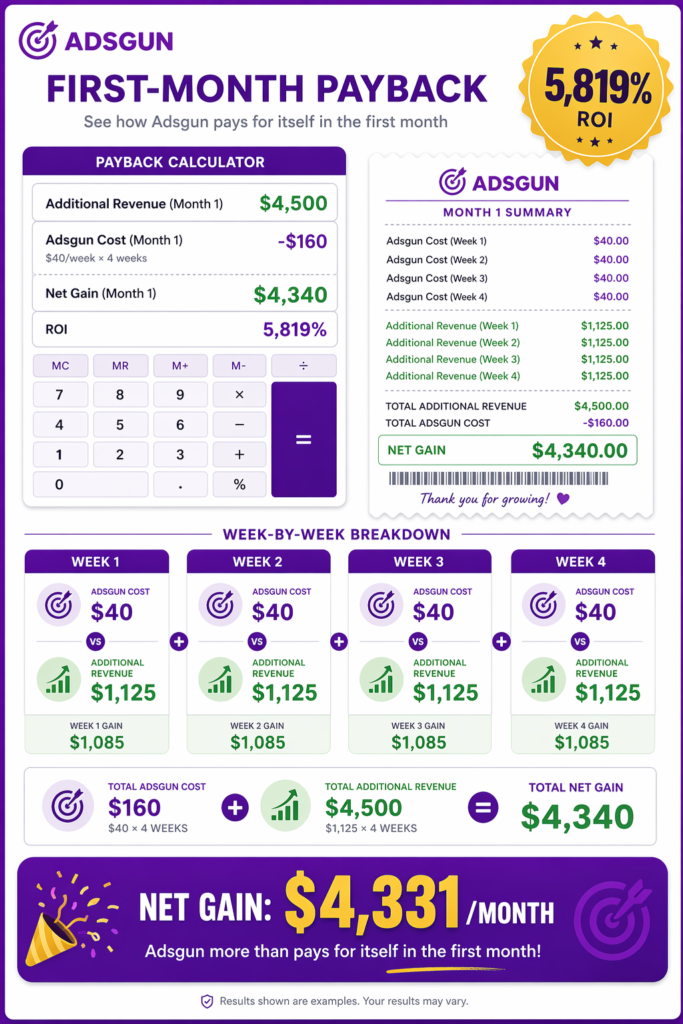
Create your VIP early access promotion:
- 24-hour window before public sale
- 40% discount
- Customer Account promotion type (applies to tagged customers)
- Scheduled to auto-start 24 hours before public sale
Test it. Tag yourself as VIP. Verify the discount applies correctly. Walk through the entire checkout flow and confirm the discount displays at every step. If you’re new to tag-based promotions, here’s a step-by-step guide to Shopify VIP customer discounts.
Week 7: Create Public Sale Promotions
Create your public sale promotion:
- 30% discount (or your chosen percentage)
- Starts at a specific time (typically 12:01 AM Thursday of BFCM week)
- Ends at a specific time (typically 11:59 PM Monday of BFCM weekend)
- All customers eligible
- Scheduled to auto-start and auto-end (no manual intervention)
The auto-start mechanic is critical. You don’t want to be flipping switches at midnight on Thanksgiving. Adsgun’s Shopify promotion scheduler handles the timing automatically.
Test across all traffic scenarios:
- From email link: discount applies
- From ad link: discount applies
- From organic search: discount applies
- From direct visit: discount applies
Week 8: Test on a Real Summer Sale
Run a summer promotion (if you have one scheduled). Use the same discount tool, same display settings, same discount mechanism you’ll use for BFCM.
Measure:
- Discount displays correctly: yes or no
- Conversion rate improvement: X%
- Revenue impact: $Y
- Any bugs or issues: note them
This real-world test is invaluable. You’ll catch problems now, not on BFCM.
Weeks 9 to 10: Content and Email Phase (September 1 to 15)
Week 9: Create BFCM 2026 Strategy Content
Blog posts, email templates, social media content. This is the content that will work in your favor during peak season.
Write about:
- BFCM gift guides
- Category-specific discount content
- How-to guides related to your products
- Listicles (10 reasons to buy our product)
- Customer testimonials and reviews
This content drives organic traffic during BFCM. Google ranks fresh, relevant content highly during seasonal searches.
Week 10: Segment Email List
Organize your email subscribers into segments:
- VIP segment (previous customers, 3+ purchases): 40% VIP early access, 24 hours early
- Engaged segment (opened 5+ emails recently): 30% off public sale
- Dormant segment (haven’t opened email in 3 months): 25% off to re-engage
- New segment (subscribed in last 3 months): 35% off to incentivize first purchase
Set up automation:
- VIP early access email sends 48 hours before VIP window opens
- Public sale email sends as BFCM begins
- Follow-up emails send each day of the sale
- Clearance email sends for final 2 days
This requires thought. Don’t segment on the day before. Segment now, test the logic, verify the emails send to the right people. For the full email playbook, see our Shopify email marketing discount strategy.
Weeks 11 to 12: Final Prep and Launch (October 1 to 31)
Week 11: Test Everything
The final test phase. Go through your entire BFCM setup as if you were a customer:
- Receive a VIP early access email, click the link, verify discount applies, add items to cart, verify savings display, complete checkout.
- Receive a public sale email, click link, run the same verification.
- Visit store from Google Ads with no special link, verify discount applies.
- Visit store organically, run the same verification.
- Visit from Instagram, click link in bio, run the same verification.
Document any issues. Fix them. Re-test.
Week 12: Final Preparation
- Ensure inventory is in stock for top products
- Verify email sending is set up and tested
- Confirm all ad campaigns are ready to launch (creative, landing pages, budgets)
- Verify customer service is staffed for increased volume
- Ensure payment processing can handle volume (talk to Stripe or PayPal)
- Set up analytics dashboards to monitor BFCM performance
- Brief team on discount structure and customer communication
BFCM Week (November)
Pre-BFCM: VIP Early Access
VIP email sends 48 hours before window opens. The VIP access window opens for 24 hours at 40% off, email subscribers only. Monitor conversion rate. If exceeding projections, you’re set up perfectly. Monitor inventory. If top SKUs are selling faster than expected, be ready to shift marketing spend.
BFCM Weekend: Public Sale
Public sale goes live Thursday at 12:01 AM. Heavy promotion across all channels (email, paid ads, social). Monitor conversion rate, revenue, inventory. Send daily emails reinforcing the deal. Be ready to adjust ad spending based on ROAS.
Cyber Monday and Final Days
Maintain public sale momentum. Use analytics to identify which products are selling well, which are lagging. Send the final email: “Clearance begins tomorrow, 50% off remaining stock.” Need fresh ideas for promotions? See our 10 Shopify Cyber Monday discount ideas that convert.
BFCM End (Tuesday)
Clearance promotion starts (50% off remaining inventory). You have 2 days to clear inventory. Use high urgency messaging (“Only 2 days left”) and a countdown timer on product pages.
Pre-BFCM 2026 Checklist
- Last year’s BFCM data analyzed
- Discount strategy defined (VIP %, public %, clearance %)
- Inventory projections updated
- Customer journey mapped
- Discount tool installed and configured
- VIP promotion created and tested
- Public sale promotion created and tested
- Summer sale test completed (bugs fixed)
- BFCM content written and scheduled
- Email list segmented (VIP, engaged, dormant, new)
- Email automations set up and tested
- Ad campaigns ready to launch
- Analytics dashboards configured
- Customer service staffed
- Payment processing capacity verified
- Team briefed on strategy
This 12-week roadmap is evergreen. Use it for BFCM 2026, 2027, and beyond. For a deeper dive into discount architecture during the actual sale weekend, read our Shopify Black Friday discount playbook.
The Bottom Line: Preparation Is Profit
The stores that execute this 12-week plan will have a BFCM 2026 that’s 20 to 40% better than their BFCM 2025.
The stores that wait until September to think about it will stumble through reactive problem-solving.
Start now. Plan in July. Test in August and September. Execute confidently in November.
Make Your BFCM 2026 Strategy Real
BFCM 2026 starts with your decision today.
Install Adsgun this month. Test it on summer sales. Build your email list. Plan your strategy. By November, you’ll be ready for your best BFCM ever.
Start Your Free 7-Day Trial and begin your 12-week prep now.