
Adsgun Complete Guide: Everything About Strike-Through Pricing for Shopify
The Adsgun Shopify app complete guide covering how visible discount pricing works, all four promotion types, the full feature set, pricing tiers, a real Tire Streets case study, FAQ, and a five-step setup walkthrough.
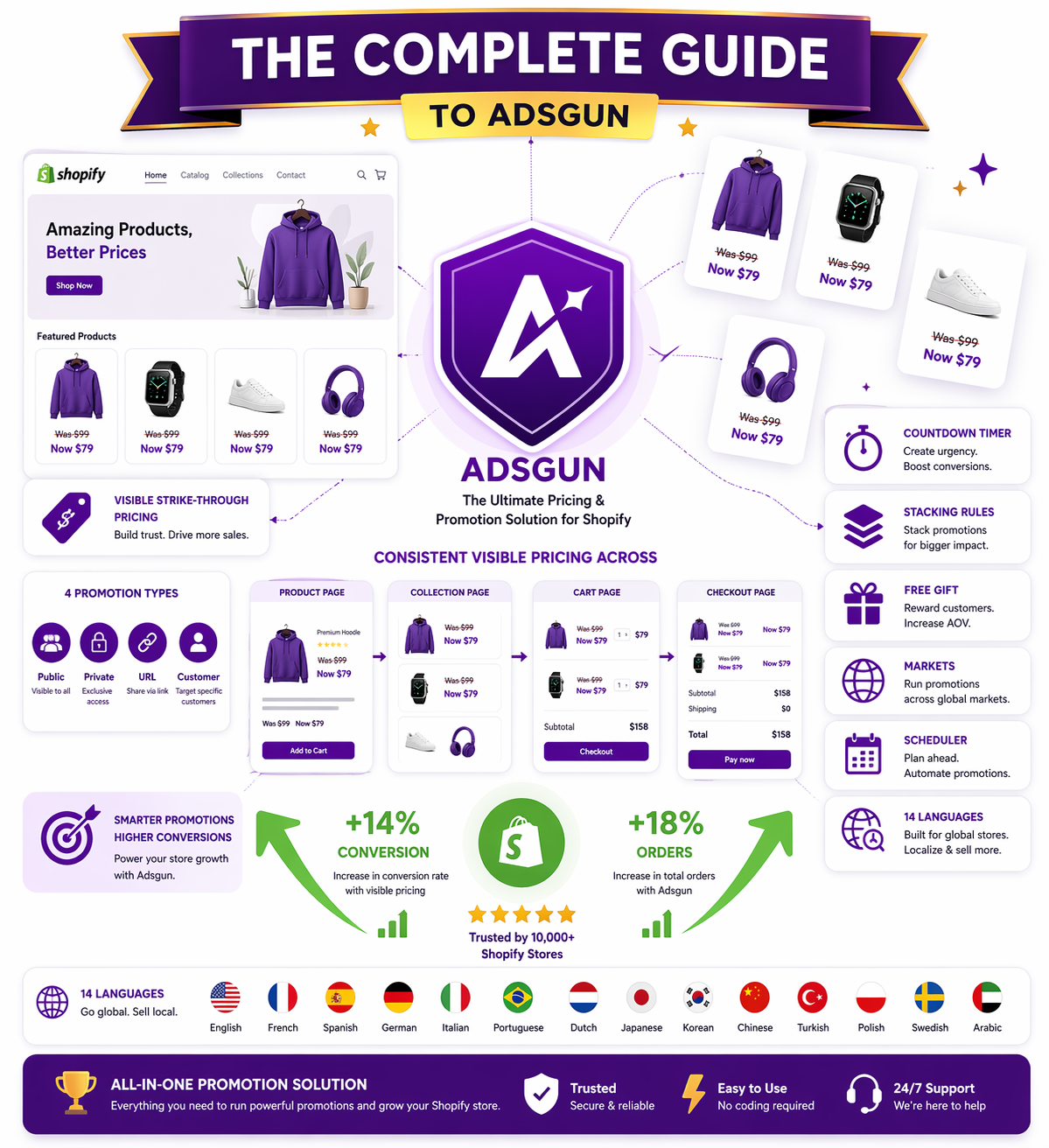
Adsgun is a Shopify app that solves a single, expensive problem: your discounts are invisible until checkout, which means they do not influence the buying decision when it matters. This Adsgun Shopify app complete guide walks through exactly what the app does, the four promotion types it supports (public, private, URL-targeted, customer account), every feature in the platform, the pricing tiers, a real BFCM case study with verified numbers, and a five-step setup that takes about ten minutes. By the end, you will know whether Adsgun fits your store and how to deploy it if it does.
What Adsgun Is: The Problem It Solves
Adsgun is a Shopify app that displays Shopify discounts visually on your entire store: product pages, collections, carts, and checkout.
The core problem Adsgun solves: Shopify discounts (automatic discounts and discount codes) are invisible until checkout. Your customers see full prices while browsing, only discovering the discount when they are about to pay. This is late. It does not influence product decisions or AOV optimization.
The Adsgun solution: Detect every active Shopify discount in real-time and display strike-through pricing (“Was $99, Now $79”) everywhere your customer sees a price. The discount influences their decisions when it matters: on product pages, in collections, and in carts.
Result: Higher conversion rates, higher AOV, better cart abandonment recovery, and accurate discount reporting (no more “compare at price” distortion).
The Two Core Problems Adsgun Solves
Problem 1: Compare at Price Limitations
Many merchants use Shopify’s “Compare at Price” field to show a struck-through original price. But this approach has critical limitations:
- Manual entry (you have to enter compare-at-price for each product variant individually, every time you change it)
- One promotion only (cannot show multiple active discounts per product)
- Analytics distortion (Shopify reports $0 discount cost because the discount is not in the discount system, it is a manual field)
- No connection to real discounts (if you create a Shopify discount, compare-at-price does not know about it)
Adsgun replaces compare-at-price with automation. Set up a discount in Shopify once, and Adsgun displays it everywhere automatically, forever, with accurate analytics. The full breakdown is in our compare at price Shopify guide.
Problem 2: Invisible Discounts (Codes and Automatic)
Shopify’s native approach shows discounts only at checkout. A customer browses at full price, does not see the deal, makes their purchasing decision without discount context, and only discovers the discount at the last moment.
This is why conversion lift from discounts is usually 5-10% at best (the discount is just a pleasant surprise, not a driver). But when discounts are visible from the product page, conversion lift jumps to 15-25% because the discount influenced the buying decision. The same dynamic explains why unexpected cost shock drives 48% of cart abandonment, and visible pricing eliminates that shock at the source.
Adsgun bridges this gap: same discount, visible from the start.
How Adsgun Works: The Technical Mechanism
The app runs in four stages on every page load, with zero performance impact thanks to Shopify’s App Bridge architecture.
Step 1: Discount Detection
When a customer lands on your store, Adsgun connects to Shopify’s APIs and scans all active discounts:
- Automatic discounts (set in Shopify admin)
- Discount codes (in the URL or auto-applied)
- Scheduled discounts (time-limited promotions)
Adsgun retrieves discount details: type, value (%, dollar amount, free shipping), eligibility, dates, and stacking rules.
Step 2: Eligibility Evaluation
For each product and customer, Adsgun evaluates: does this discount apply to this product for this customer?
- If a discount is “20% off orders over $100,” Adsgun checks the customer’s current cart value. If they are at $95, the discount does not display (does not apply yet). If they are at $105, the discount displays.
- If a discount is “15% off these 5 products,” Adsgun checks: is the current product in that list? If yes, display. If no, do not display.
Step 3: Real-Time Pricing Calculation
For each product, Adsgun calculates the discounted price:
- Original price: $99
- Discount: 20% off
- Discounted price: $79.20
Step 4: Visual Display
Adsgun displays the result in real-time on:
- Product pages (strike-through original price, discounted price in color)
- Collections (shows savings badge or pricing)
- Cart (line-item savings, total order savings)
- Checkout (confirms discount is applied)
All displays are customizable: badge text, colors, position, and format.
The Four Promotion Types
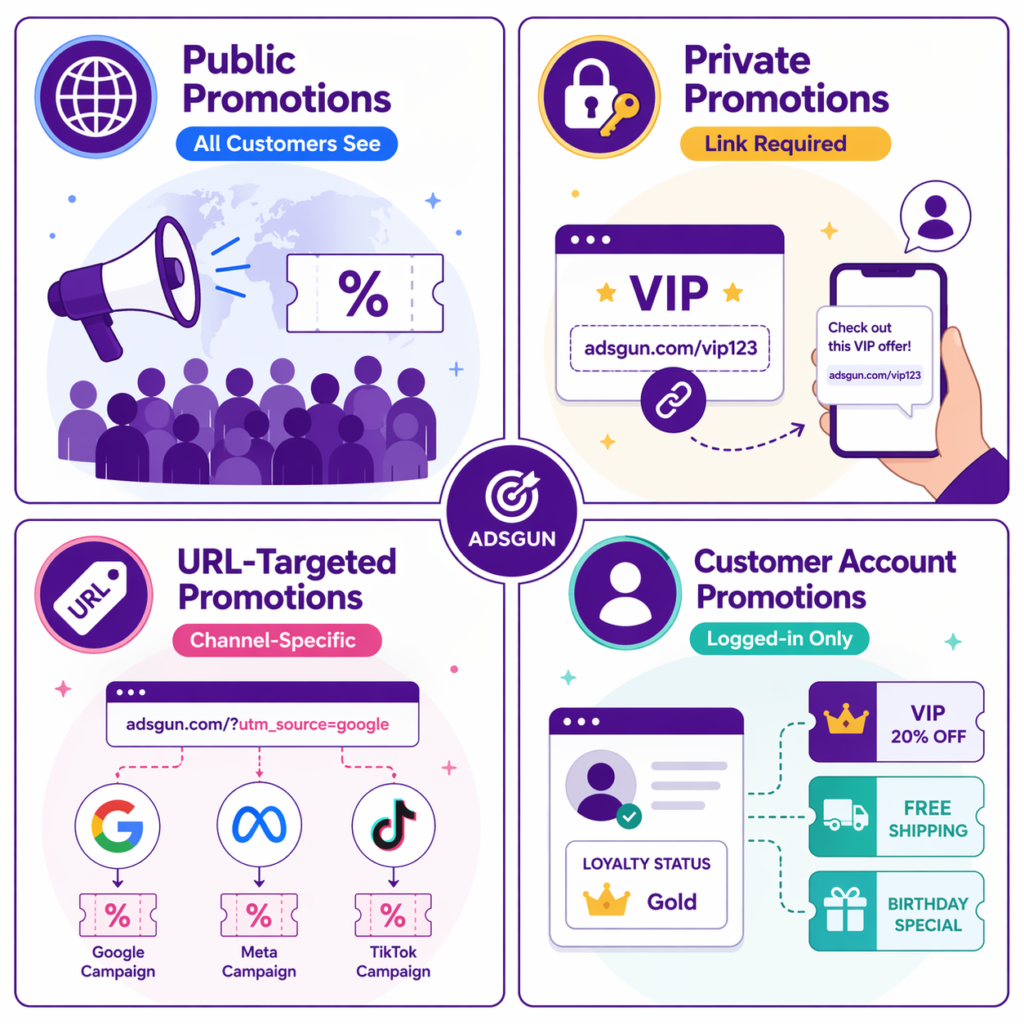
Adsgun provides four ways to structure discounts, each with different use cases. Most stores end up using all four in different combinations.
Type 1: Public Promotions
Displays to all customers. No restrictions, no personalization.
Use cases:
- Site-wide sales (“40% Off Everything”)
- Seasonal promotions (BFCM, holiday sales)
- Flash sales (24-hour events)
Example: You set up “40% off BFCM” in Adsgun as a public promotion. Every visitor to your store sees “Was $X, Now $Y” on every product page. No codes, no links, just visible pricing.
Type 2: Private Promotions
Displays only to customers who have a specific link.
Use cases:
- Email-exclusive discounts (“Email subscribers only get 20% off”)
- VIP and loyalty discounts (exclusive to members)
- Influencer and ambassador discounts (followers of a specific creator)
Example: You send an email with a private link (yourstore.com/discount/EMAILPROMO). Customers who click the link see “20% Off (Email Exclusive)” on product pages. Customers who arrive directly do not see the discount.
Type 3: URL-Targeted Promotions
Displays when customers arrive via a specific URL parameter. This is the foundation of channel-specific Shopify marketing.
Use cases:
- Paid ad campaigns (show a discount only to Google Ads traffic)
- Retargeting ads (different discount for cart abandoners)
- Channel-specific offers (email vs organic vs TikTok)
Example: Your Google Ads campaign sends to yourstore.com/?source=google_ads. Adsgun detects this parameter and shows “20% Off (Google Ads Exclusive)” only to customers arriving via this URL.
Type 4: Customer Account Promotions
Displays only to logged-in customers matching specific criteria.
Use cases:
- Repeat customer discounts (“10% off, repeat customers”)
- Customer tag-based discounts (loyalty tier: VIP gets 20%, Standard gets 10%)
- Geographic (different discounts by country)
Example: A customer logs in. Adsgun checks: has this customer made 5+ orders? If yes, show “10% Off (Loyalty Reward).” If no, do not show.
Complete Feature Reference
Scheduler with Recurring Rules
Set discounts to activate and deactivate on a schedule:
- One-time event (“Runs January 1-3”)
- Recurring weekly (“Every Friday, 8am-midnight”)
- Recurring monthly (“First week of each month”)
- Recurring seasonal (“Every holiday season, Nov 1 to Dec 31”)
Combine with countdown timers to show urgency (“Sale ends in 6 hours”).
Unlimited Stacking
Multiple Adsgun promotions can apply to the same product. A customer might see:
- Public promotion: 10% off everything
- Customer account promotion: +5% loyalty bonus
- Total: 15% off
Adsgun displays the final discounted price, accounting for all stacking.
Free Gifts and Add-Ons
“Spend $75, get a free item” promotions:
- Adsgun detects the threshold (“$75+”)
- Displays the offer on product pages (“Add $X more for a free gift”)
- Shows progress in cart (“You qualify for free gift”)
Shopify Markets Support
Different discounts by market (country, currency):
- US customers see “$79 (20% off)”
- UK customers see “£63 (20% off)”
- Each market can have region-specific discount values
Google Merchant Center Sync
Adsgun syncs discounted prices to Google Merchant Center in real-time. This means:
- Google Shopping shows accurate discounted prices
- Google Ads can use the discounted prices in performance data
- No more “price mismatch” errors in your merchant feed
14 Languages
Adsgun’s UI and displays support 14 languages: English, Spanish, French, German, Italian, Portuguese, Dutch, Polish, Swedish, Danish, Norwegian, Finnish, Czech, Romanian. Customize messages in each language.
Bulk Code Generation
Create hundreds of unique discount codes with one click:
- Specify base name (e.g., AMBASSADOR_) and count (e.g., 50)
- Adsgun generates: AMBASSADOR_001 through AMBASSADOR_050
- Export as CSV
- Assign to ambassadors and influencers (covered in detail in our Shopify ambassador program guide)
Customization
Complete control over how discounts display:
- Badge text (“SALE” vs “SAVE 20%” vs custom)
- Badge position (top-left, top-right, custom)
- Badge colors and styling
- Strike-through text (“Was” vs “Originally” vs custom)
- Savings format (“Save $20” vs “You Save $20” vs custom)
- Countdown timer style
- Custom CSS hooks for theme-specific styling
Zero Theme Code Injection
Adsgun uses Shopify’s app block system and App Bridge APIs. It does not inject code into theme files. This means:
- Theme updates do not break Adsgun
- Clean uninstall (zero leftover code)
- Works with 100% of Online Store 2.0 themes
- No compatibility issues
Developer Hooks
For developers integrating Adsgun:
- Liquid includes for custom themes
- JavaScript API for programmatic discount detection
- Webhook support for external integrations
- Custom app block configuration
Pricing: Free, Core, Plus
Free Plan
- Your first promotion free
- Auto-applied discounts using link and product pricing
- Customizable storefront notifications and banners
Core Plan: $19/month + 1.5% of revenue generated by Adsgun
- Free trial for 7 days
- Everything in Free plan
- Unlimited promotions
- Discount Links
- Bulk discount codes
- Multiple discounts promotions
- Account support
Plus Plan: $99/month + 0.7% of revenue generated by Adsgun
- Free trial for 7 days
- Everything in Core Plan
- Priority support
- Dynamic pricing display customization
- GMC Promotion Sync
Pro Plan: $249/month + 0.4% of revenue generated by Adsgun
- Free trial for 7 days
- Everything in Plus Plan
- Dedicated support
Max Plan: $499/month + 0.2% of revenue generated by Adsgun
- Free trial for 7 days
- Everything in Pro Plan
- Custom feature requests
- Extended API access
- Dedicated account manager
Titan Plan: $1449/month + 0% of revenue generated by Adsgun
- Free trial for 7 days
- Everything in Max Plan
- Zero revenue share
- Custom integrations
- Early access to new features
Case Study: Tire Streets BFCM
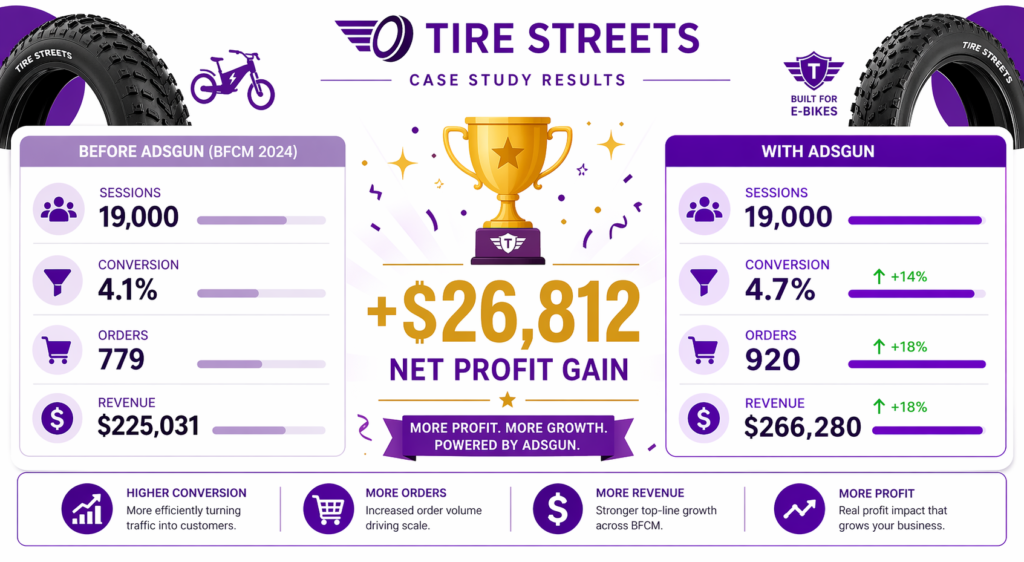
Tire Streets sells e-bike tires on Shopify. During Black Friday Cyber Monday 2024, they ran Adsgun for the first time.
Before Adsgun (discounts hidden):
- 19,000 sessions
- 4.1% conversion rate
- 779 orders
- $289 AOV
- $225,031 revenue
With Adsgun (discounts visible):
- 19,000 sessions (same traffic)
- 4.7% conversion rate (+14% uplift)
- 920 orders (+18% absolute increase)
- $289 AOV (unchanged)
- $266,280 revenue
Discount cost: 920 orders × ~$50 average discount = $46,000 Margin impact: Original gross margin 65% = $146,270 in profit. With Adsgun: $173,082. Net profit gain: $26,812.
Same discount, same traffic. Visibility alone drove the conversion lift. Revenue increased from $225K to $266K, a $41K bump. After discount cost, the net revenue increase was $37,800. The full Tire Streets case study has the campaign-level breakdown.
This is the Adsgun effect: visibility multiplies discount impact without changing the discount itself.
Getting Started: 5-Step Setup
Step 1: Install Adsgun from the Shopify App Store
Search “Adsgun” on the Shopify App Store, install, and authorize.
Step 2: Connect to Your Shopify Store
Adsgun requests permission to access your discounts and products. Grant access. No theme code injection happens at this step.
Step 3: Choose Initial Promotions to Display
- Option A: automatically display all active Shopify discounts (simplest)
- Option B: manually select which discounts to display (more control)
Most stores choose Option A. Adsgun automatically detects and displays every active discount.
Step 4: Customize Appearance
Go to Adsgun settings and customize:
- Badge text (what the badge says)
- Colors (match your brand)
- Position (where the badge sits on the product image)
- Strike-through text (“Was,” “Originally,” or custom)
Test on your store. Make sure it looks good across desktop and mobile.
Step 5: Add Adsgun Block to Theme (if needed)
For Online Store 2.0 themes, add the Adsgun app block to your product template via the theme editor. The block is pre-configured and ready to go.
For legacy themes or manual setups, Adsgun provides a simple Liquid include. Full instructions are in our step-by-step guide on showing discounted prices on Shopify product pages.
Done. Your discounts are now visible everywhere on the storefront.
Adsgun Shopify App FAQ
Does Adsgun work with automatic discounts, discount codes, or both?
Both. Adsgun displays any discount in Shopify’s system: automatic discounts, discount codes, and compare-at-price (if you are still using it, though not recommended).
What if I have multiple discounts active? Does Adsgun show all of them?
Yes, if they stack. Adsgun calculates the final discounted price accounting for all applicable discounts.
Does Adsgun work on mobile?
Yes, fully responsive. Displays cleanly on phones and tablets.
Can I hide Adsgun’s display for specific products?
Yes, per-product control. In Adsgun settings, exclude specific products from displaying discounts when needed.
Does Adsgun affect SEO?
No. Adsgun displays prices on the front-end (what customers see) but does not change your product data or schema. Google still sees your original prices.
What if my theme does not support app blocks?
Adsgun falls back to JavaScript injection (safe, does not modify theme files). You still get full functionality.
Can I export Adsgun data?
Yes. Adsgun provides reports on how many times each discount was displayed, which products it appeared on, and which discounts performed best.
Does Adsgun integrate with email marketing platforms?
Yes, through private promotion links. You can use Adsgun’s private links in Klaviyo, Mailchimp, or any email platform. The link auto-applies the discount on landing. See our Shopify email discount strategy for full email integration patterns.
What if I want to turn off Adsgun temporarily?
Toggle it off in settings. All discount displays disappear instantly. Reactivate to turn them back on.
Is there a free trial?
Yes. 7-day free trial, no credit card required. Full access to all features.
What is the setup fee?
No setup fee. Only the recurring subscription plus revenue share.
How is “discounted revenue” calculated for billing?
Discounted revenue equals the revenue of orders that received a discount, calculated after the discount is applied. If an order was $100 and the discount was $20, the revenue counted is $80.
Does Adsgun support B2B or wholesale pricing?
Not natively. You can use private or customer account promotions to achieve different pricing tiers for B2B customers.
When Adsgun Is the Right Choice
Best for:
- Any Shopify store running active promotions (which is almost all of them)
- Stores with low conversion rates (visibility often improves conversion 10-25%)
- Stores relying on compare-at-price (Adsgun is a better alternative)
- High-traffic stores (more views means more opportunity for conversion lift)
- Multi-promotion campaigns (Adsgun handles unlimited stacking)
May not be needed if:
- Your store does not run discounts at all (rare)
- Your conversion rate is already extremely high (90%+, almost no upside)
- You are using a checkout-only model with no storefront browsing (and even then, Adsgun adds value)
For most stores, Adsgun is essential. The ROI is immediate. You are not paying for a tool that might help conversion. You are paying to make existing discounts visible, which demonstrably improves conversion across every channel and product category.
Next Steps
- Start the free 7-day trial (no card needed)
- Install Adsgun and connect your store
- Set it to auto-display all active discounts
- Customize the appearance to match your brand
- Monitor conversion lift (you should see improvement in 1-2 weeks)
- Optimize: adjust discount depth, test different copy, add URL-targeted promotions for paid channels
The stores seeing the biggest wins are the ones that layer Adsgun visibility on top of strategic discounting: visible pricing + unique codes per channel for attribution + scheduled promotions for urgency + targeted discount depths for margin protection. That is also the same architecture outlined in our Shopify CRO 2026 playbook, where visible discounts rank as the highest-impact, lowest-effort tactic.
Make discounts your competitive advantage. Adsgun makes that possible.
No credit card required. Full access to all features. See exactly how visible pricing impacts your conversion rate.




